48
Getting Ready
3
When charging is complete, pull out the
USB Type-C plug of Type C Common AC
Adapter 02 (sold separately) straight from
the external connection terminal
4
Connect the power plug of Type C
Common AC Adapter 02 (sold separately)
to an outlet
◎ Note that applying unnecessary force with an external
device connected to the external connection terminal
may cause damage.
◎ When the battery is charged in the case that the batteries
run out, charging light may not turn to green soon, but
charging is started.
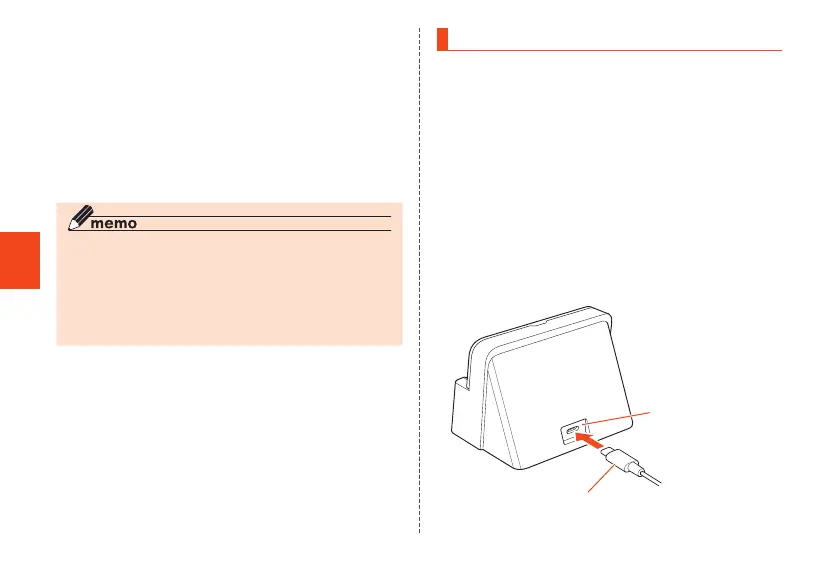
Charging Using a Desktop Holder
How to charge the product using the supplied desktop
holder connected with Type C Common AC Adapter 02
(sold separately) is described here. For information on
specified charging equipment (sold separately), refer to
"Related Accessories" (▶P. 75).
1
Plug the USB Type-C plug of Type C
Common AC Adapter 02 (sold separately)
straight into the external device port on
the desktop holder
The USB Type-C plug is reversible and can be
inserted to the terminal which side is up.
Insert it straight in the direction shown.
Type C Common AC Adapter 02
(sold separately)
External device port
CB70_EN.indb 48 2020/02/07 13:41:15













 To Next Page