Setup
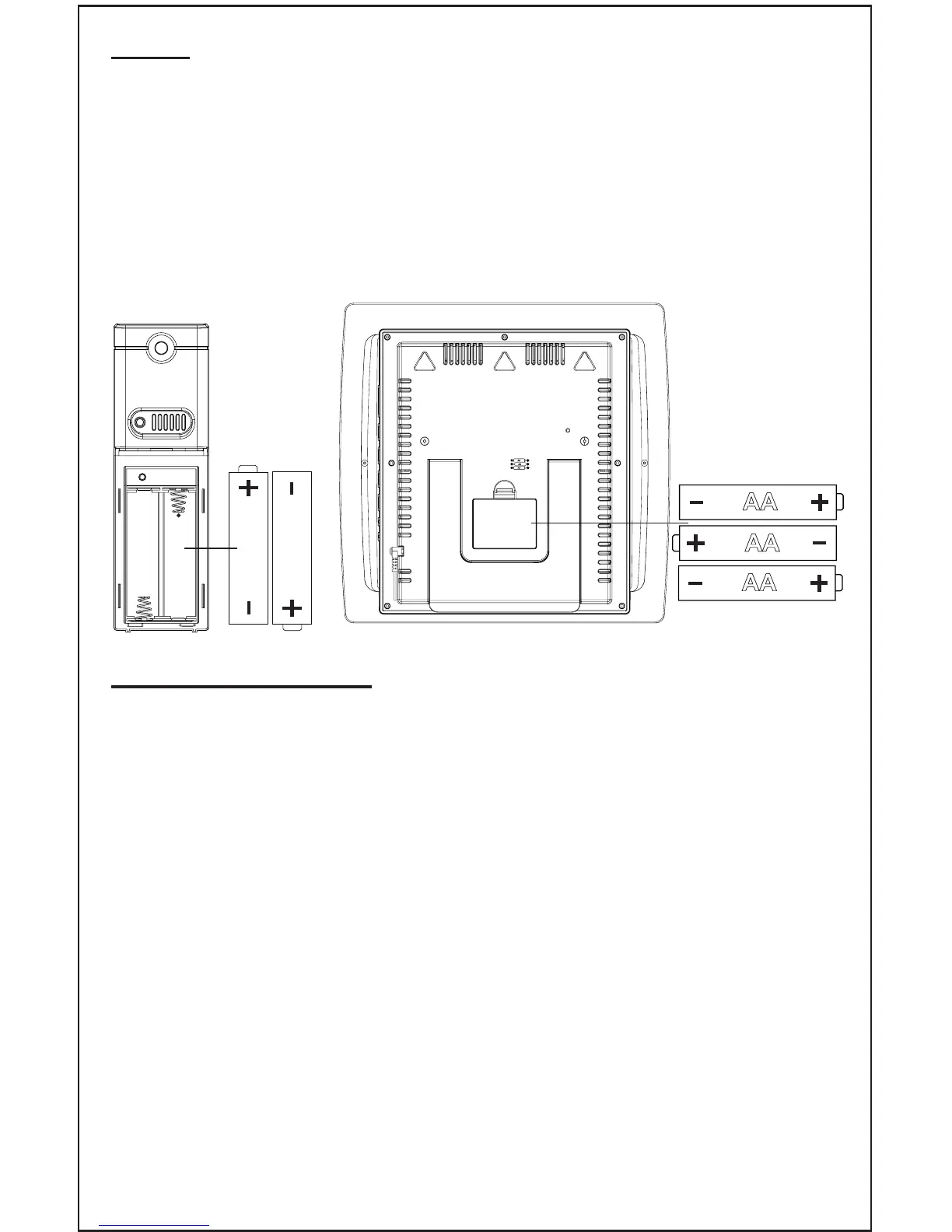
1. Insert 2-AA batteries into the TX141-Bv2 temperature sensor
according to polarity.
2. Insert 3-AA batteries into the clock.
3. After 5 minutes, place sensor in a shaded outdoor location.
4. Set time and date.
AA
AA
• Once batteries are installed, the clock will automatically search at
UTC 7:00, 8:00, 9:00, 10:00, and 11:00.
• If there is no WWVB reception, the clock will search for the atomic
time signal every 2 hours until the WWVB time is received.
• After reception, this clock will only search for the atomic signal
after midnight.
• From normal time display, press and release the SEARCH button to
search for the WWVB time signal.
• Please be sure you have selected your time zone from the list in the
Settings menu. When the Atomic time signal is received, the clock
will set to the time zone selected. Default is Eastern time.
• For information about WWVB visit:
www.nist.gov/pml/div688/grp40/wwvb.cfm
Atomic Time Signal
Page | 2 www.lacrossetechnology.com/support BBB86118
AA
AA
AA










 To Next Page