Set Alerts:
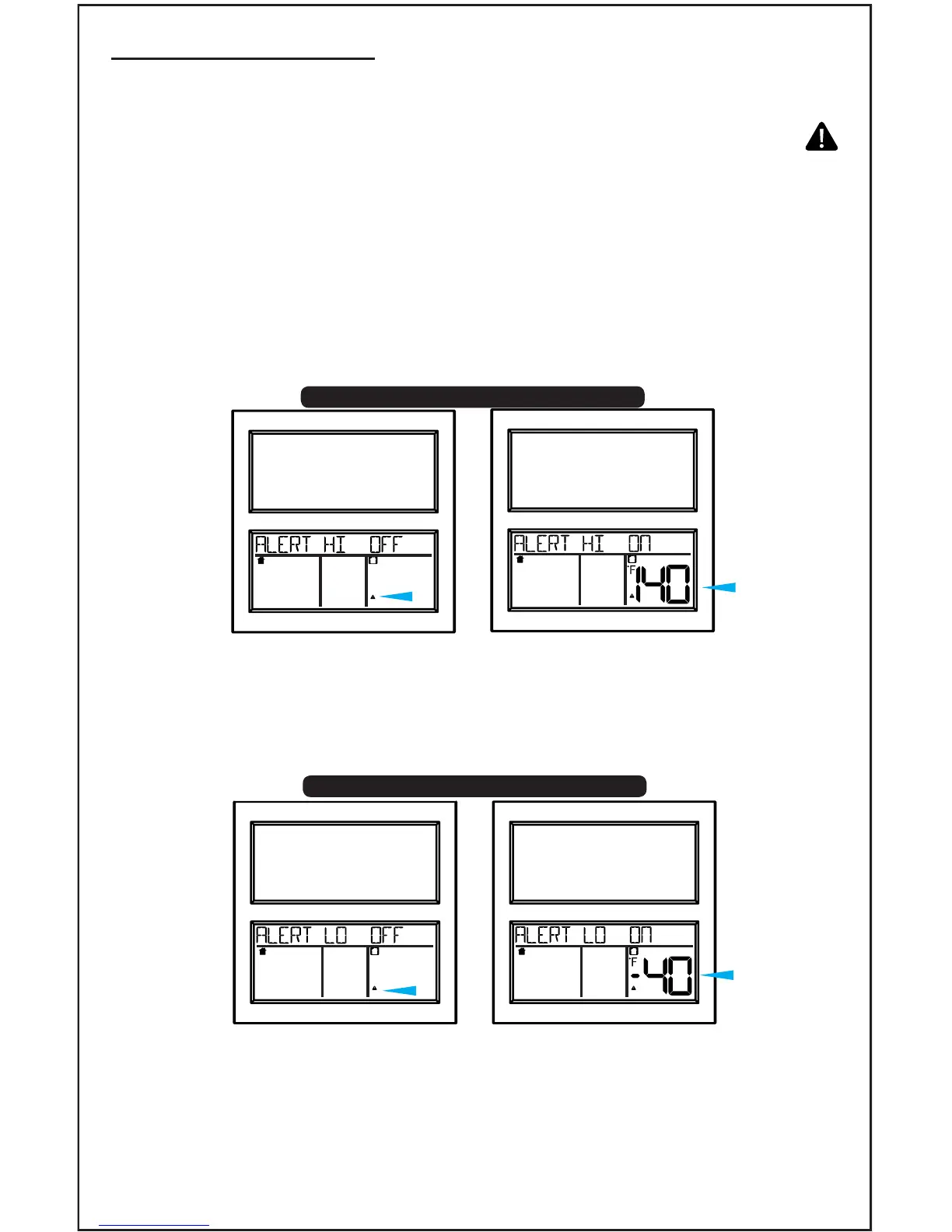
1. Hold the ALERT button 3 seconds. Outdoor ALERTS HI OFF shows.
2. Press and release the +/- button to turn ON the alert.
3. Press the ALERT button again and the outdoor HI alert value will
ash.
4. Press the +/- buttons to adjust the alert value.
Temperature Alerts
This clock offers HI and LO indoor and outdoor temperature alerts.
• Outdoor HI
• Outdoor LO
• Indoor HI
• Indoor LO
H I
LO
5. Press ALERT: Outdoor ALERTS LO OFF will show.
6. Press and release the +/- buttons to turn ON the alert.
7. Press ALERT again LO alert value will ash.
8. Press the +/- buttons to adjust the alert value.
9. Press ALERT: Indoor ALERTS HI OFF will show.
10.Press and release the +/- buttons to turn ON the alert.
11.Press ALERT again HI alert value will ash.
12.Press the +/- buttons to adjust the alert value.
INDOOR OUTDOORFORECAST
H I
INDOOR OUTDOORFORECAST
H I
INDOOR OUTDOORFORECAST
LO
INDOOR OUTDOORFORECAST
LO
BBB86118 www.lacrossetechnology.com/support Page | 5
Outdoor HI Alert
Outdoor LO Alert










 To Next Page