AM
INDOOR OUTDOORFORECAST
AM
INDOOR OUTDOORFORECAST
INDOOR OUTDOORFORECAST
INDOOR OUTDOORFORECAST
INDOOR OUTDOORFORECAST
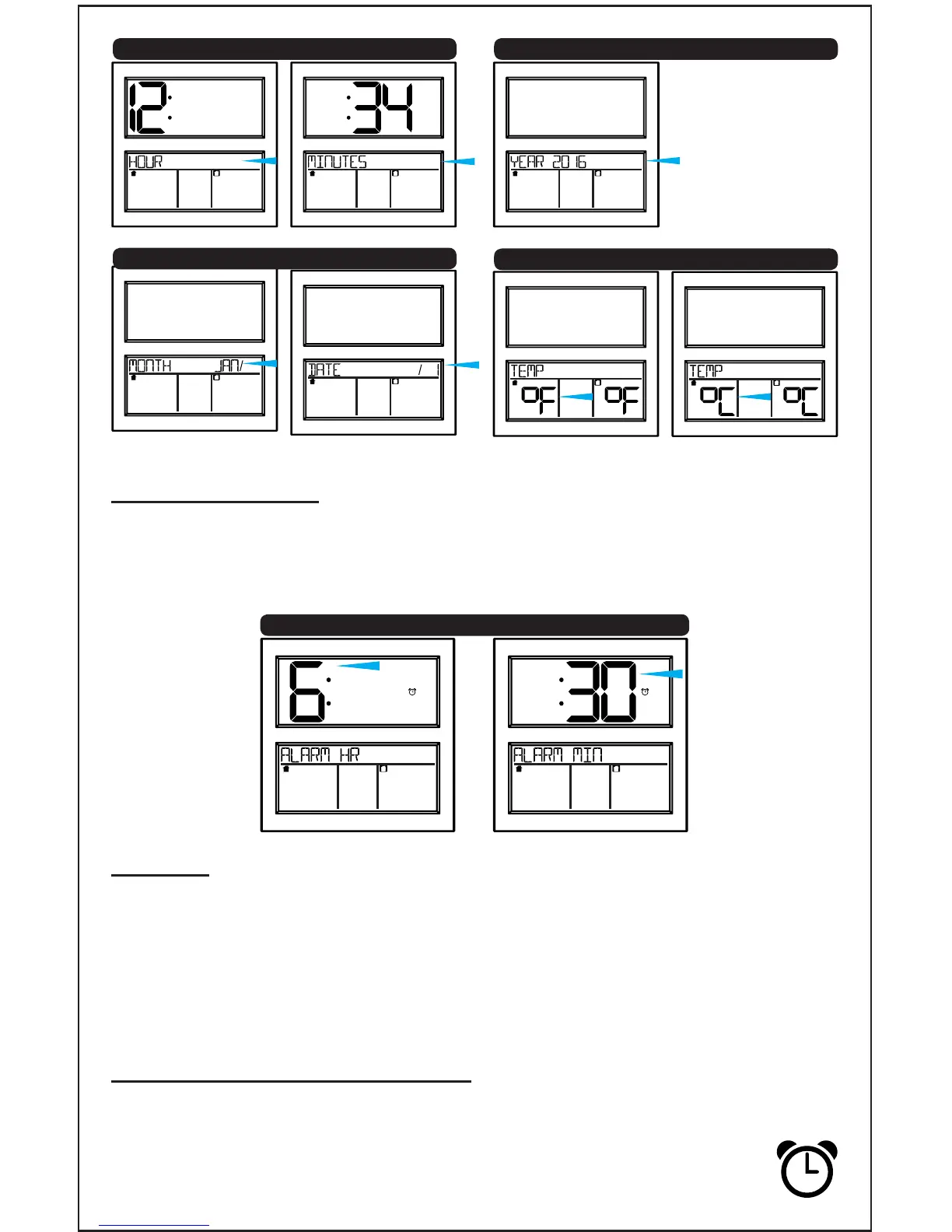
11. Press SET to conrm and exit.
INDOOR OUTDOORFORECAST
INDOOR OUTDOORFORECAST
Set Time Alarm
The alarm will be active when set.
1. Hold ALARM 3 seconds: Alarm Hour
Use the +/- button to select.
2. Press ALARM: Alarm Minutes
Use the +/- button to select.
AM
INDOOR OUTDOORFORECAST
AM
INDOOR OUTDOORFORECAST
7. Year
5. Hour 6. Minutes
8. Month 9. Date
10. Fahrenheit/Celsius
Snooze
• When the alarm sounds, press the SNOOZE button to silence the alarm
for 10 minutes.
• The snooze icon Zz will ash.
• Press any button except SNOOZE to silence the alarm for 24 hours.
• This is a crescendo alarm. It will sound for 2 minutes then shut off if no
buttons are pressed.
Deactivate/Activate Alarm
• The alarm is active when set.
• From normal time display, press and release the ALARM
button to deactivate or activate the alarm.
• The alarm icon (clock) will show when active.
Page | 4 www.lacrossetechnology.com/support BBB86118
Hour Minutes










 To Next Page