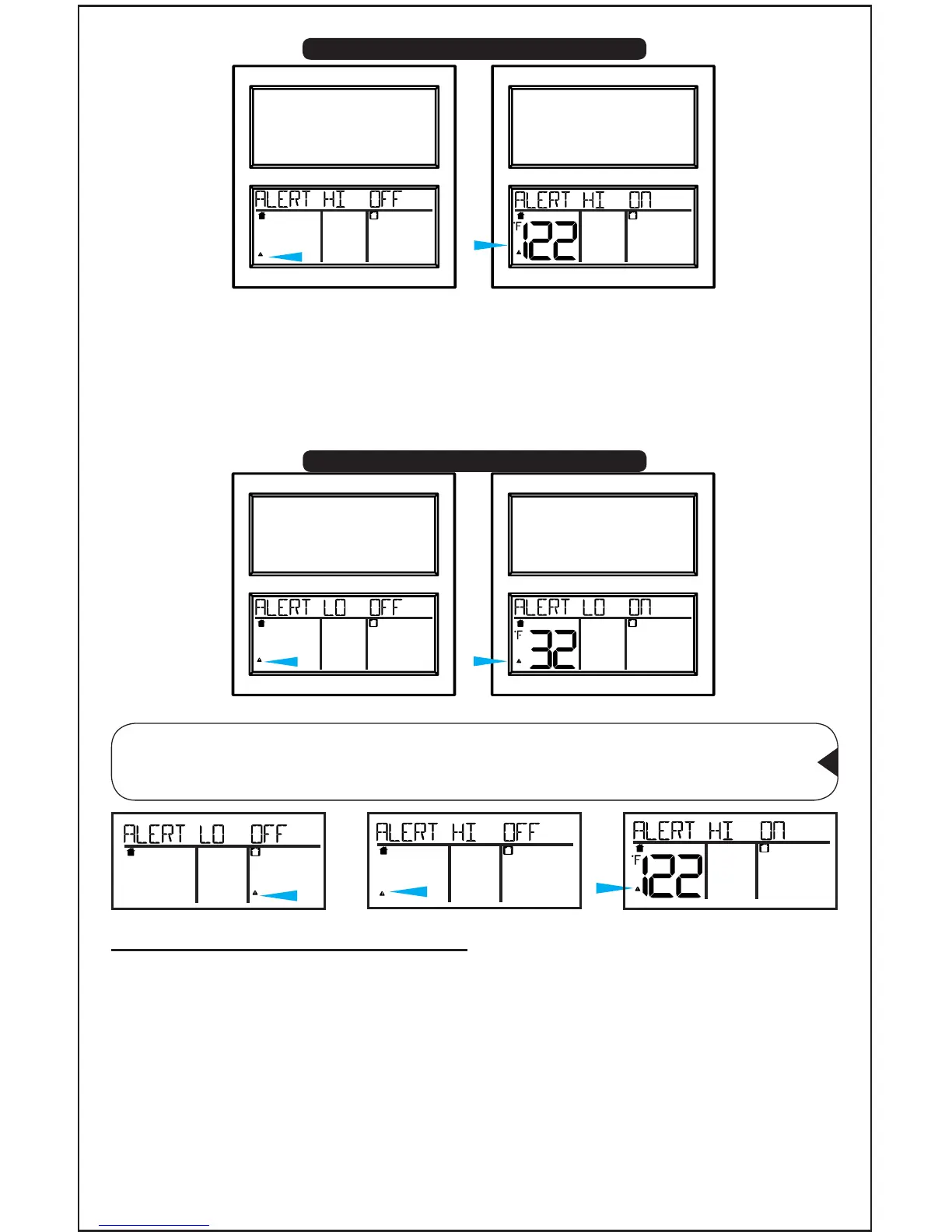
13. Press ALERT: Indoor ALERTS LO OFF will show.
14. Press and release the +/- buttons to turn ON the alert.
15. Press ALERT again LO alert value will ash.
16. Press the +/- buttons to adjust the alert value.
17. Press ALERT to conrm and exit.
Note: If OFF is selected for the alert, you will skip the alert value
and move to the next alert ON/OFF setting. Press SNOOZE at
anytime to exit.
INDOOR OUTDOORFORECAST
LO
INDOOR OUTDOORFORECAST
H I
INDOOR OUTDOORFORECAST
H I
INDOOR OUTDOORFORECAST
LO
INDOOR OUTDOORFORECAST
LO
INDOOR OUTDOORFORECAST
H I
INDOOR OUTDOORFORECAST
H I
• When armed alert value is reached, station will beep 5 times once
per minute.
• The ashing alert icon will indicate if is a LOW or HI alert.
• Press any button to stop the temp alert sound. The alert icon ash
while value is in alert range.
Temperature Alert Sounds
Page | 6 www.lacrossetechnology.com/support BBB86118
Indoor HI Alert
Indoor LO Alert










 To Next Page