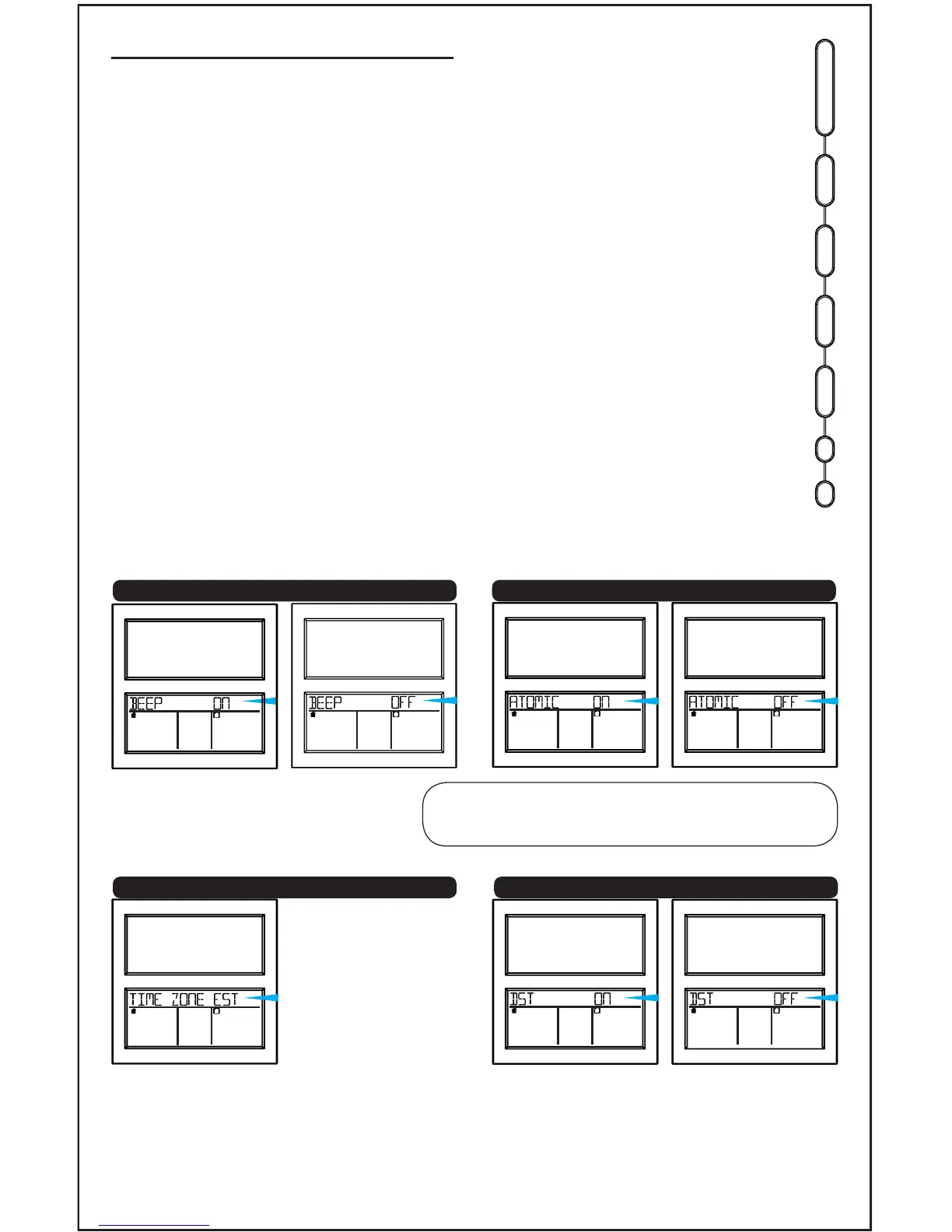
Settings: Time, Date, etc.
Buttons on
side of clock
• Hold the SET button to enter time set mode.
• Press the + or - buttons to adjust the values.
• Press the SET button to conrm adjustments
and move to the next item.
• Press the SNOOZE button at any time to exit.
Time set order:
1. Beep ON/OFF
2. Atomic ON/OFF
3. Time Zone
4. DST ON/OFF
5. Hour
6. Minutes
7. Year
8. Month
9. Date
10.Fahrenheit/Celsius
Note: If Atomic OFF is selected, you
move directly to the hour.
• Hold the SET button for 3 seconds to begin:
INDOOR OUTDOORFORECAST
INDOOR OUTDOORFORECAST INDOOR OUTDOORFORECAST
INDOOR OUTDOORFORECAST
INDOOR OUTDOORFORECAST
AST
EST
CST
MST
PST
AKT
HAT
Atlantic
Eastern
Central
Mountain
Pacific
Alaskan
Hawaiian
1. Beep ON (default) or OFF 2. Atomic ON (default) or OFF
4. DST ON (default) or OFF
BBB86118 www.lacrossetechnology.com/support Page | 3
OUTDOORFORECAST
INDOOR
INDOOR OUTDOORFORECAST
3. Time Zone-EST (default)
ALARM
SEARCH
ALERTS
SET
+
-
SNOOZE










 To Next Page