16
2.7 Enabling Load Sharing
All TPSD units include the Load Sharing feature. Load sharing allows the customer to parallel with any identical
TPSD to share a DC load and therefore reduce the strain on each charger. Chargers to be paralleled
MUST
be
the same output (Voltage and Current).
Load Sharing Procedure
Before making any connections to the TPSD ensure that the AC Power is off at the main breaker box and that
both of the units’ breakers are off. Verify that no voltage is present by using a voltmeter at all input and output
terminals.
1. Connect the DC Output of both units in parallel to the same DC load/battery.
2. Locate terminal strip TS-5 inside both of the chargers.
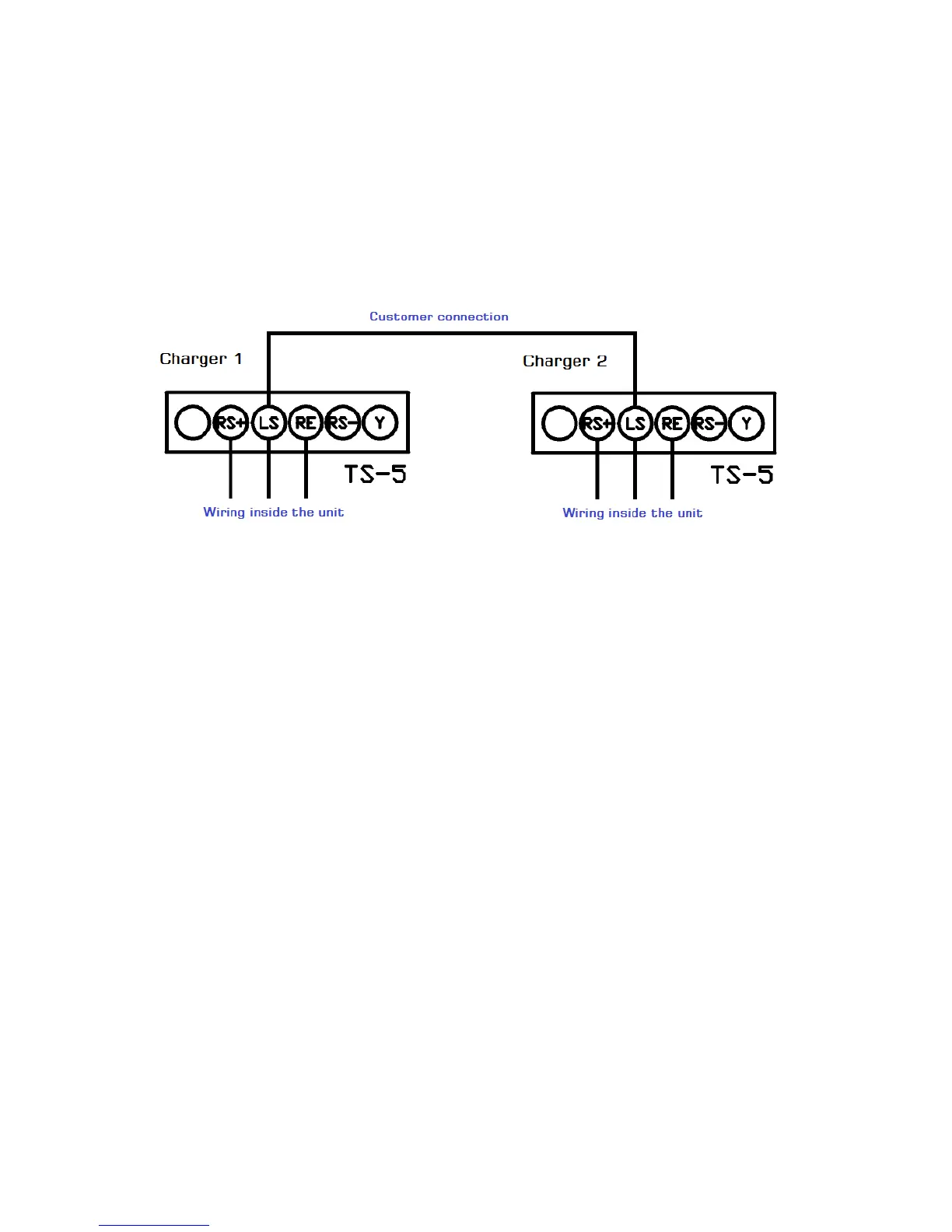
3. As illustrated in Figure 12, connect the LS terminal of one charger to the LS terminal of the second charger.
4. Once batteries are fully charged and/or loads are stabilized, turn OFF all chargers except for one.
5. Take a voltage reading on the output of the charger.
6. Turn on the next charger, turn off the first charger.
7. Set the output voltage of the second unit to match the first by adjusting the float potentiometer.
8. After all chargers have been adjusted, turn ON all chargers
9. Follow the same procedure for setting the equalize voltage.
Figure 12 - Load Sharing Connection
(Schematic wiring)


 To Next Page