EasyManua.ls Logo

LaboGene CoolSafe - Menu - Data from Controller; Menu - Settings

LaboGene CoolSafe
25 pages
Print Icon
To Next Page IconTo Next Page
To Previous Page IconTo Previous Page
Loading...
Instruction manual for CoolSafe
01032016QA01
Item No. 701157
CopyRight © 2016
Page 22 of 25
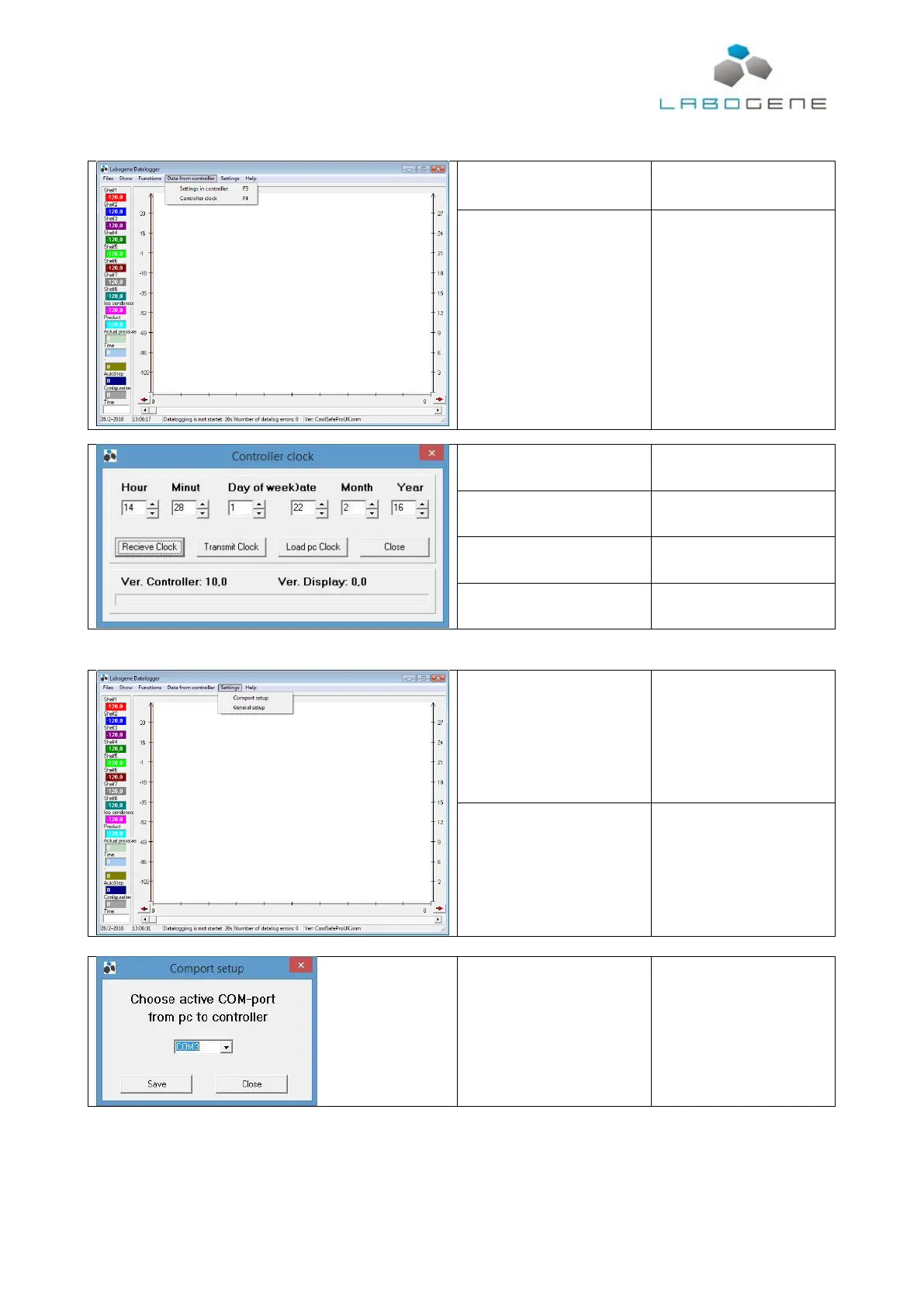
4.5 Menu Data from controller
Settings in controller
Inactive in end user versions of
the software.
Controller clock
Select to open window
Receive Clock
Controller time setting send to
computer.
Transmit Clock
Send the clock as displayed in
this window to controller.
Load pc Clock
Load the time setting from the
computer into software.
Close
Close this window.
4.6 Menu - Settings
Comport setup
Opens the COM port setup
window.
General setup
Opens the general setup
window.
Comport setup
Choose the COM port from the
dropdown list and press
“Save”.

Related product manuals