9
AmpliFi User Guide Chapter 2: Devices
ULabs
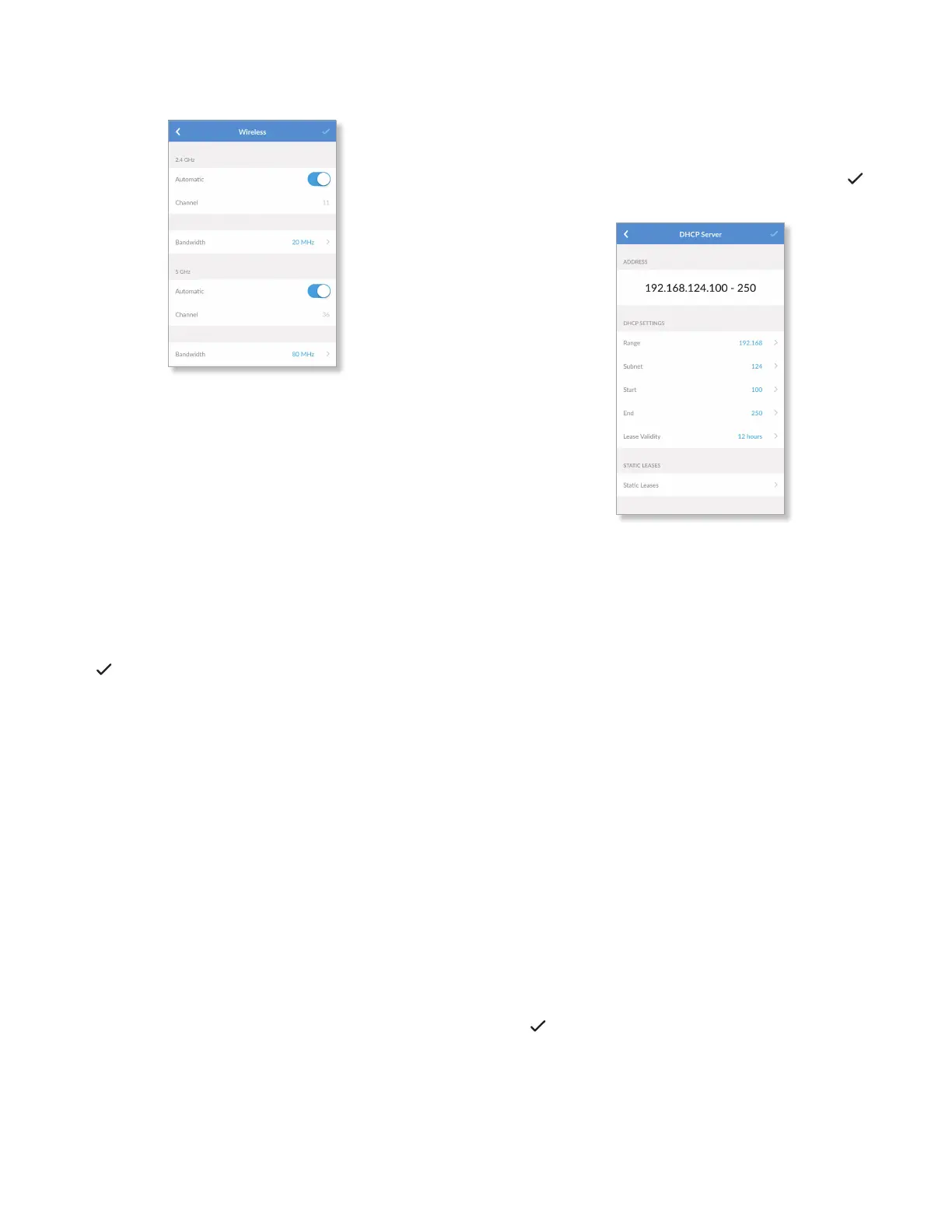
• Advanced Select this option to customize the wireless
settings for the 2.4GHz and 5 GHz radio bands.
2.4 GHz
- Automatic Enabled by default. Disable this option to
specify a channel setting.
- Channel Select the appropriate channel to use.
- Bandwidth Select the appropriate channel width,
20MHz or 20/40 MHz.
5 GHz
- Automatic Enabled by default. Disable this option to
specify a channel setting.
- Channel Select the appropriate channel to use.
- Bandwidth Select the appropriate channel width,
20MHz, 40MHz, or 80 MHz.
Tap to save your changes.
DHCP Server
The DHCP Server screen allows you to access the DHCP
settings, which determine how IP addresses are assigned
in your network. By default, the Router acts as a local DHCP
server to assign IP addresses to DHCP clients (devices such
as computers and smartphones) on the network. Tap to
save your changes.
Address
The range of available IP addresses is displayed. The DHCP
server assigns IP addresses from the pool (or group) of IP
addresses.
DHCP Settings
• Range The current range is displayed. Select the range
you want to use.
• Subnet The current subnet is displayed. Select the subnet
you want to use.
• Start The current starting IP address of the range is
displayed. Select the starting IP address you want to use.
• End The current ending IP address of the range is
displayed. Select the ending IP address you want to use.
• Lease Validity The IP addresses assigned by the DHCP
server are valid only for the duration specified by the lease
time. Increasing the time ensures client operation without
interruption, but could introduce potential conflicts.
Decreasing the lease time avoids potential address
conflicts, but might cause more slight interruptions to the
client while it acquires a new IP address from the DHCP
server. Select the appropriate option: 1 hour, 2 hours,
4hours, 8 hours, 12 hours, 1 day, 1 week, or 1 month
(30 days), or 1 year (365days).
Tap to save your changes.


 To Next Page