90038900rev00
- 50 -
SETTINGS
DATE AND TIME
Press the icon to access the Date and Time settings
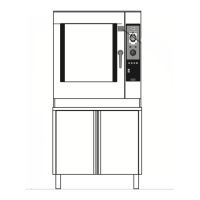
Date setting:
Click on date and select the date from
the calendar
Time setting:
Click on time and set it by dragging
the clock hands.
Time zone:
Select your time zone from the drop-
down menu.
Time format:
Select the required time format from
the drop-down menu.
Press the SAVE button to save the
settings that have been entered







 To Next Page