Driving
Instrument Cluster Control Logic
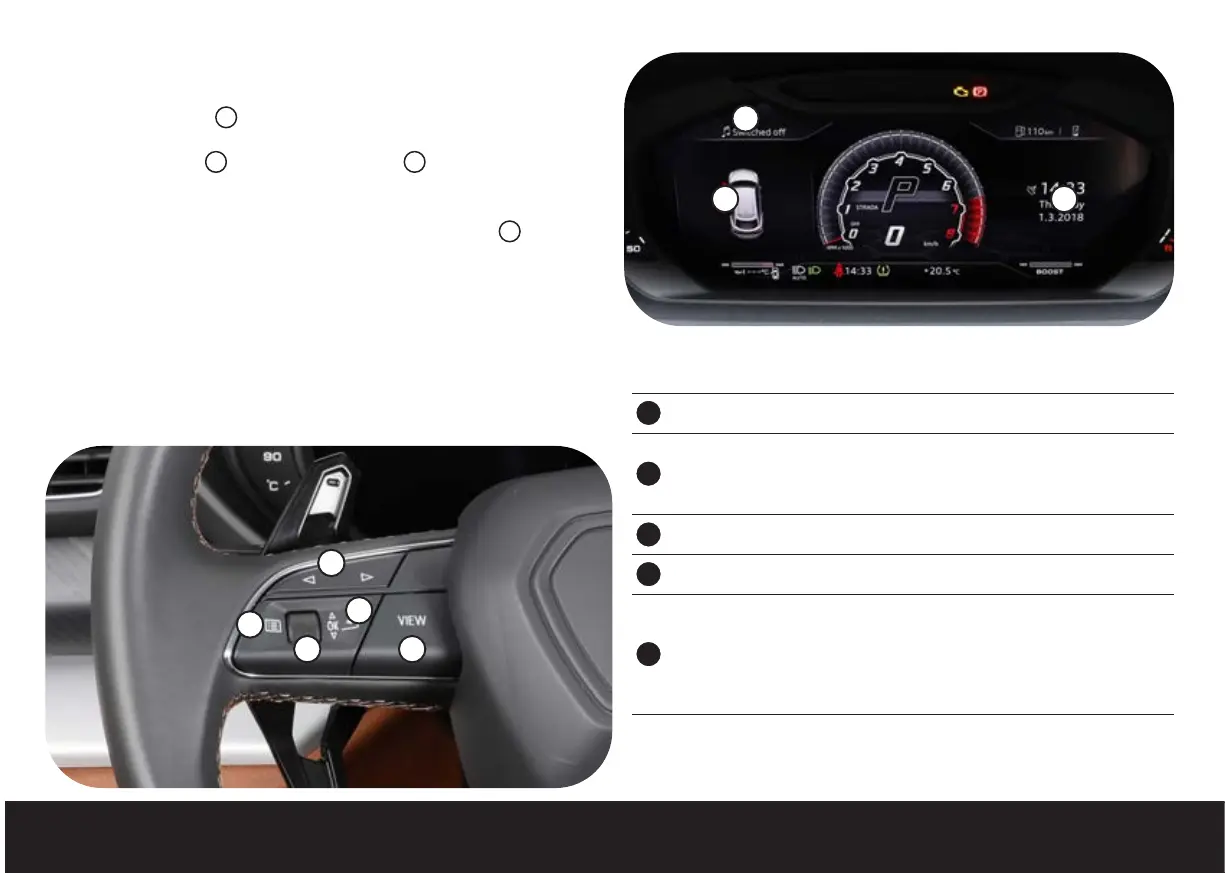
The driver information system is divided into two display areas.
The right-hand display
1
is composed of various different screens which you
can scroll through by pressing the VIEW button.
The left-hand display
2
consists of various tabs
3
which you can navigate
through using the buttons on the steering wheel.
Different tabs are available, depending on the vehicle options (
3
).
• Vehicle Functions (tab 1).
• Warnings for the driver (visible only if at least one warning light or driver
warning is displayed) (Tab 2).
• Night vision assist (visible only if the system has been activated) (Tab 3).
• Radio/Storage devices (Media)/TV (Tab 4).
• Telephone (Tab 5).
• Navigation (Tab 6).
Steering Wheel Buttons
4
Arrows for selecting the instrument cluster left menu tabs
5
VIEW button
• Press to scroll through the pages of the instrument cluster right
menu
• Press and hold to activate or deactivate reduced display
6
Button to go up one menu level
7
Button to open and close the list of functions for the selected tab
8
Wheel
• Rotate to scroll through the pages inside the selected tab
• Rotate to select the required function from a list
• Press to confirm the selected function in a list
• Rotate upwards or downwards to zoom in and downwards to zoom
out on the satnav map
3
2 1
4
5
6
7
8


 To Next Page