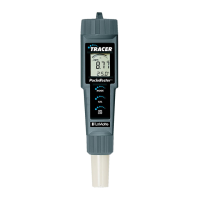
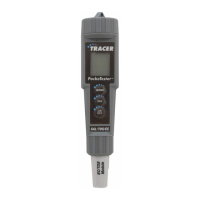
The LaMotte Tracer™ Salt/TDS/Temp PockeTester (Code 1749-KIT-01) is a revolutionary, first-of-its-kind measurement device designed for pool professionals. It offers direct readings of salinity and Total Dissolved Solids (TDS) using a single electrode, along with temperature measurements.
Function Description
The Tracer PockeTester measures conductivity, TDS (in ppm or mg/L), and salinity (in ppm), and displays the temperature. It is specifically designed for applications where monitoring salt, TDS, and temperature levels is crucial, such as in swimming pools. The device utilizes an automatic calibration mode upon startup and allows for user-adjustable TDS conversion ratios. It also features data hold, auto-power off, and a low battery indicator to enhance usability and ensure accurate readings.
Important Technical Specifications
- Display: 2000 count LCD with Bar Graph.
- Conductivity Range:
- 0 to 199.9 µS
- 200 to 1999 µS
- 2.00 to 19.99 mS
- TDS Range: 0 to 9,990 ppm (variable ratio).
- Salinity Range: 0 to 9,990 ppm Salt (fixed ratio of 0.5).
- TDS Ratio: 0.4 to 1.0, adjustable.
- Salinity Ratio: 0.5 fixed.
- Conductivity ATC (Automatic Temperature Compensation): 2.0% per °C.
- Temperature Range:
- 32.0 to 149.0 °F
- 0.0 to 65.0 °C
- Temperature Resolution: 0.1 up to 99.9, 1 > 100.
- Temperature Accuracy:
- ±1.8°F, 1°C (from 32 to 122°F, 0 to 50°C)
- ±5.4°F, 3°C (from 122 to 194°F, 50 to 90°C)
- Conductivity ATC Range: 32.0°F to 140°F (0.0°C to 60.0°C).
- Accuracy:
- Conductivity: ± 2% FS
- TDS: ± 2% FS
- Salinity: ± 2% FS
- Measurement Storage: 25 numbered readings.
- Low Battery Indication: 'BAT' appears on the display.
- Power: Four CR 2032 Lithium Ion batteries.
- Auto Power Off: After 10 minutes of no button presses.
- Operating Conditions: 23 to 122° F, –5 to 50° C.
Usage Features
The Tracer PockeTester is designed for ease of use with several operational features:
- Powering On/Off: Press the ON/OFF key. The device automatically enters calibration mode upon startup, displaying "SELF" and "CAL" during the process.
- Automatic Calibration: The meter self-calibrates when turned on. For salinity and TDS calibration, the meter must be in salinity mode and calibrated with a 3,000 ppm (3ppt) standard. The calibration range indicator will appear on the display for each calibrated range.
- TDS Conversion Ratio Adjustment: Users can adjust the TDS conversion ratio from 0.4 to 1.0. This is done by pressing the CAL/RECALL button twice, then using the MODE/HOLD button to change the value, and finally pressing CAL/RECALL to store it.
- Temperature Unit Change: To switch between °F and °C, turn the TRACER off, then press and hold the CAL/RECALL button while momentarily pressing the ON/OFF button. Release CAL/RECALL when "SELF CAL" appears.
- Data Hold: Press the MODE/HOLD button to freeze the current reading and store it. The "HOLD" icon will appear. Press again to return to normal operation.
- Auto-Power Off: The meter automatically shuts off after 10 minutes of inactivity. This feature can be disabled by a specific button sequence: turn on, wait for "SELF" display, press CAL/RECALL once, then simultaneously press MODE/HOLD and ON/OFF. "OFF" will briefly display. The auto-off feature resets when the meter is turned off.
- Measurement Function Change: To switch between Conductivity (µS or mS), TDS (ppm), and Salinity (ppm), press and hold the MODE/HOLD button for 2 seconds until the desired mode scrolls into view. Release the button to select.
- Storing Readings: After a reading is displayed, press and hold the MODE/HOLD button. The meter enters HOLD mode, and the reading is stored with a location number (1-25) displayed.
- Recalling Stored Readings: Ensure HOLD mode is off. Press CAL/RECALL, then MODE/HOLD. The location number and stored value will appear, with units flashing. Press MODE/HOLD to scroll through readings. Press CAL/RECALL to exit.
- Clearing Memory: Turn the TRACER on, then press and hold the ON/OFF button for 4 seconds. "clr" will briefly display.
Maintenance Features
Proper care and maintenance are essential for the longevity and accuracy of the Tracer PockeTester:
- Electrode Care/Storage:
- Rinse the electrode with distilled, tap, or deionized water between measurements to prevent cross-contamination. Double rinsing is recommended for high accuracy.
- Store the electrode dry with the cap on.
- Avoid touching the platinized electrode surfaces, as this can cause damage and reduce their lifespan.
- Electrode Cleaning:
- Do not soak the electrode in cleaning solutions for extended periods, as this can cause a reference potential shift and degrade performance.
- When cleaning, do not scratch or damage the platinized surfaces.
- For water-soluble contaminants, soak the electrode in deionized water and scrub with a soft brush.
- Battery Replacement:
- Twist off the battery compartment cap.
- Hold the battery housing and pull the small tabs to remove the battery carrier.
- Replace the four CR2032 batteries, observing polarity.
- Replace the battery compartment cap.
- Electrode Replacement:
- Unscrew and remove the electrode collar by turning it counter-clockwise.
- Gently rock the electrode side to side while pulling it away from the meter to disconnect it.
- To attach a new electrode, align the slots and carefully plug it into the meter socket. Ensure pins are aligned to avoid damage.
- Firmly tighten the electrode collar to create a seal with the rubber gasket.
The LaMotte Tracer PockeTester is a robust and versatile tool, designed to provide reliable and accurate measurements for professionals in various water quality applications.

 Need help?
 General











 To Next Page