Graphical user interface 6
Issue EN 2022/05 PUK 6 Operating manual
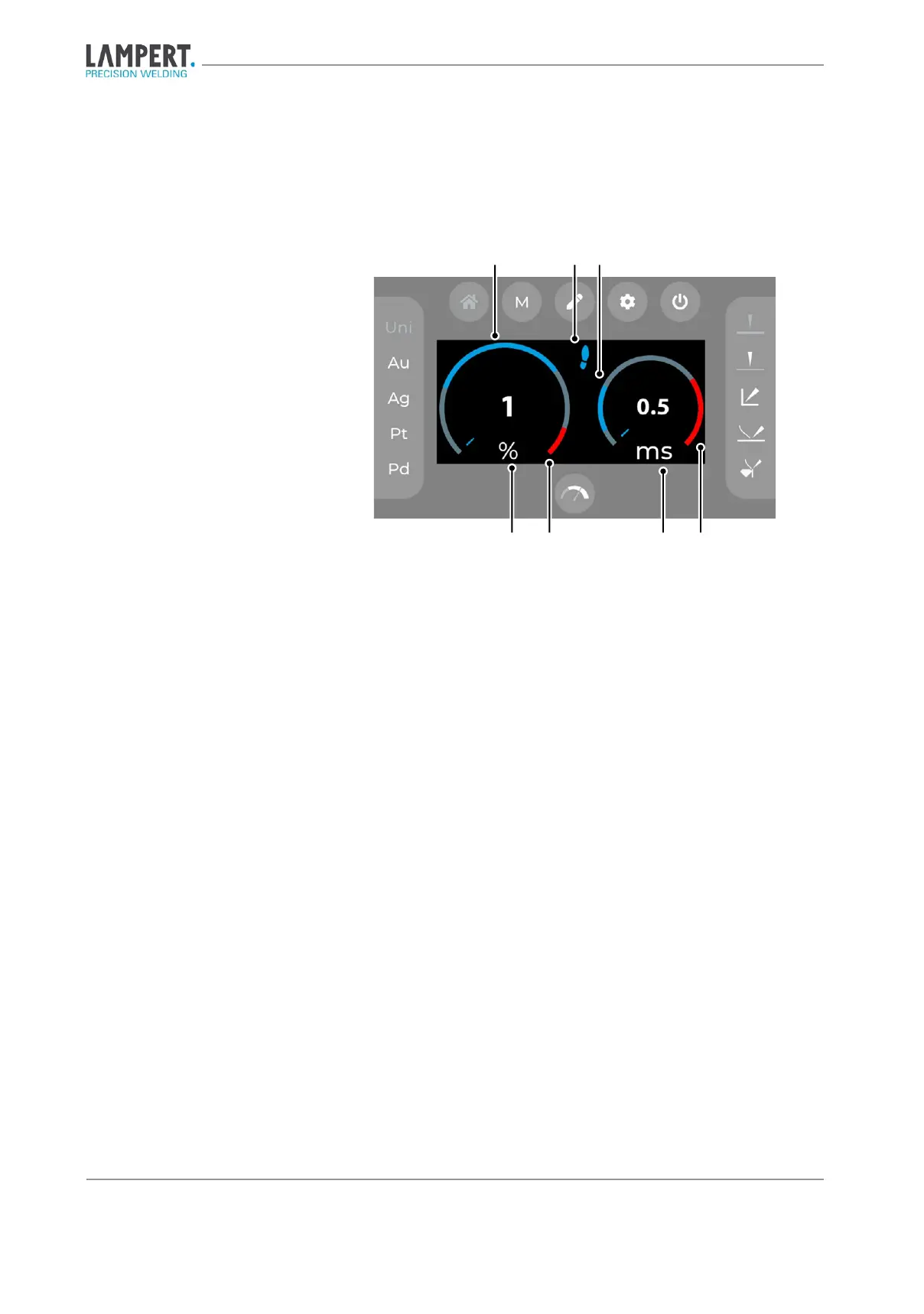
Welding power and pulse duration
Fig. 6.3 Welding energy and pulse duration
1. Blue range
2. Foot switch activated (optional)
3. Red range
4. Welding power
5. Pulse duration
To make welding with the PUK 6 easier, a value range for the welding
power and pulse duration is marked blue in the display as a recommenda-
tion for each material-geometry combination.
The foot switch is activated by pressing the connected foot switch for a
longer time (approx. 3 seconds). The blue foot symbol on the display indi-
cates that the foot switch is ready for operation. The welding process can
now be triggered directly via the foot switch. In foot switch mode, the con-
tact of the workpiece with the tungsten electrode is signalled by periodic
dimming of the eye protection system.
The red range indicates the parameter range in which damage to the mate-
rial to be welded may occur. The use of welding parameters in the red range
is therefore only recommended for experienced users.
item number 100 850)


 To Next Page