microSTAR®ii User Manual v1.3 38
7.1 Generic Dosimetry
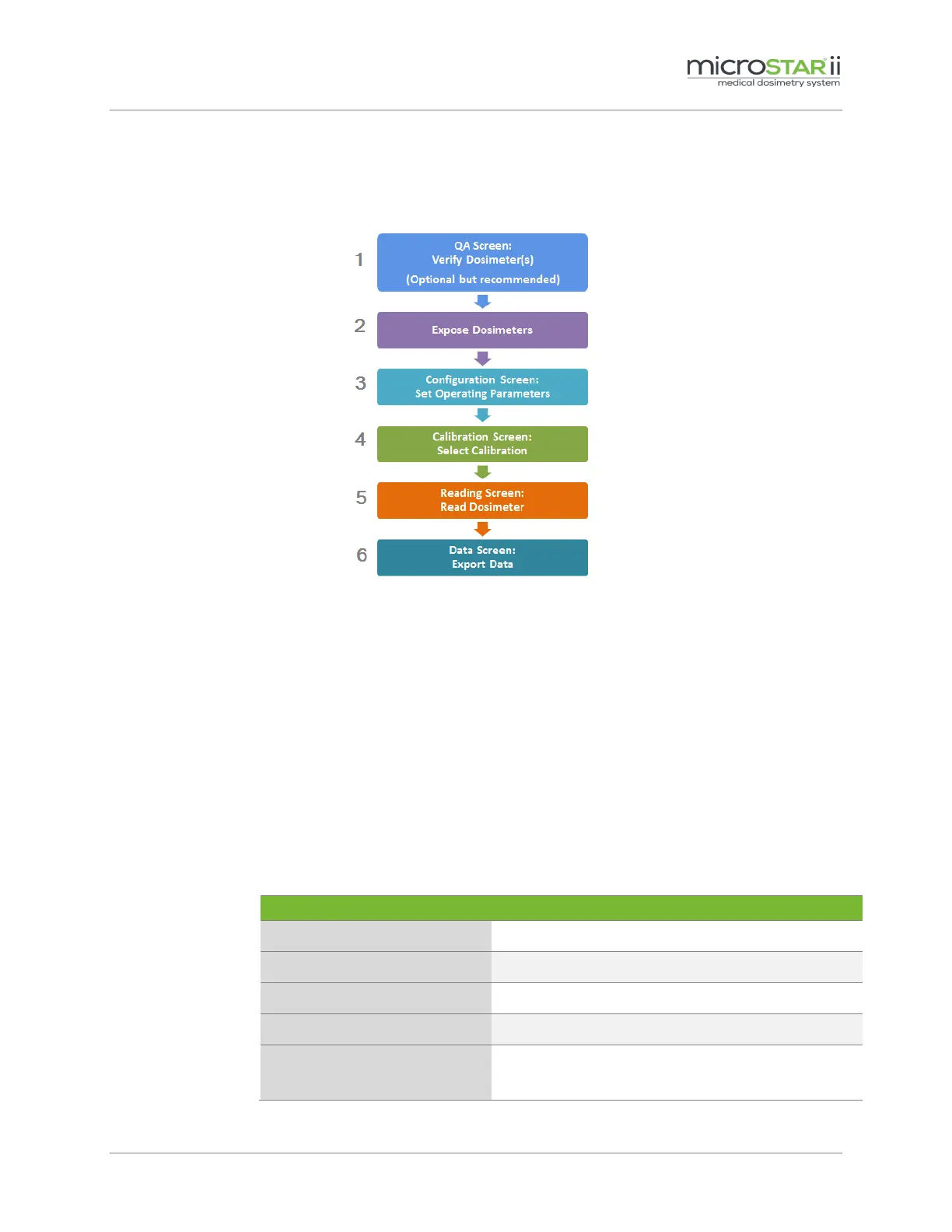
Generic Dosimetry follows the basic process flow outlined in Figure 7-1 and is not associated with
use with patients (refer instead to Section 7.2 Patient Dosimetry).
Figure 7-1: Generic Dosimetry Process
STEP 1: Verify Dosimeter
a. Navigate to the QA tab.
b. Run the Dosimeter Verification Pre-Assignment (if necessary). See Chapter 5 for
details.
c. Perform Reader Daily QC tests (if necessary). See section 5.1 for more information.
STEP 2: Expose the Dosimeter(s)
Expose the dosimeter(s) according to the application of interest.
STEP 3: Set Operation Parameters
a. Navigate to the Configuration tab.
b. Update the following fields:
ONFIGURATION
ETTING
ONFIGURATION
ALUE
Dosimetry Category Generic
Therapy, Diagnostic or Other (as applicable)
Average or Individual (as applicable)
Four (4) minimum recommended for Average;
Operator preference for Individual.


 To Next Page