microSTAR®ii User Manual v1.3 57
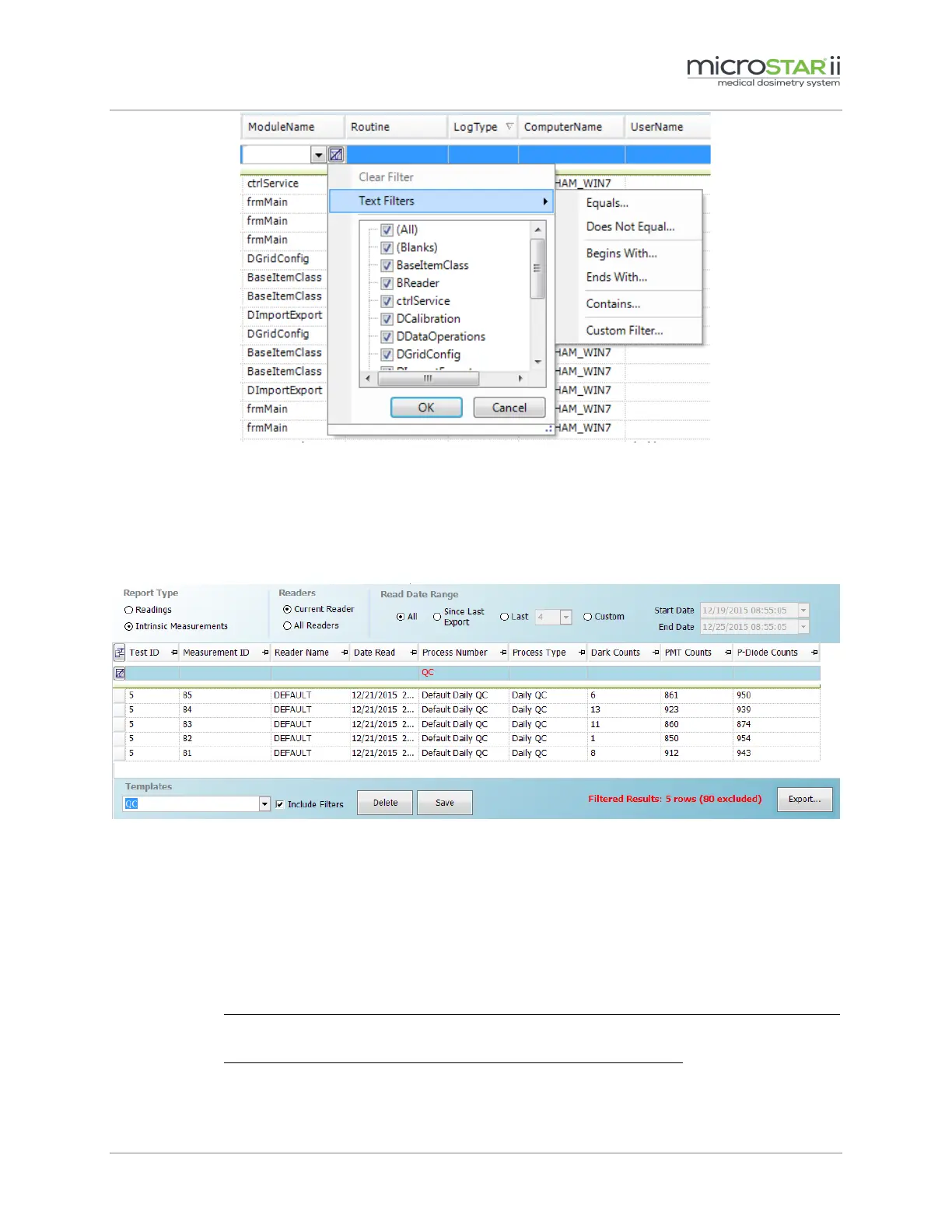
Figure 8-8: Text Filter Menu
8.2.4 Data Template
On the Data tab, you can save a report template for custom column order/visibility, filters, and other
settings.
Figure 8-9: Data Report Template
To create a template, complete the following steps:
STEP 1: Log on to the microSTARii application as an Operator or Advanced Operator.
STEP 2: Navigate to the Data tab.
STEP 3: Customize the report using filters and search criteria.
STEP 4: Enter a template name in the Templates field at the bottom of the screen (Figure 8-9).
STEP 5: If you want to save the formatting and do not want column filters included,
unselect the check box next to Include Filters.
If you want to save the formatting and all column filters, select the check box
next to Include Filters.
STEP 6: Click the Save button.


 To Next Page