microSTAR®ii User Manual v1.3 70
CHAPTER 10 SYSTEM
ADMINISTRATION
10.1 Profile Management (Security)
NOTE: We highly recommend that you install and maintain anti-virus software, firewalls, and other
security tools onto the microSTARii laptop per the polices, guidelines, and recommendations provided
by the IT and/or Information Security teams within your business.
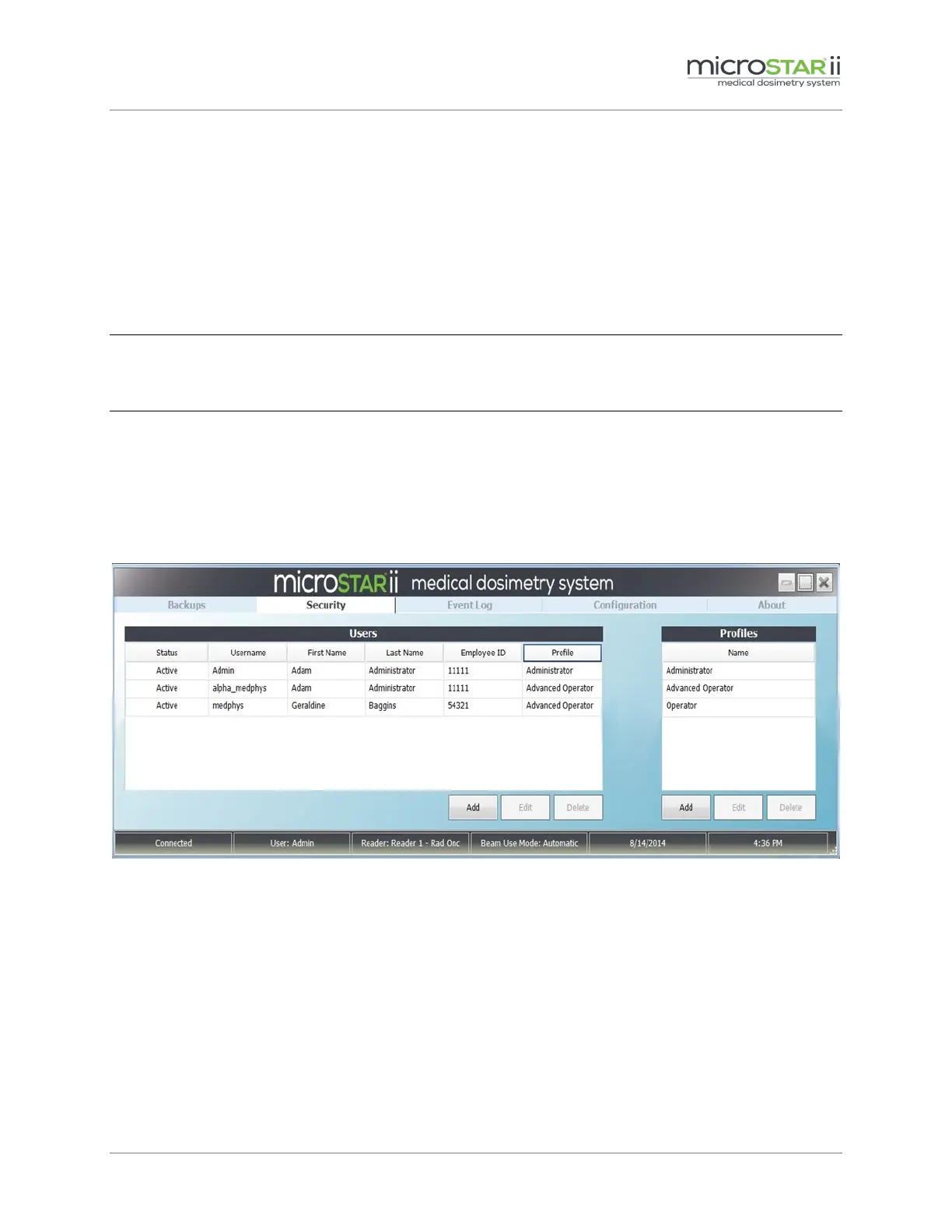
All profile administration is completed on the Security tab of the microSTARii software application.
This tab is only visible to Administrators. Profiles control the features, functions, and screens that
users have access to. The default profiles are Administrator, Advanced Operator, and Operator. You
can define other profile types based on the features available. (For a full listing of profile permission
and permissions for default profiles, see Appendix A: Profile Permissions Listing.)
Figure 10-1: Security Tab
10.1.1 Reviewing Profiles
The Profiles table lists all of the active profiles in your system. Double-click on the Name in the Profile
table to view the permissions for the profile.


 To Next Page