microSTAR®ii User Manual v1.3 65
You cannot make a simulated calibration from another simulated calibration. Simulations can only be
created from measured calibrations using dosimetry measurements.
Both a strong and weak beam version must be created for each simulated calibration.
Complete the following steps to create simulated calibrations:
STEP 1: Log on to the microSTARii application as an Operator or Advanced Operator.
STEP 2: Navigate to the Calibrations tab.
STEP 3: Click the gray box to the left of the High Dose Calibration to be simulated to select
the entire row.
STEP 4: Click the Correction Factors button to create a simulated calibration for the reader.
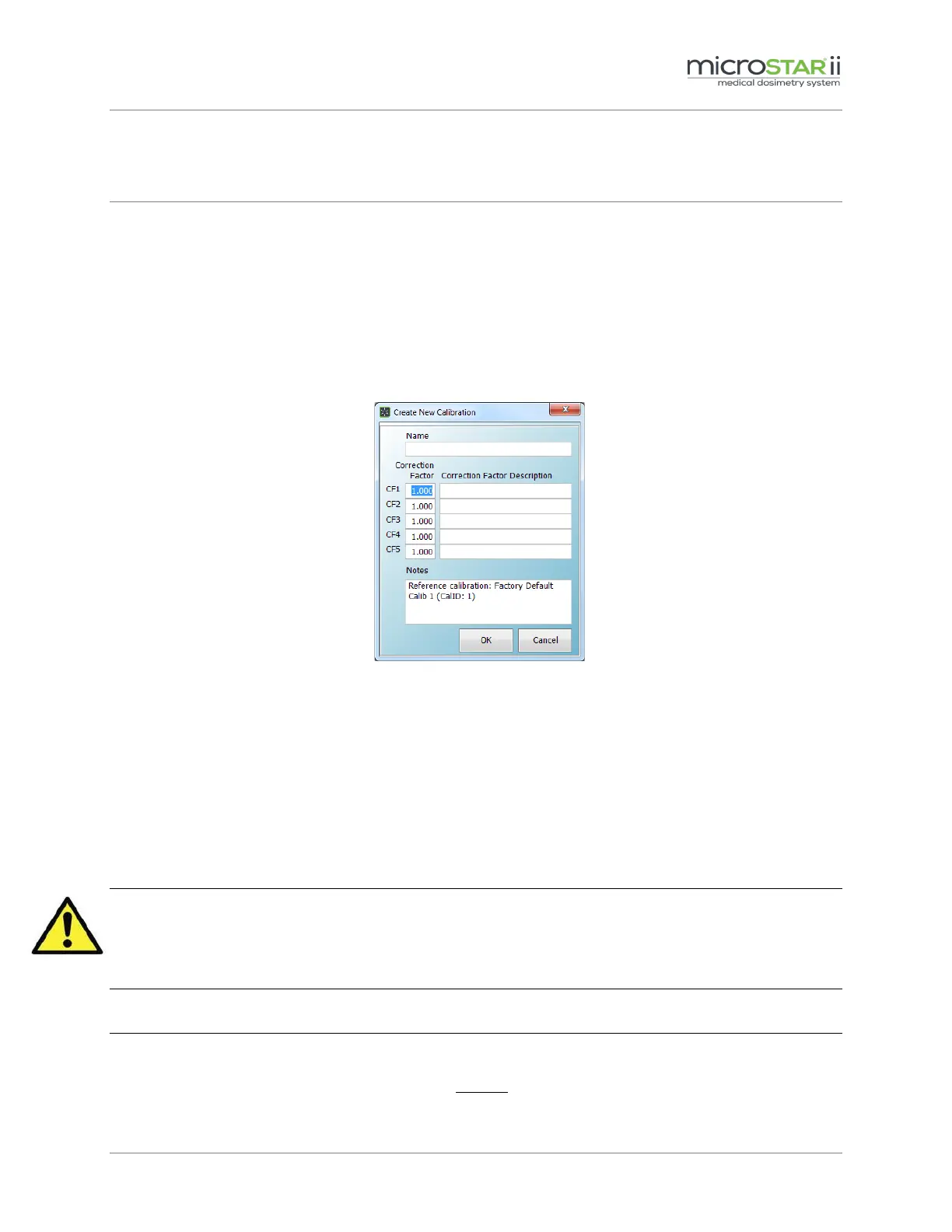
Fill in the values on the Create New Calibration dialog box.
Figure 9-3: Create New Calibration Dialog Box
STEP 5: Click OK to save the simulated calibration. The new calibration will automatically be
selected and the calibration factors will be highlighted in yellow when approved.
STEP 6: Select the Low Dose Calibration to be simulated. Repeat Steps 4 & 5.
9.4 Sensitivity Adjustment Factor Values
CAUTION: The implementation of the SAF is a custom feature and is not recommended for
routine medical dosimetry applications. LANDAUER precisely determines the sensitivity
value in controlled conditions. If the SAF is implemented, the LANDAUER-determined
sensitivity assignment is voided.
NOTES:
The SAF correction factor is only supported in Linear dose calculations.


 To Next Page