10
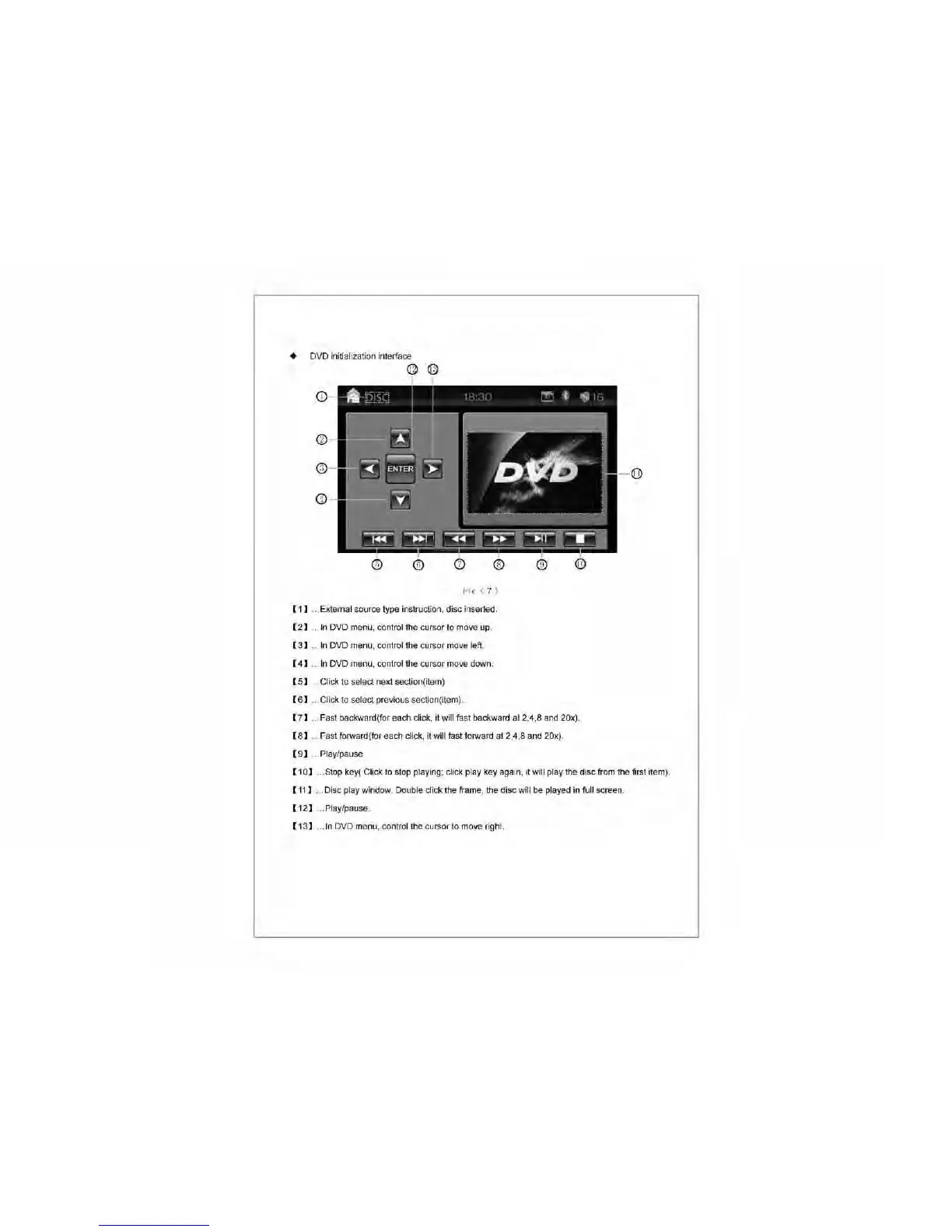
• DVD initialization interface
I'ie
(7;'
[1]
..
External source type instruction, disc inserted.
[2]
..
In
DVD menu, control the cursor
to
move up.
[3]
..
In
DVD menu, control the cursor move left.
[4]
..
In
DVD menu, control the cursor move down.
[5]
Click
to
select next section(item)
[6]
..
Click
to
select previous section(item).
[7]
..
Fast backward(for each click, it will fast backward at 2,4,8
and
20x).
[8]
..
Fast forward(for each click, it will fast forward at 2,4,8 and 20x).
[9]
..
Play/pause
[10]
... Stop key( Click
to
stop playing; click play key again,
it
will play the disc from the first item).
[11]
... Disc play window. Double
dick
the frame, the disc will
be
played
in
full screen.
[12]
... Play/pause.
[13]
...
In
DVD menu, control the cursor to move right.



 To Next Page