18
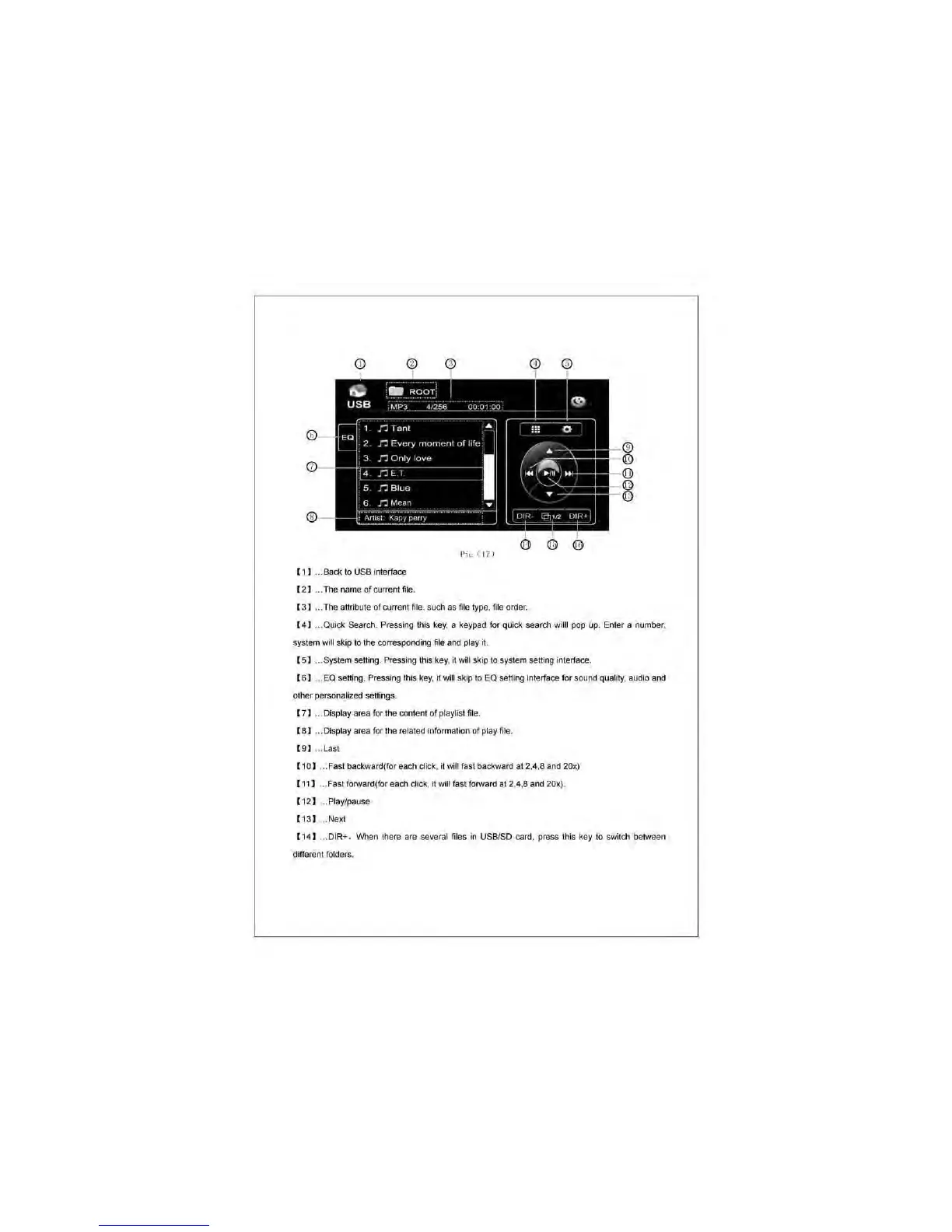
I I ) ... Back
to
USB interface
(2
) . . The name
of
current file.
( 3 ) ... The attribute of current file. sud1 as file type,
fi
le order.
( 4 ) .. Quick Search. Pressing this key. a keypad for quick seard1 willi pop up. e nter a number.
system will skip to the corresponding file and play it.
I 5 ) . . System setting. Pressi
ng
this key. it will skip
to
system setting interface.
( 6 ) . .
eo
selling. Pressing this key. it will skip to
eo
selling interface for sound quality. audio and
other personalized settings.
( 7 ) ... Disptay area for the conteflt of pl
ayt
ist
fi
le
( 8 ) ... Display area for the related information
of
play file.
( 9 ) . . Last
I 10) .. . Fast backward(for ead1
dick
. it will fast backward
at
2.4.8 and 20x)
(
11
) . . Fast forward(for ead1 dick.
it
will fast forward at 2.4.8 and 20x).
( 12 ) ... Play/pause
(
13
)
...
Next
( 14 ) ... DIR+ . When there are several files in USBJSD card, press this key
to
switch between
different folders.



 To Next Page