- 4 -
Color monitor MVC-8151
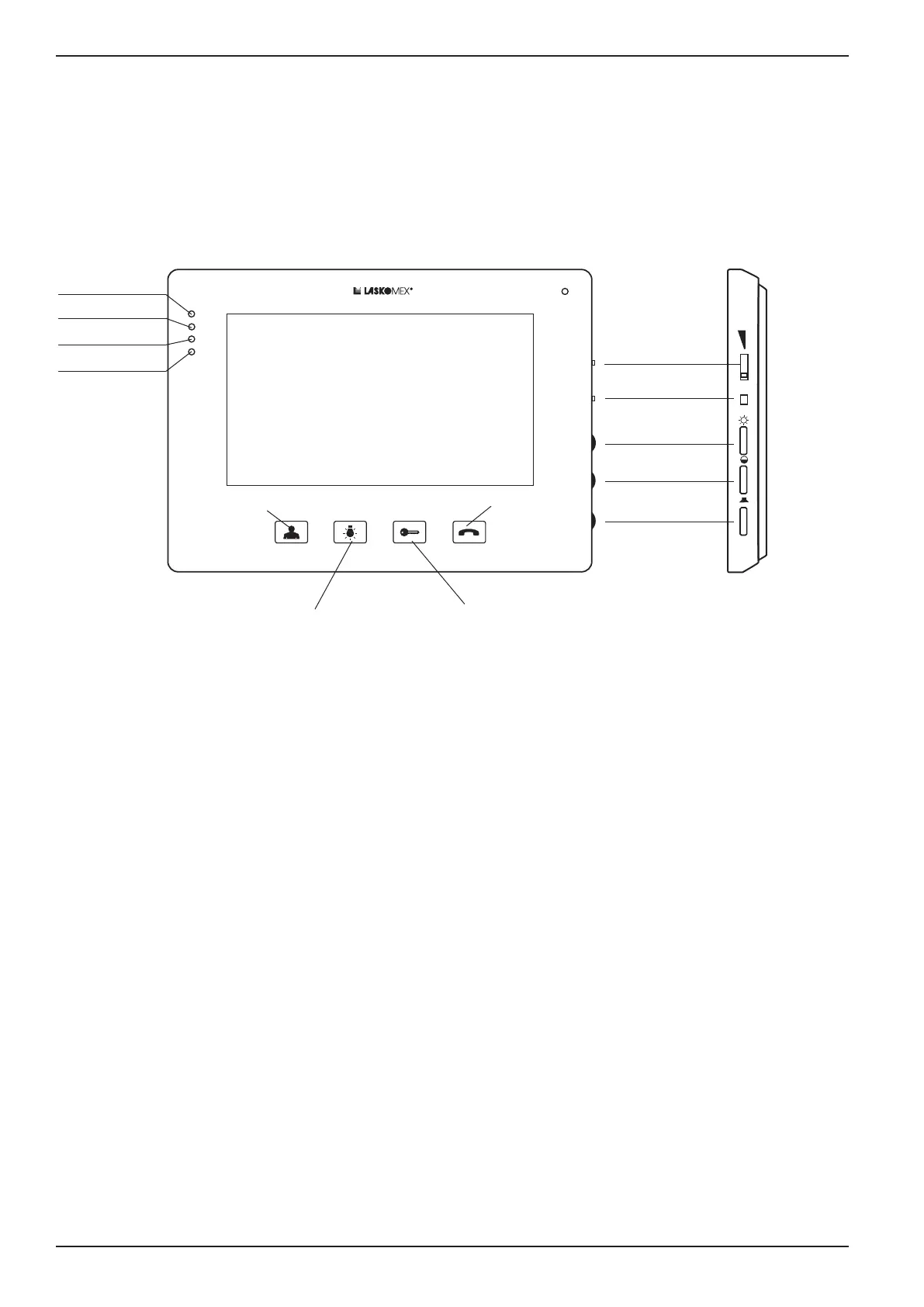
• Preview– switchingon andoffthe previewfrom thecamera, endingtheconnection,
extendingtheconnectiontime,extendingthepreviewtime.
• Control–controlofthegatedrive,lighting,etc.
• Lock–controloftheelectricstrike,stepadjustmentofthecallvolume.
• Conversation–receivingandmakingcalls,switchingonthemonitor-panelaudiopath.
PREVIEW
CONTROL
CONVERSATION
PROG
BRIGHTNESS
COLOT
VOLUME
(conversation)
VOLUME
(call)
KEY(LOCK)
PROG
LED1 (green)
LED2 (red)
LED3 (yellow)
LED4 (blue)
Figure 1. Monitor MVC-8151
3. Using the monitor
Conversation
Anattempttoestablishaconnectionwiththemonitorissignaledbythebell,atthesame
time the caller’s image will appear on the screen.
Tomakeacall,presstheCONVERSATIONbuttonduringthecallorwithin30secondsafter
the call.
Thetalktimeislimitedandis120secondsbydefault.10secondsbeforetheendofthistime,
short beeps will appear in the loudspeaker indicating that the end of the call is approaching.
The conversation can be ended at any time by long pressing the PREVIEW button.
Switching to simplex mode
Ifthereisalotofnoiseintheplacewherethepanelisinstalled,itmaybedifculttocon-
ductaconversation.Thenyoucanusethesimplexmode.Todothis,usetheCONVERSA-
TIONbutton.Aslongasthebuttonispressed,thesoundistransmittedinonlyonedirec-
tion – from the monitor user to the person at the external panel.


 To Next Page