18
19
Confirming the 1st comment line
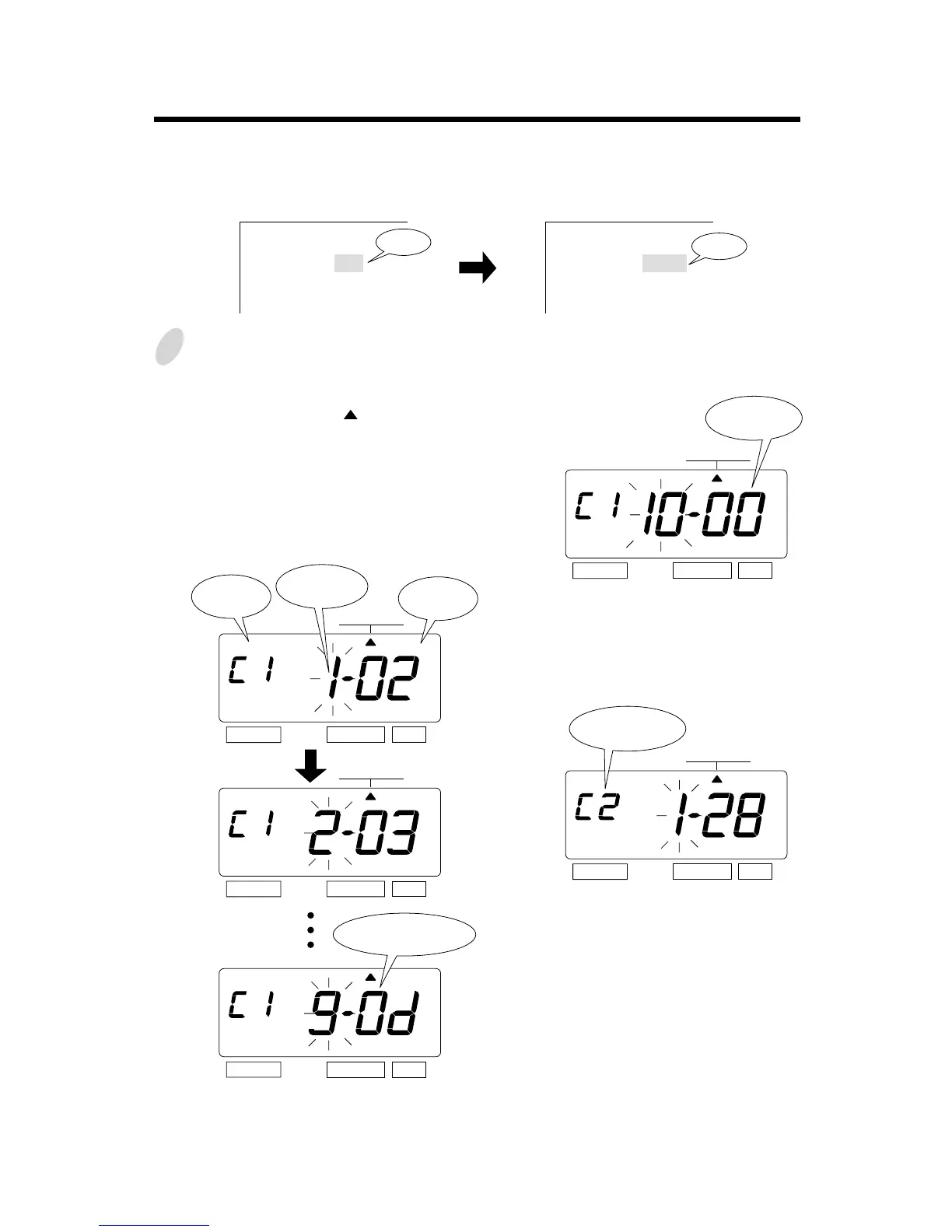
To confirm the customized comments that
have been set, press the [SELECT] button
and position the " " under the
"COMMENT" mark. At that moment, the
"Character Position" flashes, and press the
[CHANGE] button.
While the "Character Position" changes,
the "Character Code" that has been set
appears.
After confirming the last character
code of the 1st comment line, press
the [CHANGE] button once again.
At that moment, the display changes
to the following figure.
SELECT CHANGE SET
Confirming and Changing the Customized Comments
ABC HOTEL
21 OCT '03
BOSTON, MA
ABC HOTEL
21 OCT 10:03
BOSTON, MA
Example: 1st comment line: No change.
2nd comment line: Change from "Year" to time "HH:MM".
3rd comment line: No change.
1
SELECT CHANGE SET
SELECT CHANGE SET
Comment
Line
Character
Code
SELECT CHANGE SET
At this time, press the [SET] button
twice, and the 2nd comment line is
displayed.
SELECT CHANGE SET
The 2nd
comment line
The last
character code
Time
Year
COMMENT
COMMENT
COMMENT
COMMENT
"00" means
"NULL".
Character
Position



 To Next Page