20
19
Changing
the Customized Comments
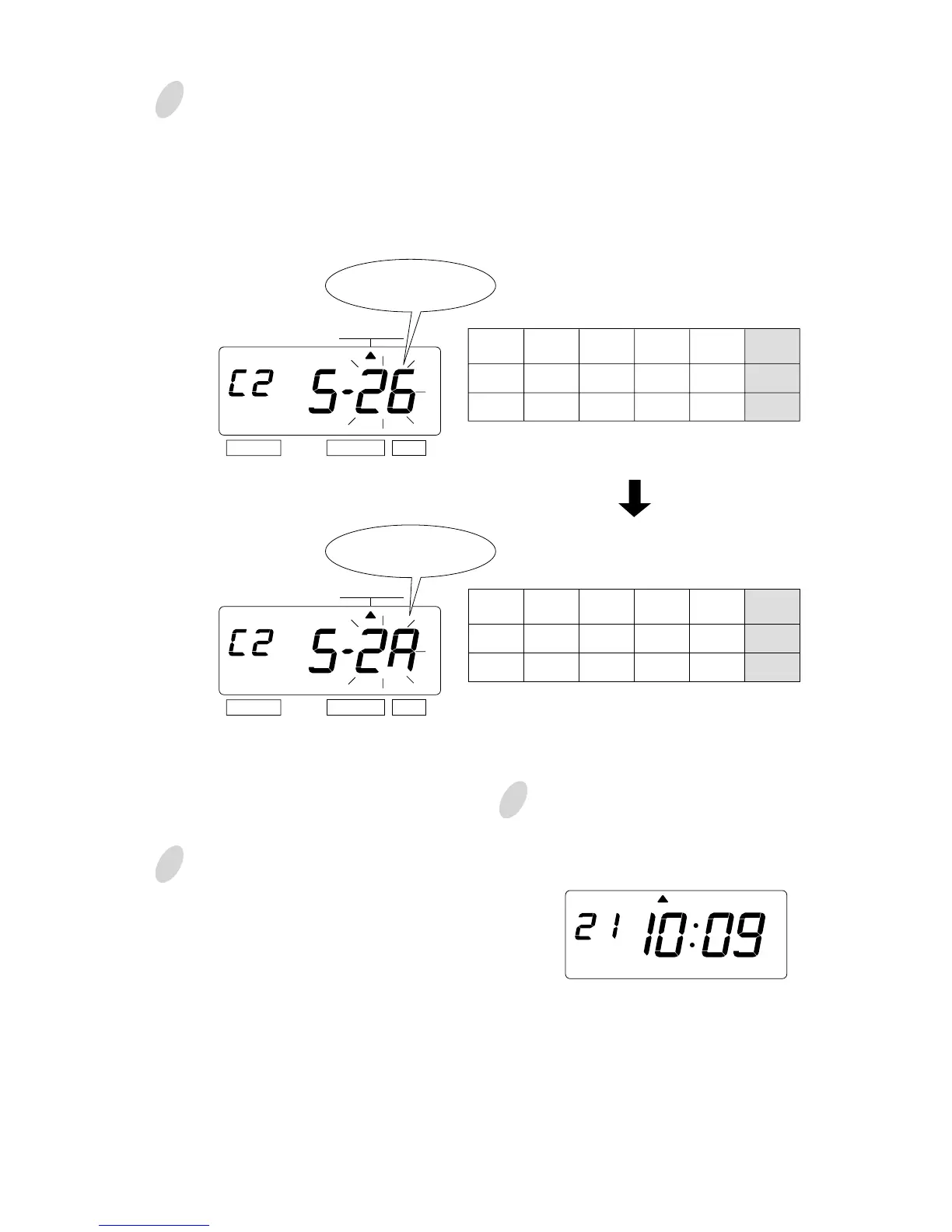
In case of example, press the
[CHANGE] button to set at "5". And
then press the [SET] button. At that
moment, flashing changes from the
"Character Position" to the
"Character Code".
Press the [CHANGE] button to set at
"2A".
Then press the [SET] button once.
Now changing the character code has
been completed.
2
After you finish confirming and
changing the customized comments,
press the [SET] button once again.
4
Confirming the 3rd comment line
Confirm the 3rd comment line in the
same manner as Step 1.
3
SELECT CHANGE SET
The character code
"26" means "Year".
SELECT CHANGE SET
The character code
"2A" means HH:MM"
Cord
Meaning
28
Date
01
SPACE
27
Month
01
SPACE
26
Year
1
Character
Position
2 3 4 5
Cord
Meaning
28
Date
01
SPACE
27
Month
01
SPACE
2A
HH:MM
1
Character
Position
2 3 4 5
MO TU WE TH FR SASU
Now confirming and changing the
customized comments have been
completed. Replace the cover and
lock.
Important: If you do not complete Step
4, the Time Recorder will not print.
COMMENT
COMMENT



 To Next Page