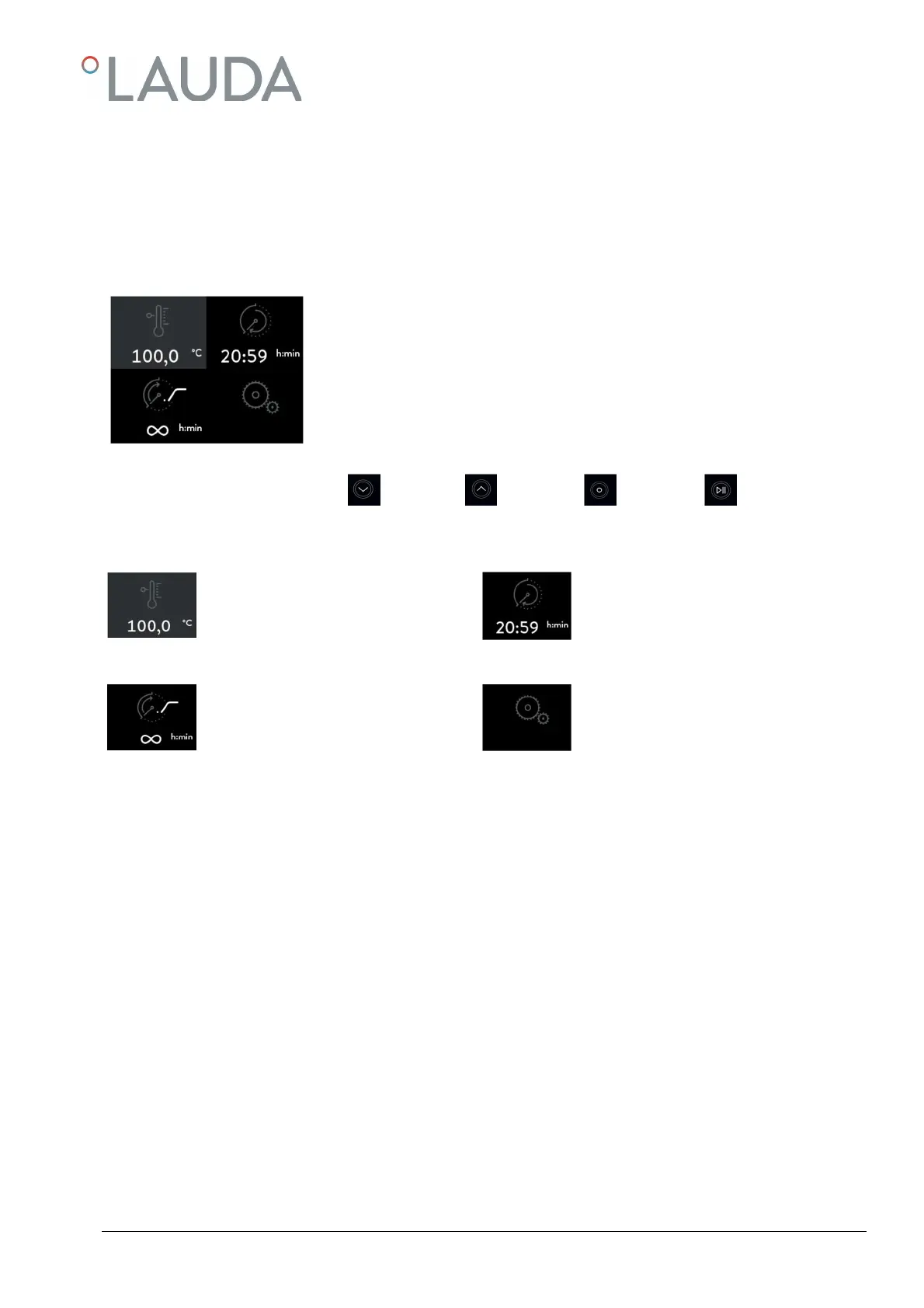
Main Menu
8.1
The Water Bath is started in the main menu after checking the set points. Sub-functions of the main menu permit set-
ting and saving the values for temperature, switch-on delay and operation time. The current set points are shown below
the symbols of the relative function and remain saved after switching the Water Bath off. Furthermore, the main menu
permits access to the basic settings of the regulator. The bottom line of the following input windows provide information
on the tasks assigned to keys ①, ② and ③.
Keys ① and ② permit to move in the menu. The current function is marked in black
and can be opened with key ③. If the saved set points below the function symbols are in
conformity with your process requirements, the Water Bath can be started by pressing
key ④ (keep pressed for 3 seconds) and switched off again by pressing key ④ (shortly).
Key
Key
Key
Key
Set temperature
with currently saved set point
(see 8.1.1)
Switch-on delay
with currently saved set point
(see 8.1.2)
Operation time
with currently saved set point and pre-
set timer functions
Basic settings
(see 8.2)


 To Next Page