82
LAUNCH X-431 PAD V
User's Manual
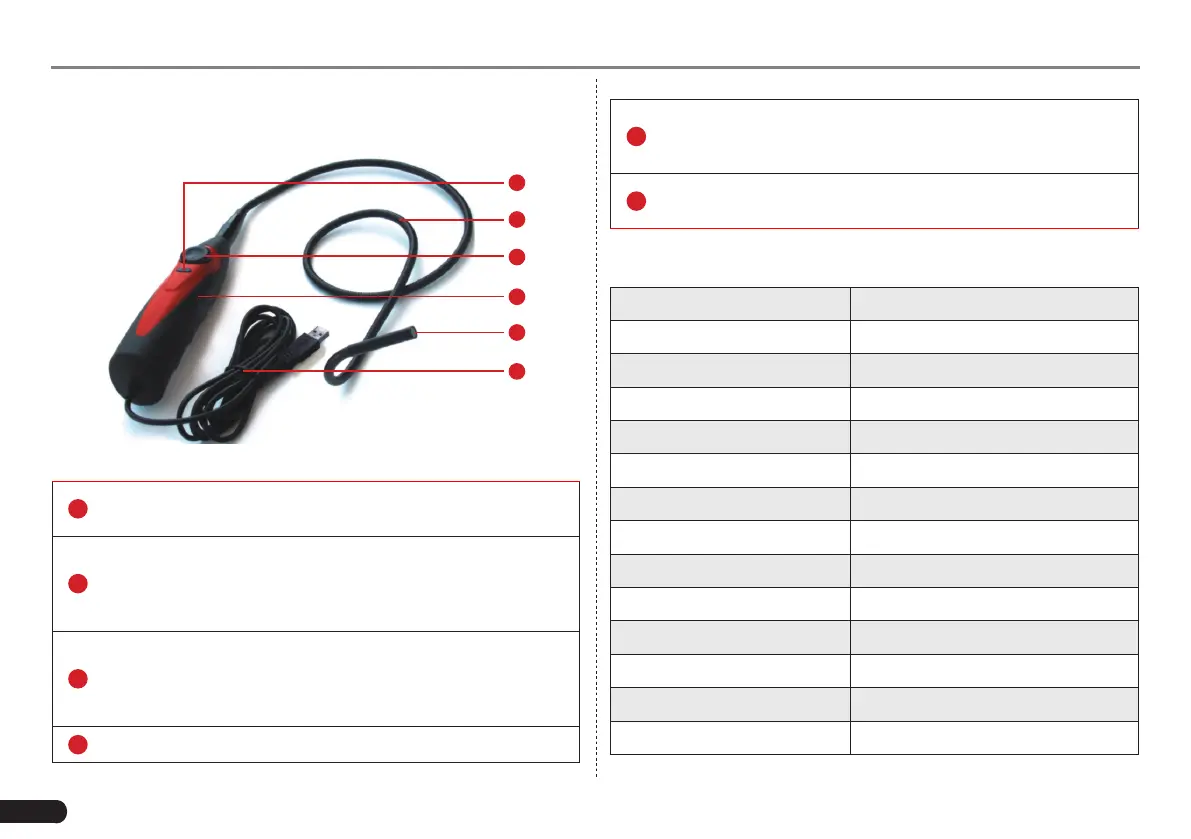
7.5.2 About Videoscope
1
3
4
2
6
5
Fig. 7-52
1
Snapshot button: To take a snapshot of the current view and
save it on the tablet as an image.
2
Flexible tube: You can bend the neck to get in to hard-to-
reach places and even if it is not straight, it can still give you
pictures of what the camera is looking at. (
*Note: Do NOT force
it too hard while bending the neck into strange shapes.
)
3
Dial for LED light brightness: There are 4 LED lights in the
lens that act like a torch to illuminate dark spots where the
camera can not see well. This dial allows you to adjust the
light brightness.
4
Handle
5
Camera with 4 adjustable LED lights: The camera head
is water-resistant and is where you can attach the useful
optional accessories (magnet, mirror, hook) add-on.
6
Data cable: Connect it to the diagnostic tool for viewing what
the camera captures.
7.5.3 Technical Parameters
Resolution 640 x 800 pixel (VGA)
Frame Rate 30fps (pictures/sec)
Image Sensor 1/12" CMOS
White Balance
Automatic
Exposure Automatic
Light Source 4 adjustable LEDs
Power Supply 5V
Ambient temperature 0 to +65
o
C
Data Cable Length Approx. 2000mm
Probe & Camera Length 1030mm
Probe Cable Length 830mm
Min. Bending Radius 50mm
Lens Diameter 7.0mm
Probe Tube Diameter 6.0mm



 To Next Page