4
LAUNCH X-431 PAD V
User's Manual
2.1 X-431 PAD V Tablet
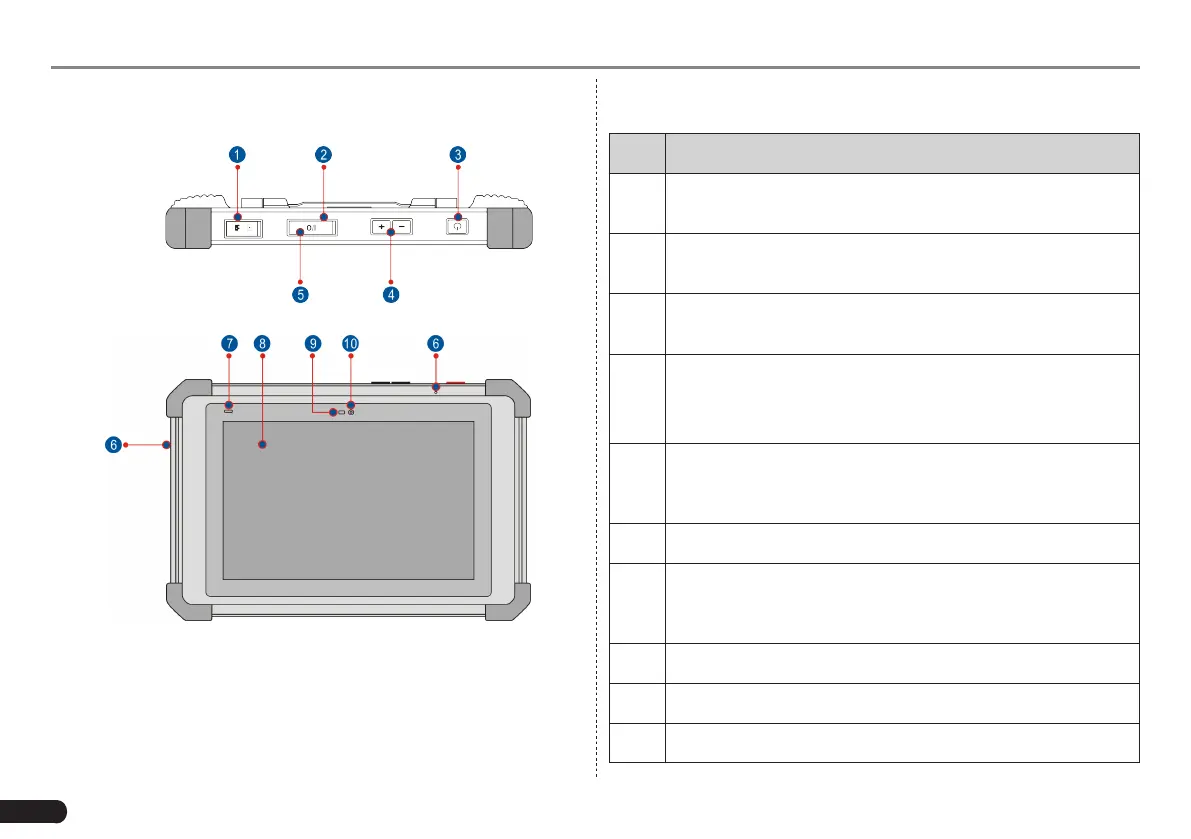
Fig. 2-4 Top & front views
Table 2-1 formulates ports and indicators of X-431 PAD V tablet:
No. Name & Descriptions
1
Memory Card Slot -- To store the memory card for storage
expansion.
2
Type C Charging Port -- Reserved for charging the X-431
PAD V tablet.
3
Power/Screen Lock Button -- To turn the tablet on/off with
long press, or lock the screen with short press.
4
Volume Buttons -- To adjust the volume.
*Note: Press and hold [POWER] and [VOL -] key to capture the
current screenshot.
5
Data I/O Port -- Reserved for add-on modules (such as
Batterybox, Scopebox and Sensorbox), and other devices
with similar port.
6 Microphone
7
Charging indicator -- It illuminates red while X-431 PAD V
tablet is charging. Once charging is nished, it will illuminate
solid green.
8 10.1" Capacitive Touch Screen
9 Ambient Light Sensor
10 Front Camera



 To Next Page