EasyManua.ls Logo

LDG AT-100Pro - Command Reference

LDG AT-100Pro
22 pages
Print Icon
To Next Page IconTo Next Page
To Previous Page IconTo Previous Page
Loading...
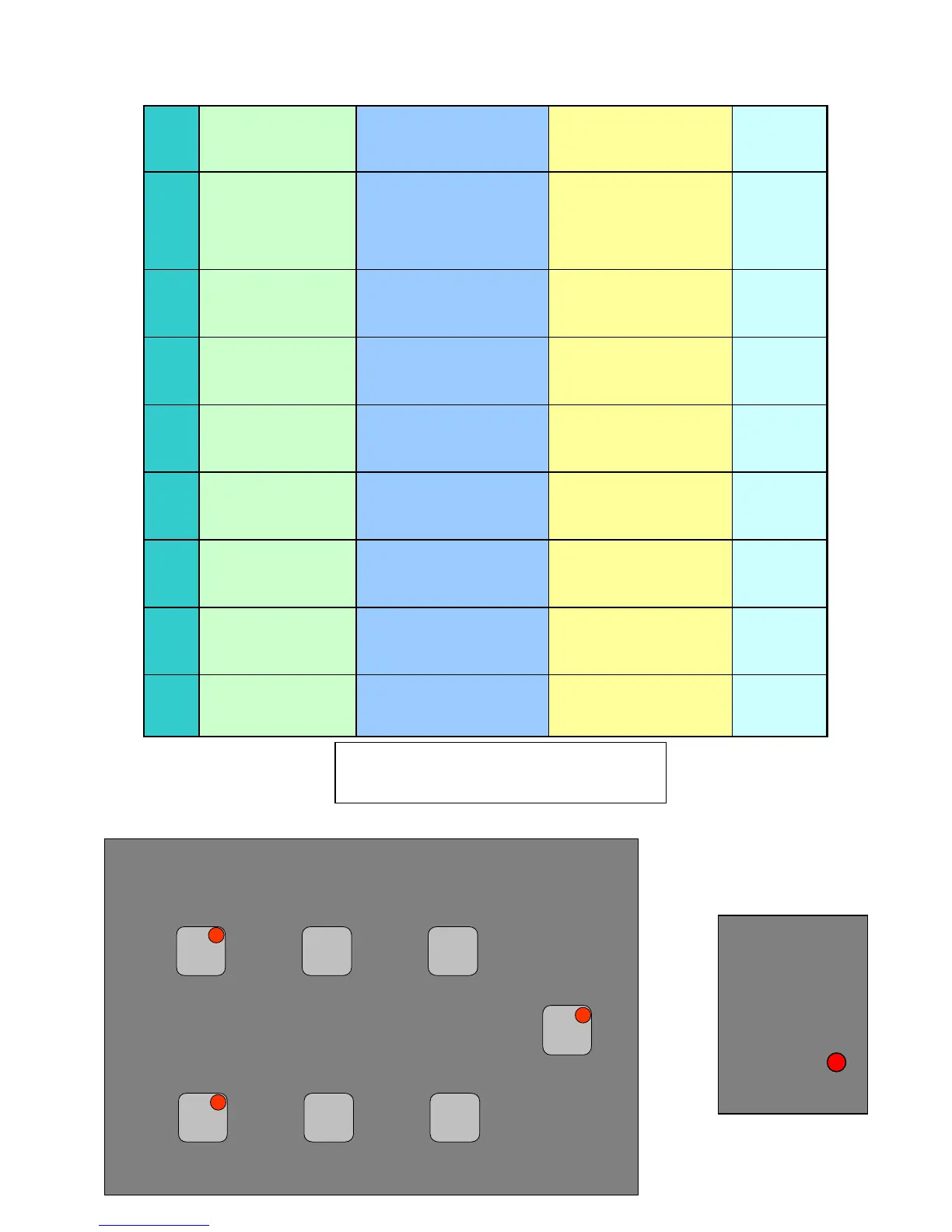
Button
Primary Function
Secondary Function
(Func + Button)
Status Check (Func
Hold + Button)
Power-Up
Function
Tune
Manual Tune (Long)
Auto Tune (Medium)
Bypass (Short)
Manually Store Tuning
Parameters
Present Relay Settings NA
Ant
Switch between Ant 1
and Ant 2 connectors
on back panel
Toggle Hi-Lo Impedance
Present Antenna
[Ant 1]
LEDs
On/Off
C Up
Manually increase
capacitance
Toggle Power meter
Peak/Average
Present PWR Meter Mode
[Avg]
NA
C Dn
Manually decrease
capacitance
Set Auto/Manual Mode
Present Mode (Auto or
Semi)
[Auto]
NA
L Up
Manually increase
inductance
Set PWR Meter Scale
Present PWR Meter Scale
[125 Watts]
NA
L Dn
Manually decrease
inductance
Set Auto Tuning
Threshold SWR
Present Auto Tune
Threshold
[2.0]
NA
Func
Select Alternative
Functions For Other
Buttons
NA NA
Version
Number
Func+
Ant+
Tune
NA NA NA
All
Reset
AT-100Pro Command Reference
[
Default settin
g
s in brackets
]
Peak/Avg
Mtr Mode
NA
Hi/Lo Imp
Sel Ant
LEDs On/Off
Auto/Man
Tune Mode
NA
Man Store
Rly Settings
NA
12/125 Watts
Mtr Scale
NA
Auto Thresh.
Pres. Thresh.
NA
Func C Up L Up
Ant C Dn L Dn
Tune
Func + Key
Func Hold + Key
Hold on Power Up
Hold on power-up
for All Reset
15

Other manuals for LDG AT-100Pro

Related product manuals