D
D
C
C
S
S
8
8
1
1
0
0
V
V
2
2
D
D
i
i
g
g
i
i
t
t
a
a
l
l
D
D
C
C
S
S
e
e
r
r
v
v
o
o
D
D
r
r
i
i
v
v
e
e
r
r
M
M
a
a
n
n
u
u
a
a
l
l
R
R
e
e
v
v
1
1
.
.
0
0
Tel: (86)755-26434369 24 Website: www.leadshine.com
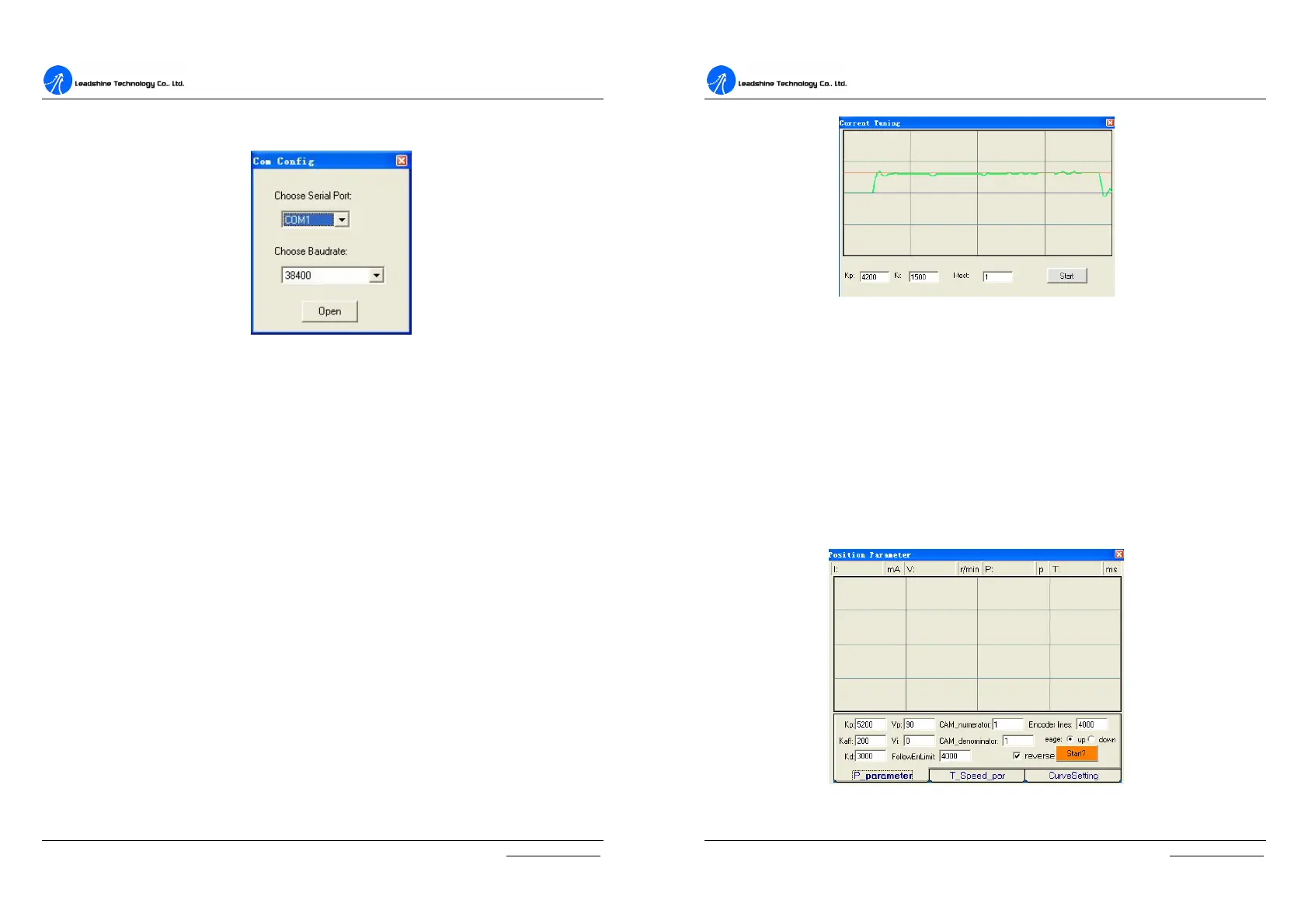
Com Config Window
Figure 6-11: RS232 communication configuration window
Serial Port: Select the serial communication port to which the driver is connected.
The factory default setting is COM1.
Baud Rate: Select the communication baud rate. The factory default setting is
38400.
Click Open button to establish a connection with the specified settings. When
connecting, you can choose SaveToDrive to download the current parameter
settings to the driver, or to upload the stored driver settings into the ProTuner by
clicking Tuning > Position Loop on the menu bar.
Tuning
The user can choose one or two drop-down menu(s) by clicking Tuning, including
CurrentLoop and PositionLoop.
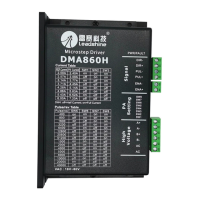
l CurrentLoop: It is used to configure current loop parameters according to
different motor. In the tuning window, User can set Kd, Ki and I-test.
D
D
C
C
S
S
8
8
1
1
0
0
V
V
2
2
D
D
i
i
g
g
i
i
t
t
a
a
l
l
D
D
C
C
S
S
e
e
r
r
v
v
o
o
D
D
r
r
i
i
v
v
e
e
r
r
M
M
a
a
n
n
u
u
a
a
l
l
R
R
e
e
v
v
1
1
.
.
0
0
Tel: (86)755-26434369 25 Website: www.leadshine.com
Kp: Current Proportional gain. Increase this parameter to make current rise fast.
Ki: Current Integral gain. Adjust this parameter to reduce the steady error.
I-test: The current amplitude for the step response.
Start button: Click to activate the test. A target curve and a actual curve will display
on the screen for user analysis.
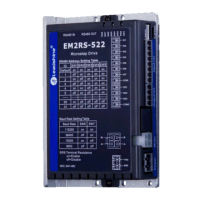
l PositionLoop: There are three tabs in Position Loop Tuning window,
including P_parameter, T_Speed_Par, and CurveSetting tabs.
Figure 6-12: P_parameter tab


 To Next Page