D
D
C
C
S
S
8
8
1
1
0
0
V
V
2
2
D
D
i
i
g
g
i
i
t
t
a
a
l
l
D
D
C
C
S
S
e
e
r
r
v
v
o
o
D
D
r
r
i
i
v
v
e
e
r
r
M
M
a
a
n
n
u
u
a
a
l
l
R
R
e
e
v
v
1
1
.
.
0
0
Tel: (86)755-26434369 38 Website: www.leadshine.com
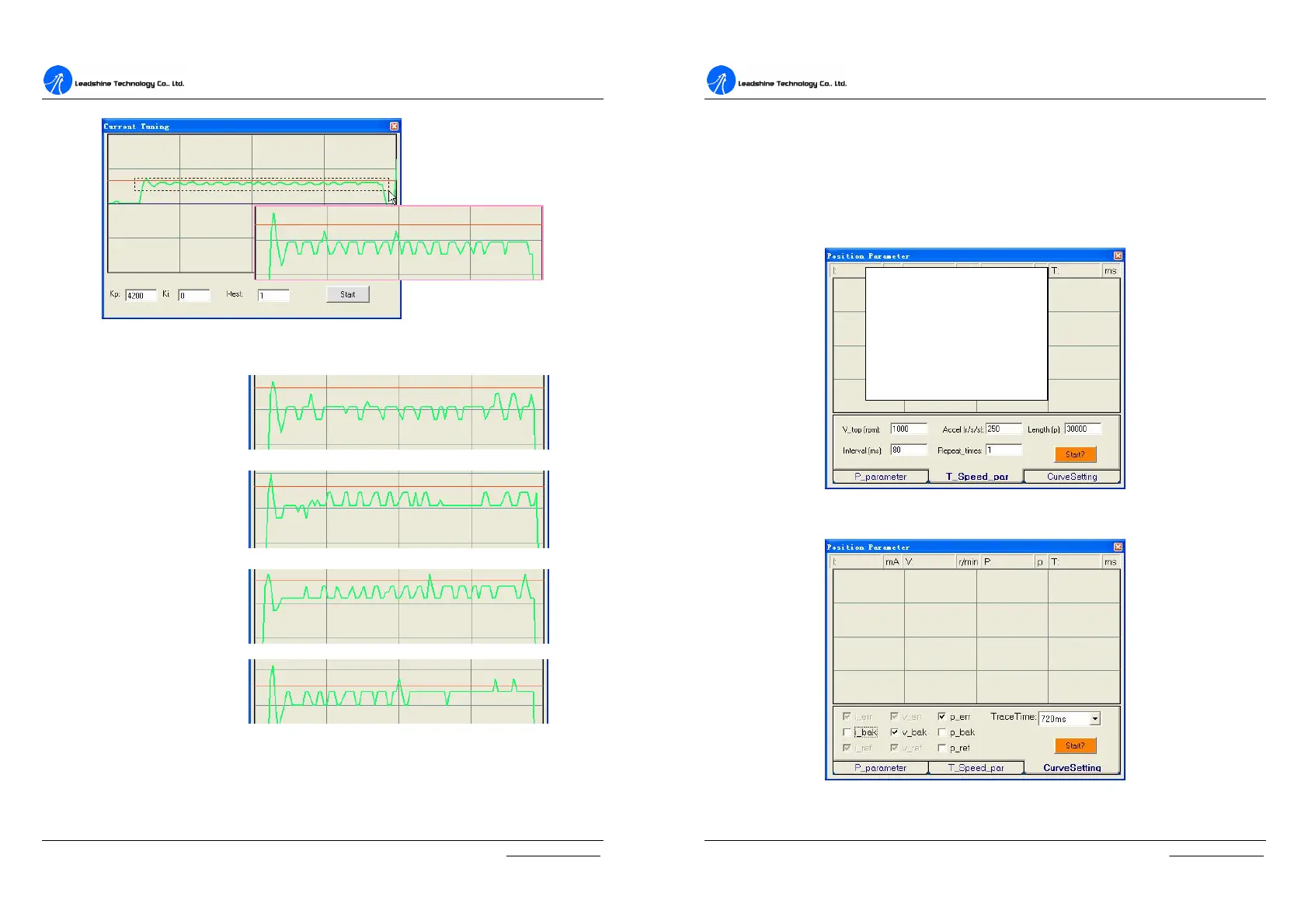
Figure 6-23: Drag a rectangle to zoom in the steady error
Figure 6-24: Current loop tuning with Kp=4200 and increasing Ki
Kp=4200, ↑Ki=200
Kp=4200, ↑Ki=800
Kp=4200, ↑Ki=1500
Kp=4200, ↑Ki=2500
D
D
C
C
S
S
8
8
1
1
0
0
V
V
2
2
D
D
i
i
g
g
i
i
t
t
a
a
l
l
D
D
C
C
S
S
e
e
r
r
v
v
o
o
D
D
r
r
i
i
v
v
e
e
r
r
M
M
a
a
n
n
u
u
a
a
l
l
R
R
e
e
v
v
1
1
.
.
0
0
Tel: (86)755-26434369 39 Website: www.leadshine.com
Velocity and Position Loop Tuning
Before trying to manage the velocity and position loop parameters (Vp, Vi, Kp, Kp,
Kaff, see page 25), connect the system as figure 6-19. Then set self-test motion
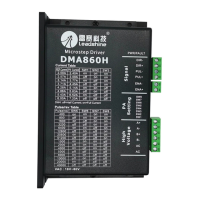
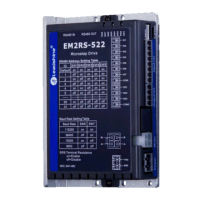
parameter and select the display curve in digital scope as figure 6-25, figure 26.
TraceTime affects the display length of the curve. Here we select 720ms.
Figure 6-25: Self-test motion settings for the tuning
Figure 6-26: Digital Scope settings for the tuning
Vtop = 1000 RPM
Accel = 250 R/S
2
Length = 30000 pulses
Inernal = 80 ms
Repeat = 1


 To Next Page