D
D
C
C
S
S
8
8
1
1
0
0
V
V
2
2
D
D
i
i
g
g
i
i
t
t
a
a
l
l
D
D
C
C
S
S
e
e
r
r
v
v
o
o
D
D
r
r
i
i
v
v
e
e
r
r
M
M
a
a
n
n
u
u
a
a
l
l
R
R
e
e
v
v
1
1
.
.
0
0
Tel: (86)755-26434369 48 Website: www.leadshine.com
Maximum Pulse Input Frequency
Maximum Pulse Input Frequency is the highest frequency that the driver can accept.
To convert this frequency to RPM, use the following formula:
atordenoCAM
numeratorCAM
CountLineEncoder
FrequenceInputPulseMax
RPM
min_
_
4)(
60)(
(max) ×
×
×
=
Save data to a file
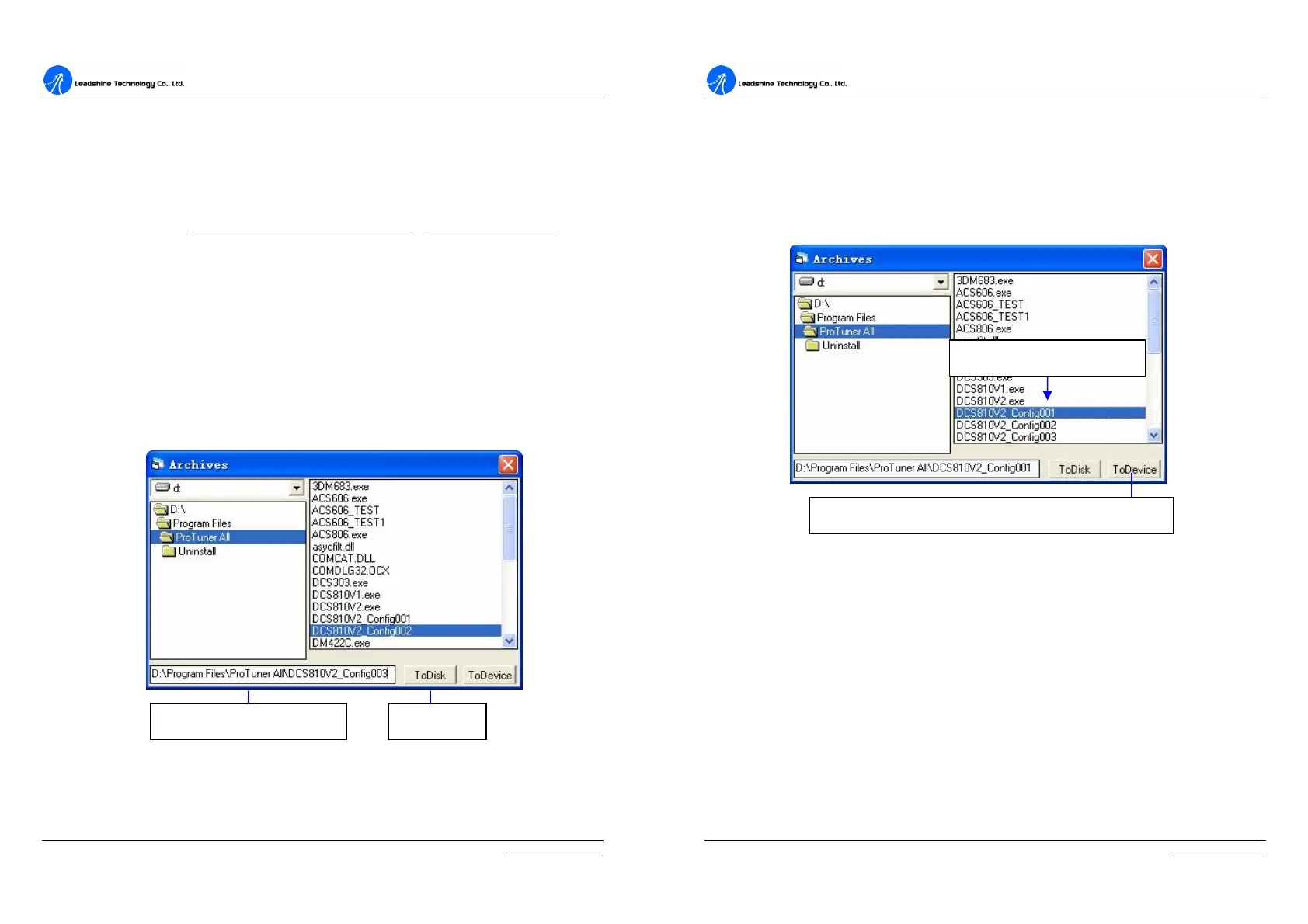
The ProTuner offers a tool to save parameter to a file. It is very useful when
building machines with the same motors and other components. Select
Option->Archives, the archives window will appear as figure 7-2. To save the
current parameter to a file, type in the path and file name in the edit box and then
click ‘ToDisk’ button. See figure 7-2 for more detail.
Figure 7-2: Save parameter to a file
Type in path and file name Save to file
D
D
C
C
S
S
8
8
1
1
0
0
V
V
2
2
D
D
i
i
g
g
i
i
t
t
a
a
l
l
D
D
C
C
S
S
e
e
r
r
v
v
o
o
D
D
r
r
i
i
v
v
e
e
r
r
M
M
a
a
n
n
u
u
a
a
l
l
R
R
e
e
v
v
1
1
.
.
0
0
Tel: (86)755-26434369 49 Website: www.leadshine.com
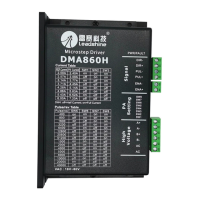
Load data from file to Drive
When communication between the ProTuner and the ACS806 is established, you
can open a configuration file then download the data from the file to the drive. See
figure 7-3 for more detail.
Figure 4: Download data to the drive
Click to download data to the Drive from the selected file.
Select a configure file in the


 To Next Page