7
4.Leap timer APP operation instruction:
a. First scan the QR code of instruction home page , Download and install “Leap timer” APP on the phone.
b. Finish installed, Connect the Bluetooth Stopwtch with the Apps.Pls make sure the Bluetooth is turned
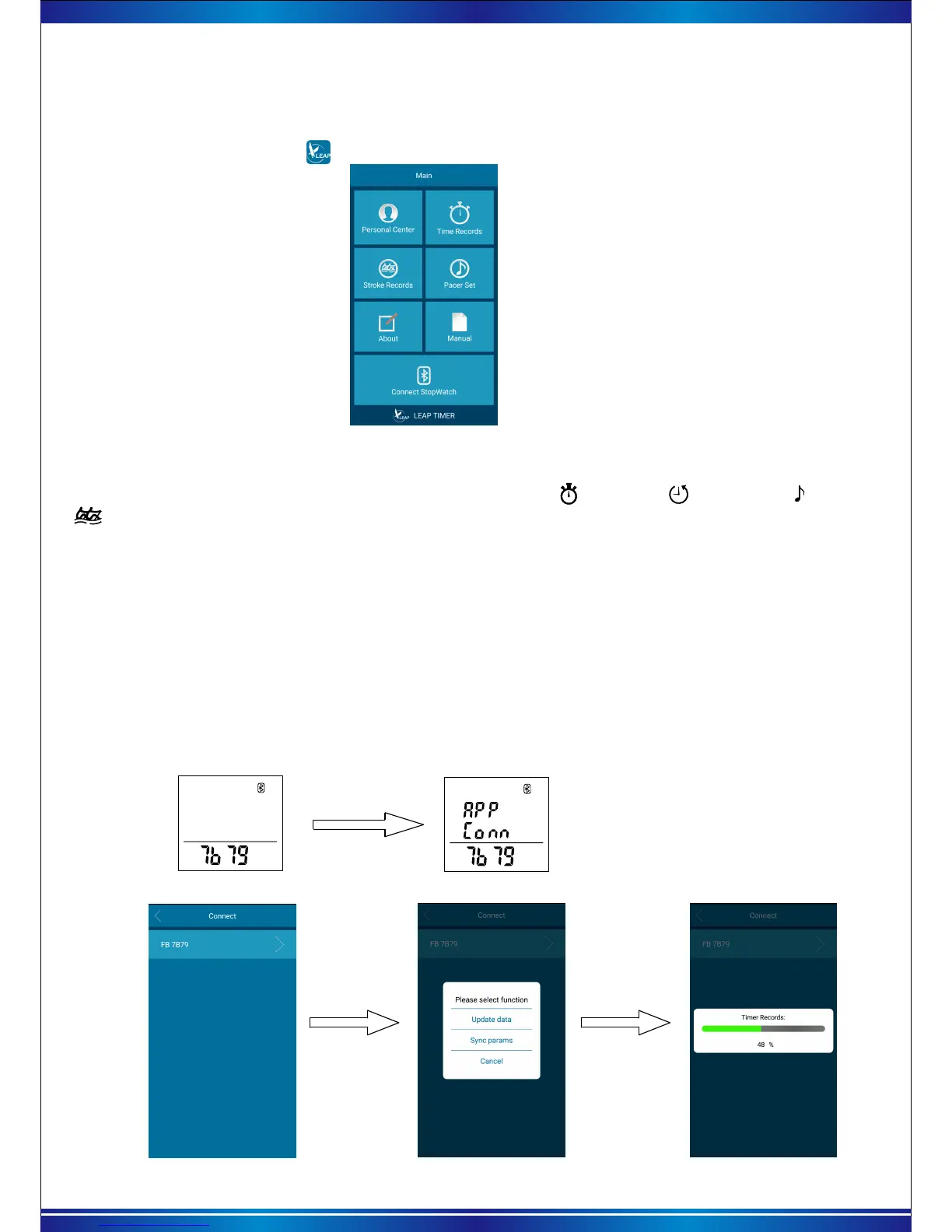
on before running the app.Tap “ ”(Leap timer) icon, to enter the main menu of Apps as picture 1 as below:
2).Synchronize the timer reords and Calendar
a. Before connecting, please stop and reset the functions of “ stopwatch/ countdown / pacer/
stroke frequency”.
b. keeping press the 【Mode】 key for 3 secs to turn on the stopwatch Bluetooth, A 4-digits ID will
show in the LCD screen and inside the cell of connect page. Bluetooth icon and Bluetooth device
number (as picture 2). And then click the APP home page at the bottom of the "connect stopwatch".
Pls find the same Bluetooth device number as the stopwatch is displayed in the list.(as picture3).
Picture 2 Opening Bluetooth interface
Picture 1 Main menu of the Apps
Picture 3 Bluetooth device lists
c. In the device list, click the same list of Bluetooth device as the stopwatch. Then connect stopwatch
and App. Connecting succeed, it will show ‘APP Conn’ on stopwatch (as picture4), Meanwhile the APP
will pop up” update data /sync params /Cancel selection menu (as pictures5).
(*each stopwatch has an individual Bluetooth device number, if there has other Bluetooth device around the phone,
they also can be searched and loaded into device list.)
Picture 4 Connection success
Click “update data”, will send the timer records to the APP and save (as pictures 6).
Click” sync params” will update the Year/month/day/time’ on phone to the stopwatch.
Picture 5 function selection menu
Picture 6 Synchronizing data
1).Install the app


 To Next Page