2
3.Operation
3).Adjust the mode
[Time/Calendar]
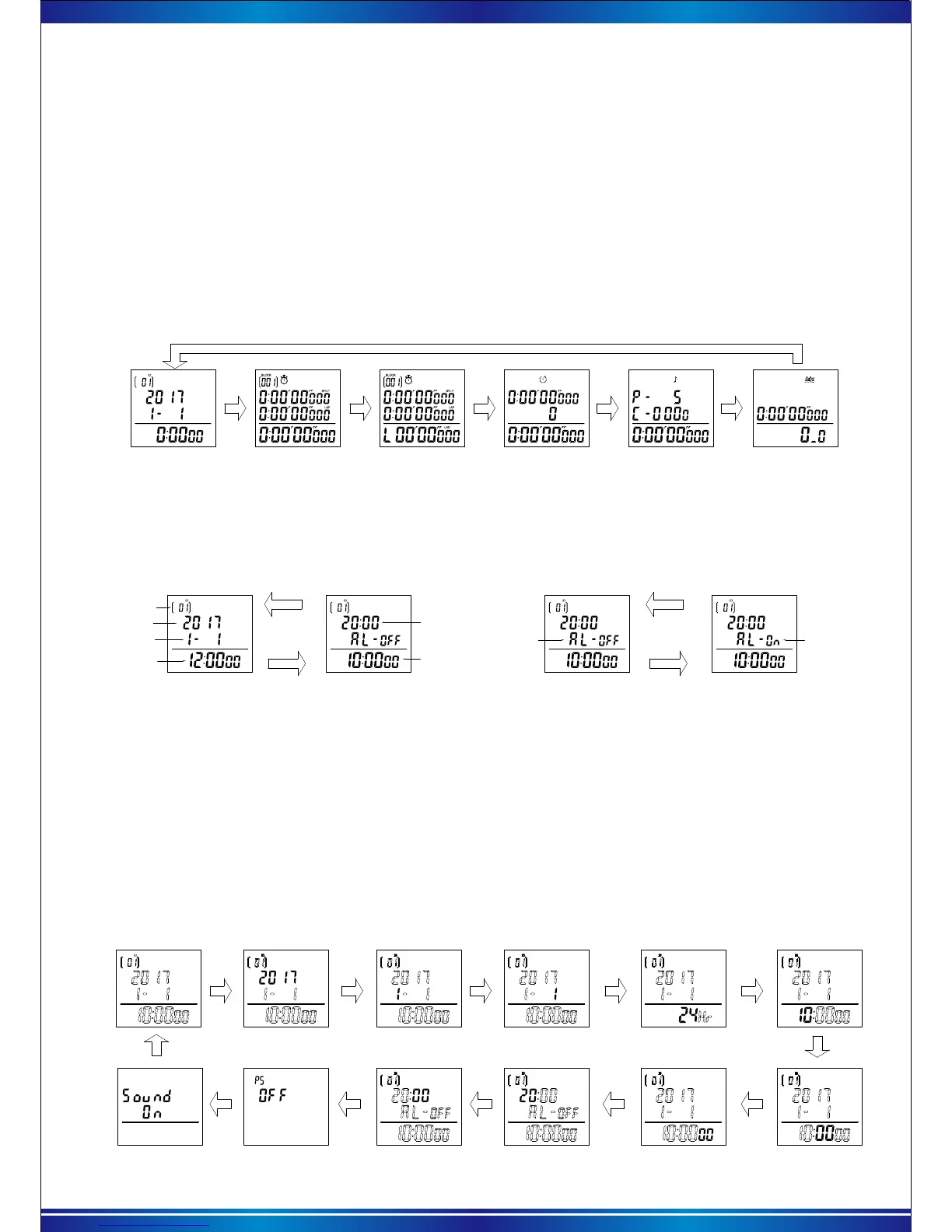
4).[ Time/Calendar ] and alarm function
Year
Month-Day
User ID
Current time
Time/Calendar interface
Current time
Alarm interface
Alarm time
1).Turn On
On the turn off status, press and hold the【Mode】key two seconds to turn on the stopwatch.
Show the time/calendar interface.
2).Turn off
On the time/calendar interface, Keep pressing 【Start】+【Recall】+【Reset】keys one after
another three seconds to turn off. (Please make sure stopwatch is no running and reset mode.
Otherwise, the stopwatch couldn’t be turned off.)
Press【Reset】
key to switch
Alarm off Alarm on
Press【Start】to
turn on or off
the alarm
5).Set the parameter
On the [Time/Calendar] interface, press【Recall】key two seconds to set the parameter, set the
user ID firstly, the digits start to flash, when flashing, press【Start】key one time to add 1, keep
pressing to keep adding. Press【Reset】key to next digit one by one .(
* Note: During the setting,
no operation within 30 second, the interface will return to [Time/Calendar] interface.).
User can set the parameter: user ID,date,12/24 time format, current time, alarm time, turn on/off
power saving, sound on/off for the buttons, the operations are as below.
User ID Year
Month
Date
Hour
12/24Hr
Minute
Second
Hour for alarmMinute for alarm
PS power
saving(On/off)
The sound for
pressing (on/ off)
Setting sequence:User ID→Year→ Month→Date→12/24 Hr→ Hour→Minute→Second→Hour for
alarm
→ Minute for alarm→ PS power saving mode→ Sound on/off setting. The charts are as below.
When turning on, press【Mode】key one time to adjust one by one: [Time/Calendar] →[Stopwatch1]
→[Stopwatch 2]→[Count down ]→[Pacer]→[Stroke measurement]. The charts are as below.
[Stopwatch1] [Stopwatch2] [Count down ] [Pacer] [Stroke measurement]
On the [ Time/Calendar] interface, press【Reset】key one time to [Alarm] interface, press it again
to return [ Time/Calendar] interface.
On the [Alarm] interface, press 【Start】to turn on or turn off the alarm. The charts are as below.
Alarm interface
Alarm interface



 To Next Page