4
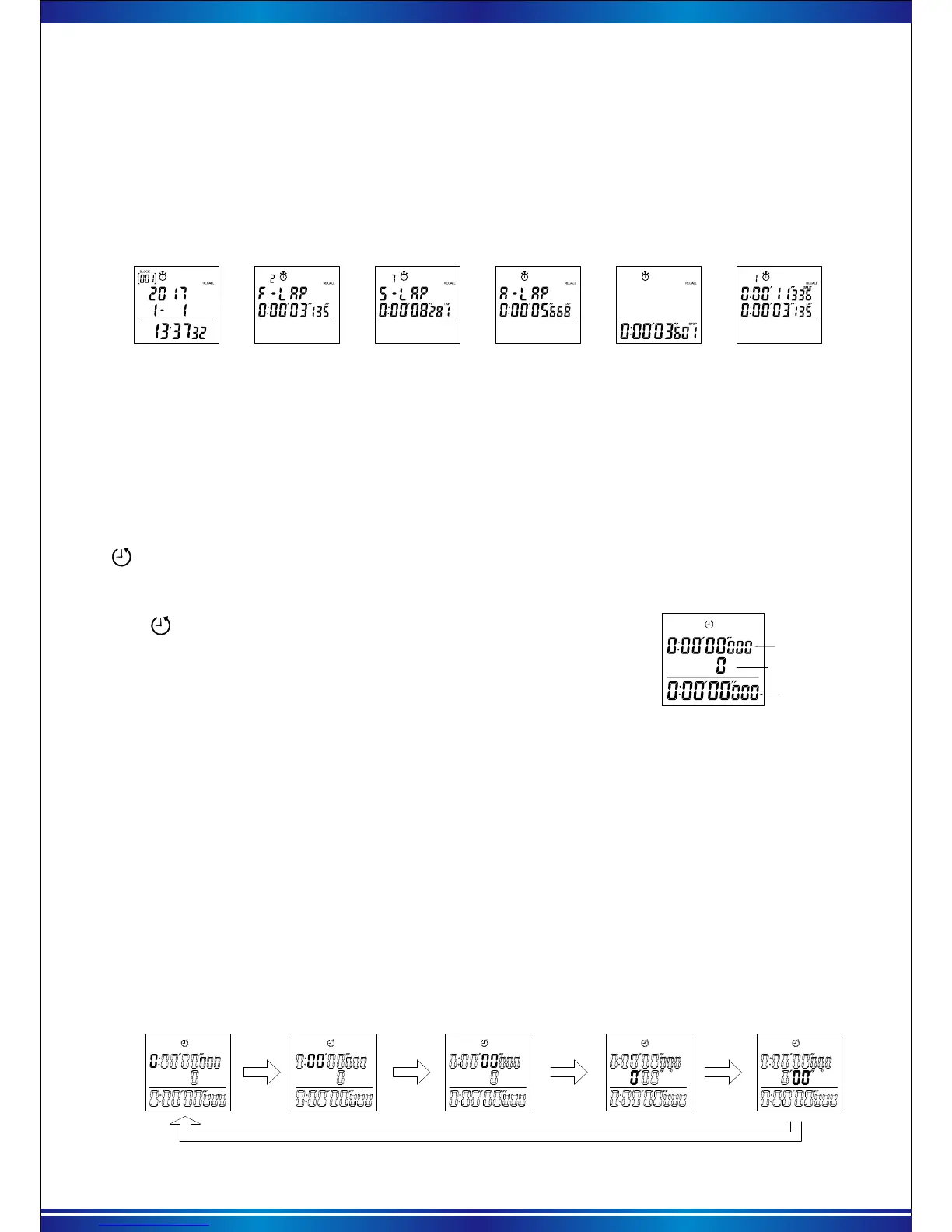
In state of operation/ pause /reset, Press【RECALL】to query memory , the BLOCK group number
and RECALL will be continuous flashing. The screen will show the information “year/month/day/time”
of that data. With each press of the【RECALL】key, the data of BLOCK is recalled successively.
Keeping 【RECALL】pressed, can be quickly loop (BLOCK 001→BLOCK 002→BLOCK 003→
.....and so on ).
d. Recall stopwatch memory
“BLK ”option
F-LAP
S-LAP A-LAP
Stop Time
Each Memory
e. How to clear the stored data
Once the following steps are taken, all the stored data are erased from memory. The stored data
cannot be erased one by one or block by block. Before clearing the data, check that the stopwatch is
reset to “00.”Press【RECALL】 to show the memory recall display. Keeping 【RESET】 pressed for
more than 1.5 seconds, the screen shown at right appears “Clear all data” with warning beeps. After
3 seconds, all the stored data is erased from memory with a long beep. Then the initial measurement
display is shown. If the【RESET】button is released within 3 seconds , the stored data will not be
erased from memory.
7). Countdown function
Target time
Times for countdown
Current countdown
timer
After entering the countdown function, the countdown function
icon will be shown on the top of screen.The first line show the
preset target time, the second line show the number of completed
time, the third line show the current running countdown.
a. Countdown function description
b. Countdown parameter setting
Hour of target time
Countdown interface
After entering the countdown mode without running , press and hold 【RECALL】button for 2
seconds to enter the countdown data setting.
In the countdown parameter setting, beside "target time" to be set, you can also set a "interval
alarm time"."Interval alarm time": time setting range 0-10 minutes, when the set interval is larger
than 0, it shows the interval alarm time is activated. Then during the running countdown, It will be
a beep according to the preset interval of time. When the time is set to 0, “interval alarm” will be
turned off. The specific steps are as follows:
* Note: It will automatically exit the settings and return to the countdown mode, if no any operation within 30
seconds. If the target time is set to 0: 00'00 ", then the current time will start to countdown from 9: 59'59".
When recall the number of BLOCK you need, press【START】 to enter the data. And each press
【START】 to recall the Fastest (FS), Slowest (SL), Average (AV) time and each memory time of this
BLOCK, long press to recall quickly. After finish the memory recall of one group, press【RECALL】
back to “BLK” group number, repeat the above operation to recall other group’s data. Press【MODE】
key to exist the query , return to the Chrono mode at any time.
When the target time is completed, a beep "Di Di" will sound,
the second line will count once, and the third line will start counting
down again.
When the countdown is up to 9999 times, the countdown stops
and resets, and the data will be reset to zero.
When the number flashes, each press【START】key, the value plus one, long press to increase
quickly. Press the 【RESET】button to switch the next setting and so on. The sequence for setting
as shown below:
Minute of target time
Second of target time Minute of interval time Second of interval time


 To Next Page