6
9). Stroke frequency measurement function
a. Stroke frequency function description
The stroke/frequency of an activity per minute is automatically calculated by measuring the
time required to make three strokes. Measurable number of strokes per minute is between 10
and 180. Stroke frequency range: 180 times / min> effective frequency> 10 times / min.
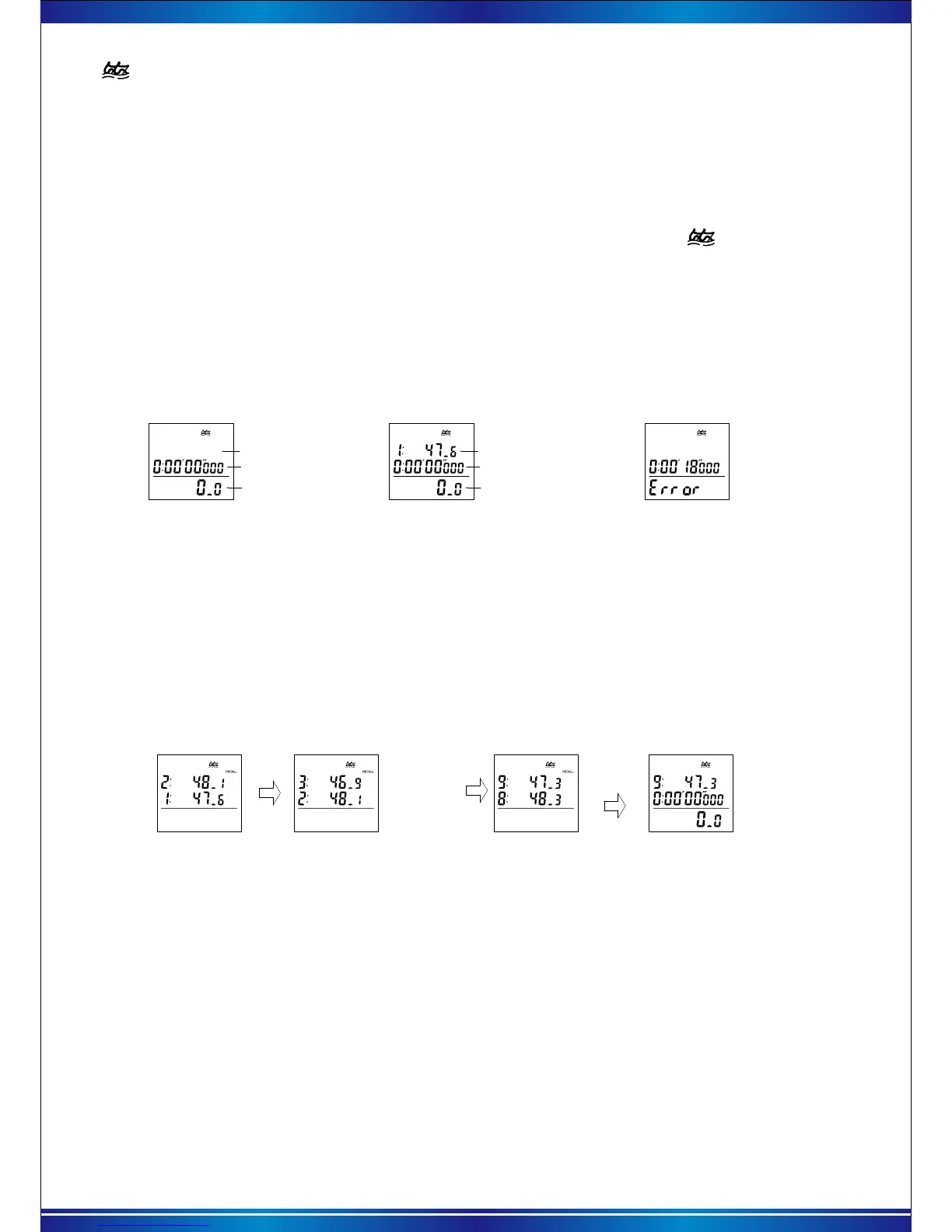
Measurement interface
Numbers of stroke
b. Stroke frequency measurement
After entering the stroke function, the top of the screen will display the " " icon press the
【START】key to start the stroke rate measurement, after the athletes complete 3 times training ,
press the【START】key to complete a stroke measurement.
If you want to re-calculate the stroke rate, operate the instruction as above.
Each time you recalculate, the last stroke data is automatically saved. Up to the last 9 times data.
When the completion of a stroke frequency measurement no need to measurement again.
You can press the 【RESET】 key to save the current stroke frequency, while the measurement
stops, the screen is cleared.
Current count-up timer
* During the first second after the measurement has been started by press【START】key,
flashing “180.0” is displayed. If the measurement is stopped by pressing 【START】key, during
the period,"Error" will appear. If the measurement is not stopped until "10.0" on display, "Error"
will automatically appear.
The last stroke data
No memory
Measurement interface
Numbers of stroke
Current count-up timer
Error mark
c. Query stroke frequency memory
When the stroke frequency measurement is stopped, with each press of 【RECALL】 key, the
data is recalled starting from memory -1. The screen will continue to flash "RECALL" characters),
up to the last 9 times frequency memory, after recall all the memory, return to the stroke frequency
measurement screen as shown below:
And so forth……
Recall interface Recall interface Recall interface Measurement for stroke
Press 【RECALL】 firstly then the letter of recall is flashing , Keeping 【RESET】 pressed
for more than 1.5 seconds, the screen shown appears “Clear all data” with warning beeps.
After 3 seconds, all the stored data is erased from memory with a long beep. Then the initial
measurement display is shown. If the【RESET】button is released within 3 seconds , the
stored data will not be erased from memory.
d. Clear the stroke frequency memory
Back to
stroke mode
10). System reset mode
At Calendar mode, Keep pressing 【START】+【RECALL】+【RESET】+【MODE】one
after another 3 seconds to reset all record and setting. (saved "stopwatch / stroke "memory
is still retained).


 To Next Page