Digital Receiver
Rio Rancho, NM
13
IR Sync & Encryption Menu
Encryption Key Management
The DSQD has three options for encryption keys:
• Standard: This is the highest level of security.
The encryption keys are unique to the DSQD and
there are only 256 key instances available to be
transferred to a transmitter. The receiver tracks the
number of keys generated and the number of times
each key is transferred. Once a Standard key has
been transferred 256 times, you will be alerted that
a new key must be created.
• Shared: There are an unlimited number of
shared keys available. Once generated by the
DSQD and transferred to a transmitter, the encryp-
tion key is available to be shared (synced) by the
transmitter with other transmitters/receivers via the
IR port.
• Universal: This is the most convenient en-
cryption option available. All encryption-capable
Lectrosonics transmitters and receivers contain
the Universal Key. The key does not have to be
generated by the DSQD. Simply set a Lectroson-
ics encryption-capable transmitter and the DSQD
to Universal, and the encryption is in place. This
allows for convenient encryption amongst multiple
transmitters and receivers, but not as secure as
creating a unique key.
Encryption Keys
The DSQD generates high entropy encryption keys to
sync with encryption-capable transmitters. The user
must select a key type and create a key in the DSQD,
and then sync the key with a transmitter.
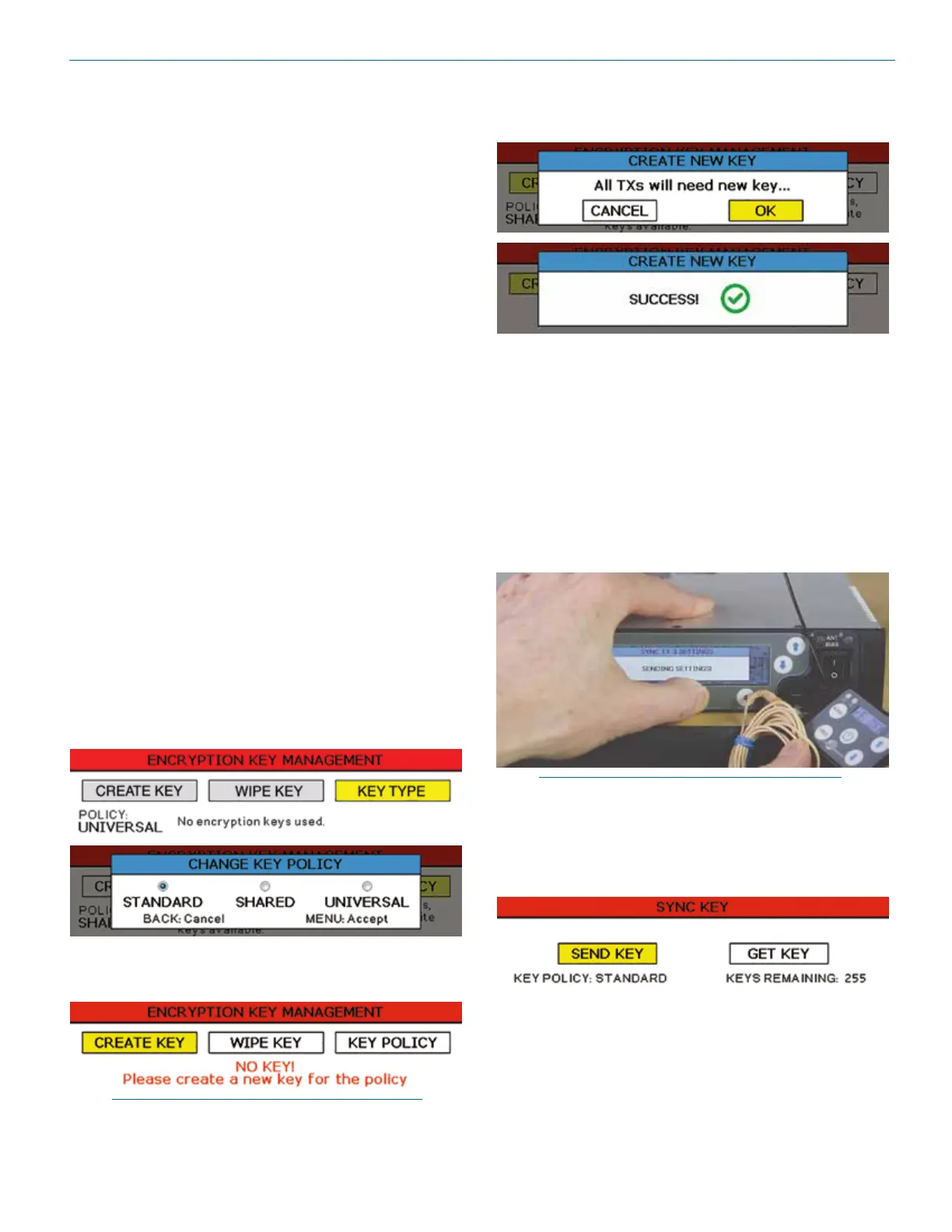
1. Begin by selecting a key type.
2. The DSQD will then display a warning to indicate
that there is NO KEY! Select CREATE KEY to
generate a new key.
NOTE: When Universal Key type is selected, there
is no prompt to create key. See Encryption Key
Management for more information.
3. A message will pop up on the screen warning the
user that all transmitters will need a new key. Select
OK. The creation of a new key is confirmed.
4. Sync new key with transmitter (see Sync Key). The
transmitted audio will then be encrypted with the
new key.
Sync Settings
Allows sending or retrieving setup data via the IR port.
Sync options: Choose to send frequency, send all
settings, retrieve (get) frequency from a transmitter
or retrieve (get) all settings from a transmitter.
Choose Transmitter: Choose one of four Rx chan-
nels by using the Channel Selector Buttons, 1, 2,
3 or 4.
NOTE: You must position the transmitter’s IR port
directly in front of the DSQD IR port, as closely as
possible, to guarantee a successful sync.
Sync Key
Send or retrieve (get) encryption keys.



 To Next Page