EasyManua.ls Logo

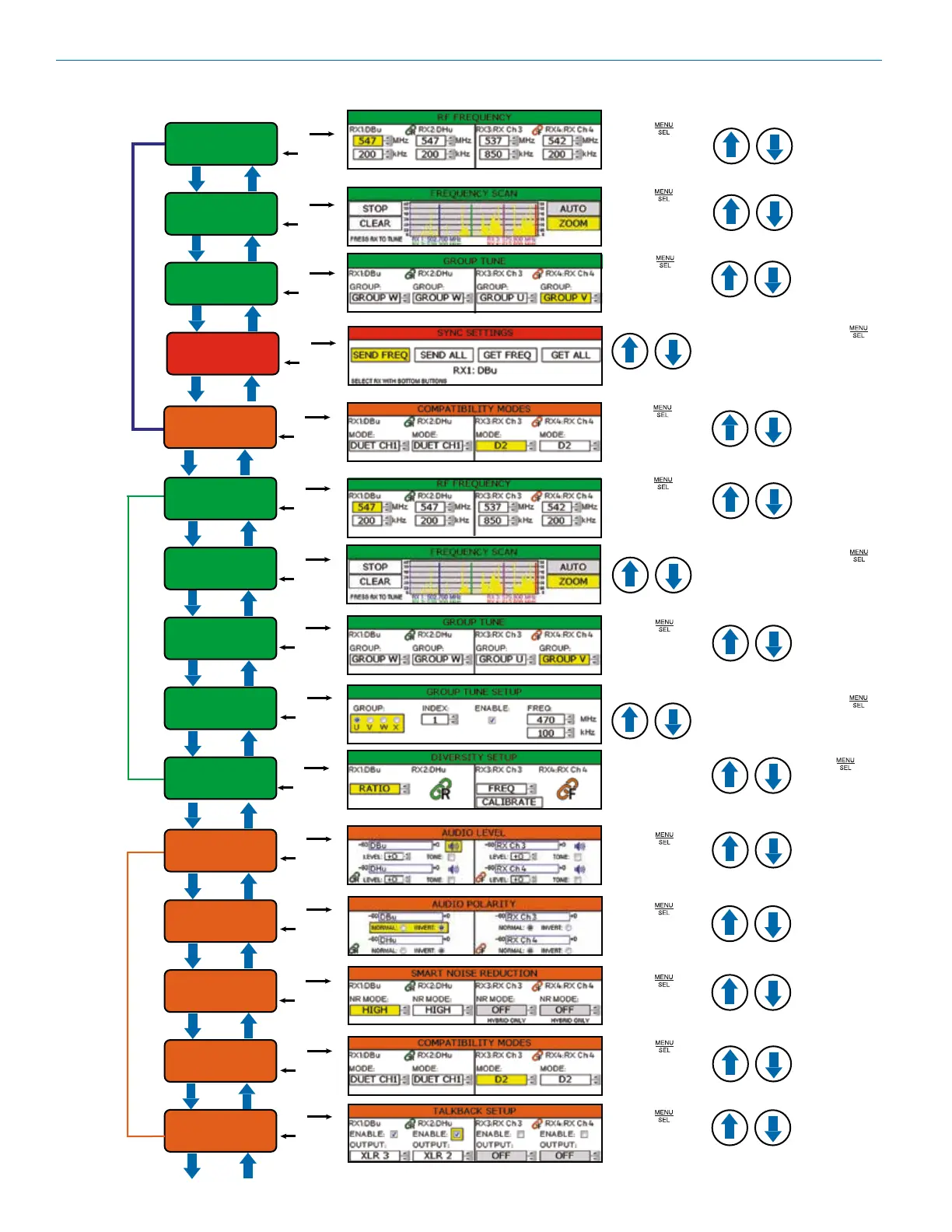
Lectrosonics D2 DSQD - LCD Menu Map and Navigation

Lectrosonics D2 DSQD
24 pages
Print Icon
To Next Page IconTo Next Page
To Previous Page IconTo Previous Page
Loading...
DSQD
LECTROSONICS, INC.
6
RF FREQUENCY
FREQUENCY SCAN
GROUP TUNE
SEL
BACK
SEL
BACK
SEL
BACK
SYNC
SETTINGS
SEL
BACK
Use arrow keys
to enable or
adjust
Press SEL to
select desired
channel
Press SEL to
select desired
channel
Quick
Menu
Use arrow keys
to select tuning
group
SEL
BACK
COMPATIBILITY
MODES
Use arrow keys to
select desired
compatibility mode
Press SEL to
select desired
channel
DIVERSITY
SETUP
SEL
BACK
RF
Setup
RF FREQUENCY
FREQUENCY SCAN
GROUP TUNE
SEL
BACK
SEL
BACK
SEL
BACK
GROUP TUNE
SETUP
SEL
BACK
Use arrow keys
to enable or
adjust
Press SEL to
select desired
channel
Press SEL to
select desired
channel
SEL
BACK
SEL
BACK
AUDIO POLARITY
SMART NOISE
REDUCTION
SEL
BACK
Use arrow keys to
select desired
talkback function
Audio
Setup
SEL
BACK
AUDIO LEVEL
TALKBACK
SETUP
Use arrow keys
to select tuning
group
Press SEL to
select desired
channel
Use arrow keys
to adjust audio
output level
Press SEL to
select desired
channel
Use arrow keys
to select desired
audio setting
Press SEL to
select desired
channel
Use arrow keys
to select noise
reduction setting
Press SEL to
select desired
channel
SEL
BACK
COMPATIBILITY
MODES
Use arrow keys to
select desired
compatibility mode
Press SEL to
select desired
channel
Use arrows to
select desired
function
Press SEL to
select setting
Use arrow keys
to adjust setting
Press SEL to
select desired
function
Use arrow keys to
highlight desired
command
Press SEL to
select desired
function
Use arrow keys to
highlight desired
command
Press SEL to
select scan
setting
Use arrow keys to
select desired
group/parameter
Press SEL to
select setting
LCD Menu Map

Related product manuals