DSQD
LECTROSONICS, INC.
14
Tools and Settings Menu
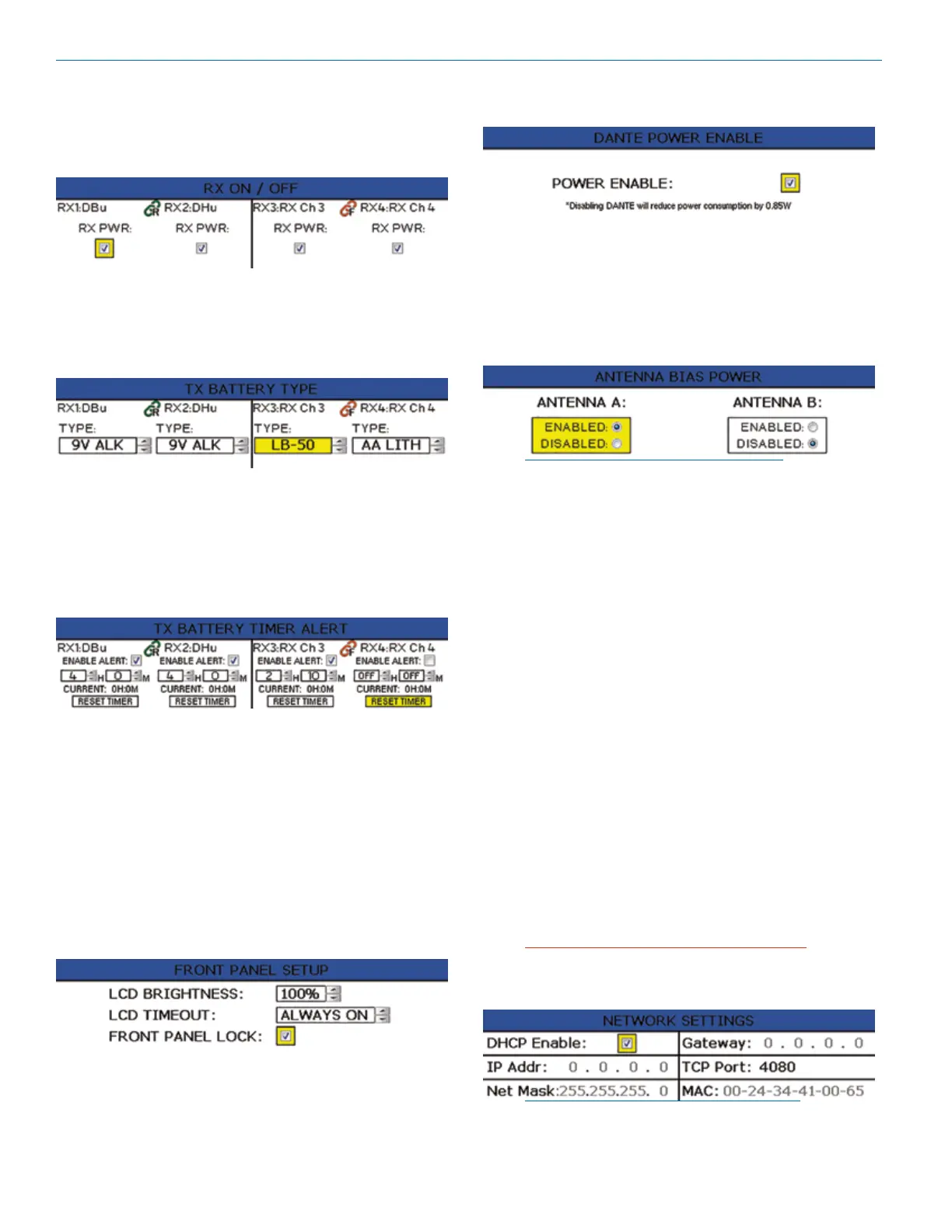
RX On/Off
Use UP and DOWN arrows to toggle power on and off.
TX Battery Type
Set battery type for each channel. Use MENU/SEL to
set and move cursor and the UP and DOWN arrows to
change values.
TX Battery Timer Alert
Set transmitter battery timer alerts for each channel.
Choose to enable/disable alert, set time in hour and
minutes and reset timer. Use MENU/SEL to set and
move the cursor and the UP and DOWN arrows to
change values.
Front Panel Setup
Front panel settings may be customized as follows:
• LCD brightness: Use UP and DOWN arrows to
choose from 100%, 75%, 50% or 25%
• LCD Timeout: Use UP and DOWN arrows to
choose from Always On, 30 seconds, or 5 minutes
• Front Panel Lock: Use UP and DOWN arrows to
turn lock on/off. When locked, menus can still
be viewed, but if the UP and DOWN arrows are
pressed to change settings, a “FRONT PANEL
LOCKED” message will appear.
Dante Power Enable
Enable or disable Dante as needed.
Antenna Bias Power
DSQD BNC connectors are provided for use with right-
angle whip antennas, cables from remote antennas, or
cables from another DSQD receiver. DC bias voltage
can be supplied on these connectors from an internal
source to power remote RF amplifiers.
NOTE: See Panels and Features for more
information on antennas/connectors.
Network Settings
Allows the user to set network settings when needed.
The following controls are available:
• DHCP Enable - this is checked if DHCP is used to
assign an IP address, Netmask and Default Gate-
way to the device. Uncheck this to use “static” IP
addressing.
• IP Address - This is in “dotted quad” format. If
DHCP is enabled, this is read only.
• Netmask - This is in “dotted quad” format. If DHCP
is enabled, this is read only.
• Default Gateway - This is in “dotted quad” format. If
DHCP is enabled, this is read only.
• TCP Port - This is the Primary TCP port number, an
integer in the range 0 - 65535. The Secondary TCP
port number is not set directly - it is always the next
number after the Primary TCP port number. The
defaults are 4080 for the Primary port and 4081 for
the Secondary port. The Secondary TCP port is
available on firmware versions 1.4.0 and higher.
• MAC Address - this is the address of the device
ethernet port, assigned at the factory. It is read only.
IMPORTANT: Always consult your network
administrator before attempting to connect and
configure a processor for a network interface.
NOTE: New network settings require the unit
to reboot to take effect. Making a change and
pressing the BACK key will prompt the user to
Reboot Now, Save and Exit, or Discard and Exit.



 To Next Page