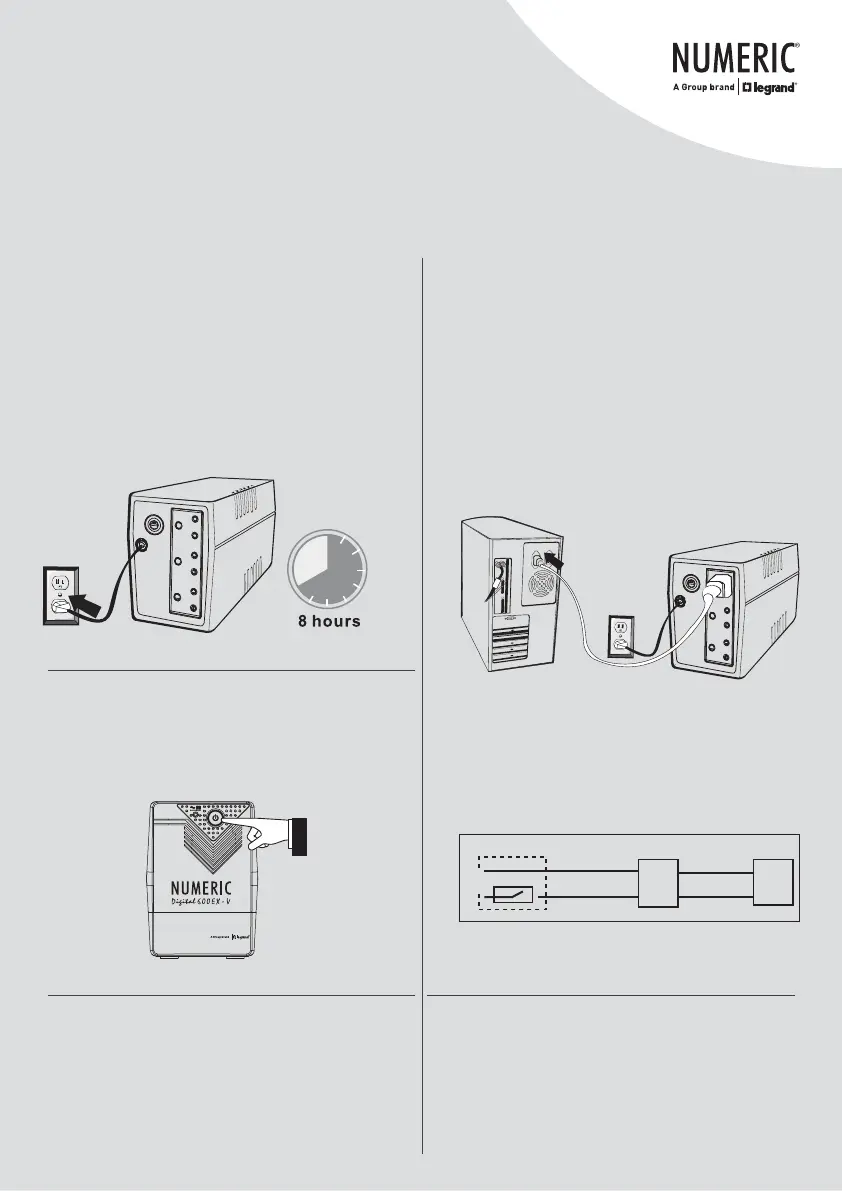
3. Charging
This unit is shipped from the factory with its internal
battery fully charged, however, some charge may be
lost during shipping and the battery should be
recharged prior to use. Plug the unit into an
appropriate power supply and allow the UPS to charge
fully by leaving it plugged in for at least 8 hours with
no load (no electrical devices such as computers,
monitors, etc.) connected.
4. Connection
Plug the UPS into a 2-pole, 3-wire grounded
receptacle. Then connect one computer related device
into each of the power receptacles supplied on the
back panel.
Note: Circuit breaker rating of the branch circuit
supplied from the mains input panel sizing must be
6 A/250 Vac in accordance with National Electrical
Codes and Standards as per schematic (based on
N.E.C NFPA 70 -2014; Reference: Article 240)
Note: Circuit Breaker rating of the Branch Circuit
supplied from the mains input panel sizing must be
6 A/250 Vac in accordance with National Electrical
Codes and Standards as per schematic (based on
N.E.C NFPA 70 -2014; Reference: Article 240)
5. Turn On/Off
To turn on the UPS unit, press the power switch lightly.
To turn off the UPS unit, press the power switch again.
6. DC Start
This series is equipped with DC Start. To start the
UPS when AC utility power is not available, simply
press the power switch.
7. Green Power Function
UPS is equipped with Green Power function. If no load
is connected, UPS will automatically shut down in 5
minutes for energy saving during power failure. The
UPS will restart while AC recovery.
Load
UPS
6A breaker
N
L
Mains Power Panel
Input power
cord from UPS
Input power
cable








 To Next Page