4
LIGHT LEVEL FEATURES
The Light Level feature holds lights off upon initial occupancy if adequate ambient light exists. It will not turn the lights OFF if they are
ON. The default setting is for maximum, meaning that even the brightest ambient light will not hold the lights OFF.
Notes on Functionality
Avoid mounting the sensor close to lighting fixtures.
Adjust during daylight hours when ambient light in the area is at desired level.
Light Level cannot be enabled while Test Mode is active. Either wait for Test Mode to expire or select any of the other Time Delay
settings before enabling the Light Level feature.
The red LED will flash periodically to indicate the sensor has Light Level enabled.
Light Level settings are only saved in the event of a power loss. Disabling Light Level and then reenabling it will not return it to previous
settings.
If Test Mode is enabled after Light Level has been set, Light Level functionality will cease to function throughout the duration of Test
Mode. When Test Mode period expires, the Light Level functionality will resume, even if the Dip Switches remain set to Test Mode.
Setting Light Level
1. Make sure Test Mode is not active.
2. Toggle the state of the sensor, by briefly pressing the Light Level button, to include or exclude the lighting load from the light level
calibration. Open the Front Cover and locate the Light Level pushbutton. See Sensor Adjustment.
3. Press and hold the Light Level button between 2s and 5s. The red LED will be ON showing 2s is reached and then be OFF
showing 5s has passed*. The sensor enters setup mode, as indicated by the rapidly flashing LED. The LED will flash throughout
the setup process. Occupancy indications from the LED is disabled during setup.
4. Move away from the sensor to avoid interference with light level detection. The sensor measures the light level for a 10 second
period, then averages the readings and automatically sets the level that will be used as the new setting. The sensor will hold lights
OFF when the ambient light exceeds this setting.
5. When the LED stops flashing, replace the Front Cover.
Disabling Light Level
Pressing the Light Level button for 5 seconds or more resets the light to default (maximum).
The LED will be ON while the button is pressed, and then OFF once five seconds have passed. The LED flashes rapidly for 10 seconds
after the setting has changed.
DIP SWITCH SETTING
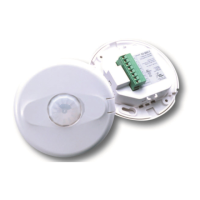
The CI-355 has 6 DIP switches under the cover.
Time Delay: Switches 1, 2, 3
The sensor will hold the lights ON as long as occupancy is detected. The time delay countdown starts when
no motion is detected. After no motion is detected for the length of the time delay, the sensor will turn the
lights OFF.
Walk Through: Switch 4
Walk-through mode turns the lights OFF three minutes after the area is initially occupied, if no motion is
detected after the first 30 seconds. If motion continues beyond the first 30 seconds, the selected time delay
applies.
Sensitivity: Switch 5
Minimum forces a reduced detection range for the PIR.
Maximum forces the sensitivity to the maximum coverage area. This setting is constantly updated.
Service: Switch 6
To override all sensor functions, set DIP switch 6 to the ON position. The red LED will come on and stay on
for the duration of the override.
This bypasses the light level and occupancy detection control functions of the sensor.
Switch#
5 minutes
10 minutes
15 minutes
20 minutes
25 minutes
30 minutes
30 seconds
123
Time Delay
Test Mode/20 min
5
Minimum
PIR Sensitivity
Maximum
6
Normal
Service
Service
= ON
= OFF
= Factory Setting
4
Disabled
Enabled
Walk-Through
Feature


 To Next Page
 Loading...