7
Check & Adjust
Sprinter 50 - 1.0.0en
EN
DE
FR
ES
NO
SV
FI
DA
IT
PT
NL
6. Check & Adjust
6.1 Electronic collimation ad-
justment
To activate "Adjustment" program, press and
hold measuring key for 3 seconds.
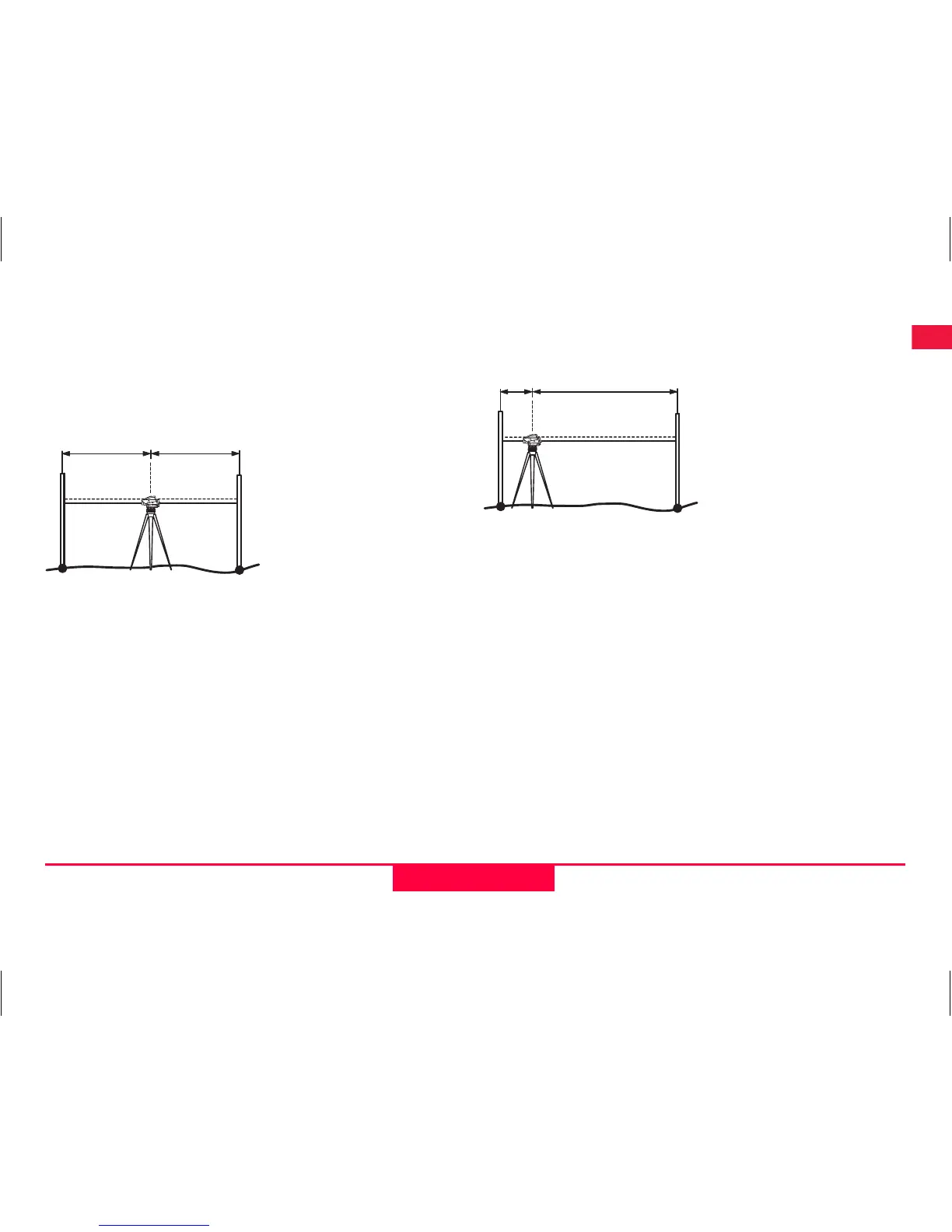
Step 1: Aim at Staff A and press MEAS key. Measure-
ment display, press and hold measuring key for 3
seconds to accept.
Step 2: Aim at Staff B and press MEAS key. Measure-
ment display, press and hold measuring key for 3
seconds to accept.
Now shift the Sprinter towards staff A and set it up at
about 3 m to staff A.
Step 3: Aim at Staff B and press MEAS key. Measure-
ment display, press and hold measuring key for 3
seconds to accept.
Step 4: Aim at Staff A and press MEAS key. Measure-
ment display, press and hold measuring key for 3
seconds to accept.
The new electronic collimation error is displayed. To
accept new correction, press and hold measuring key
for 3 seconds to accept; otherwise single press of
measuring key to decline adjustment result.
)
Optical collimation error can be corrected by
adjusting the reticle.
B
A
~15m
~15m
B


 To Next Page