JIG ASSEMBLY, MOUNTING, AND USING THE CLAMPS
4
Chapter 1 D4R Pro User Guide
1-13
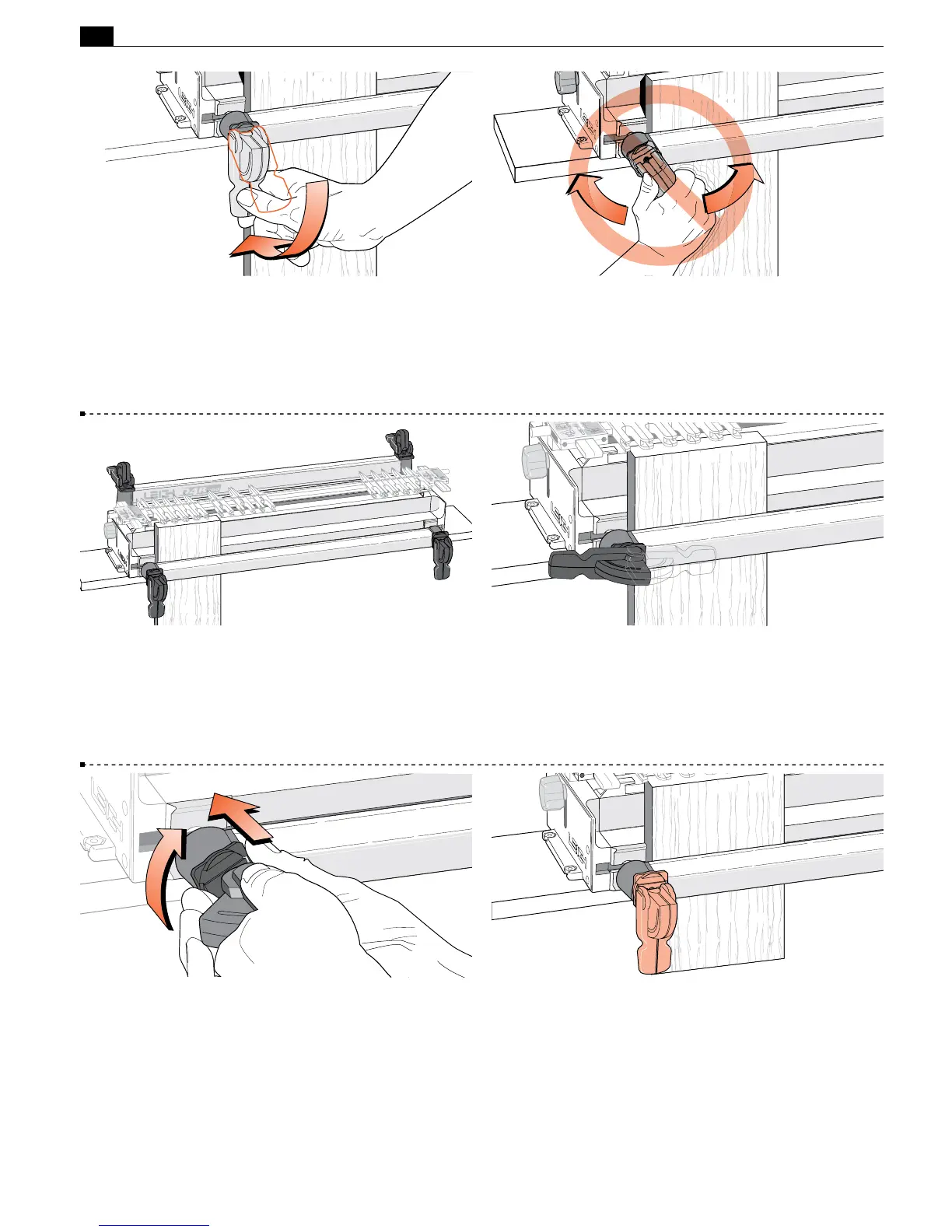
A smooth, firm action is enough to engage the clamp.
Rule of thumb: If you can’t throw the lever comfortably by pressing
the end of it with your thumb, reduce the tension. A few minutes
of trial and error will help you feel the right clamp tension. Firm
thumb pressure is about right.
1-15 When engaged, the front clamp levers should point down
and the rear clamp levers should point away from the operator.
1-16 If the lever is badly positioned at the correct clamping
pressure...
1-17 Release the clamp, remove the board and turn the step
washer a quarter turn (the step height inside the step washer is
one quarter of the thread pitch).
1-18 Then adjust the clamp until the clamp lever is in the right
position at the right pressure.
1-14 Do Not use the lever as a torque arm. Adjust the clamp
tension only with the clamp disengaged.



 To Next Page