D4R Pro CHAPTER 4
11
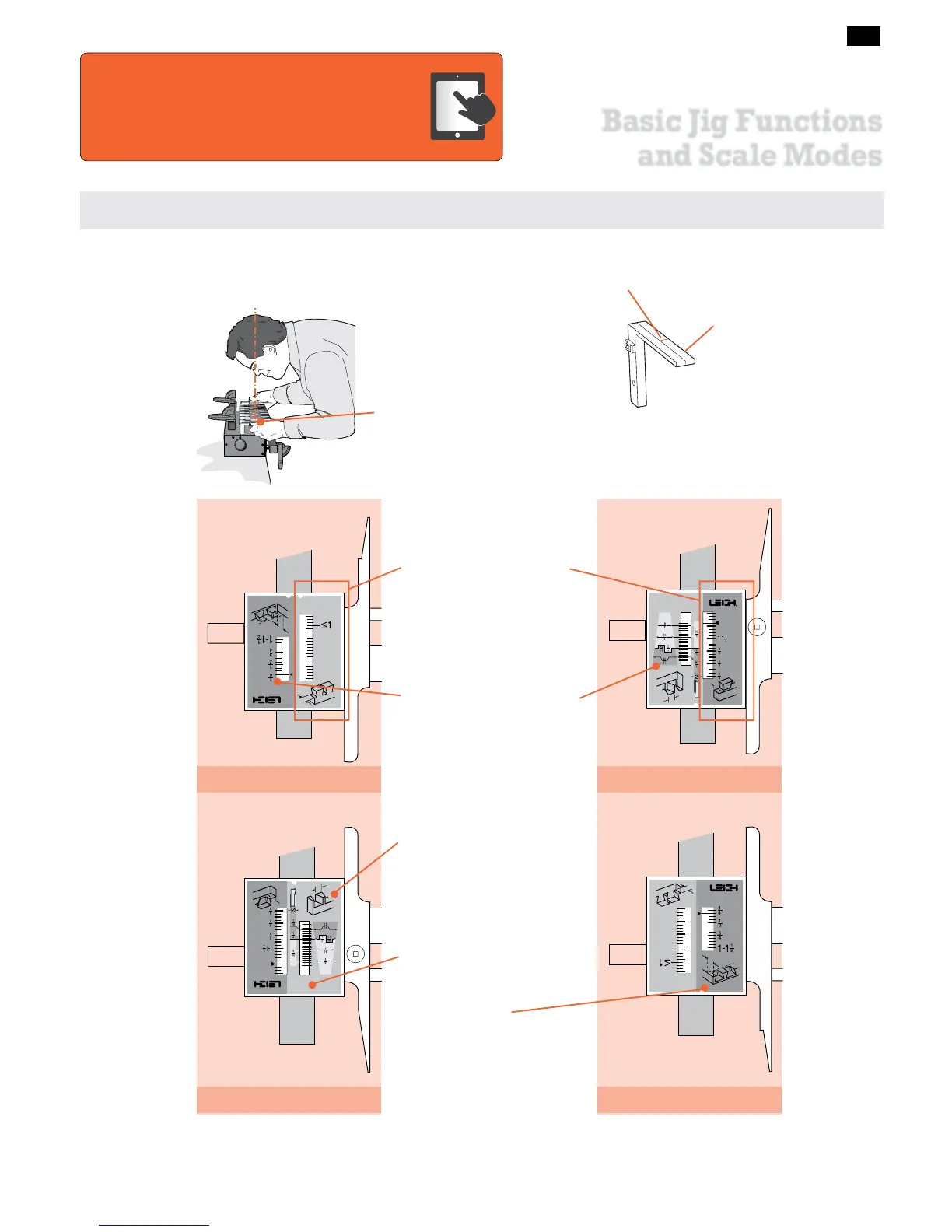
Here are the very basics for understanding the different D4R Pro dovetail modes and settings.
2. TD PINS
3. HB TAILS
4. HB PINS
1. TD TAILS
THE FOUR SCALE MODES
The Finger Assembly attaches to the support brackets in four
different modes to match the type of joint you are cutting.
Note: Inch scales are shown
here. Millimeter scales have
identical layout.
The active scale is always
on the right of each scale
assembly.
The inactive scale is always on
the left of each scale assembly
and is upside down.
Scales are color coded.
Silver background for
Through Dovetails.
Green background for Half-
Blind Dovetails.
The specific settings for each
scale are fully described in
the appropriate chapters.
Each scale has its own mode
icon (a drawing of the joint
part made in that mode).
This index line is used when setting the finger assembly
scales. The line is illustrated in red for clarity, but is black
on the jig.
Always read scales from
directly overhead to avoid
parallax problems.
All D4R Pro jigs are shipped
with “short” support brack-
ets.
The online video will reduce your learning time
dramatically!
Stream to your smart phone or tablet to use in
your shop as a visual reference. Find the video in the Instructional
Videos section of the Support menu at leighjigs.com.
Watch the Online Instructional Video
Basic Jig Functions
and Scale Modes



 To Next Page