10
5
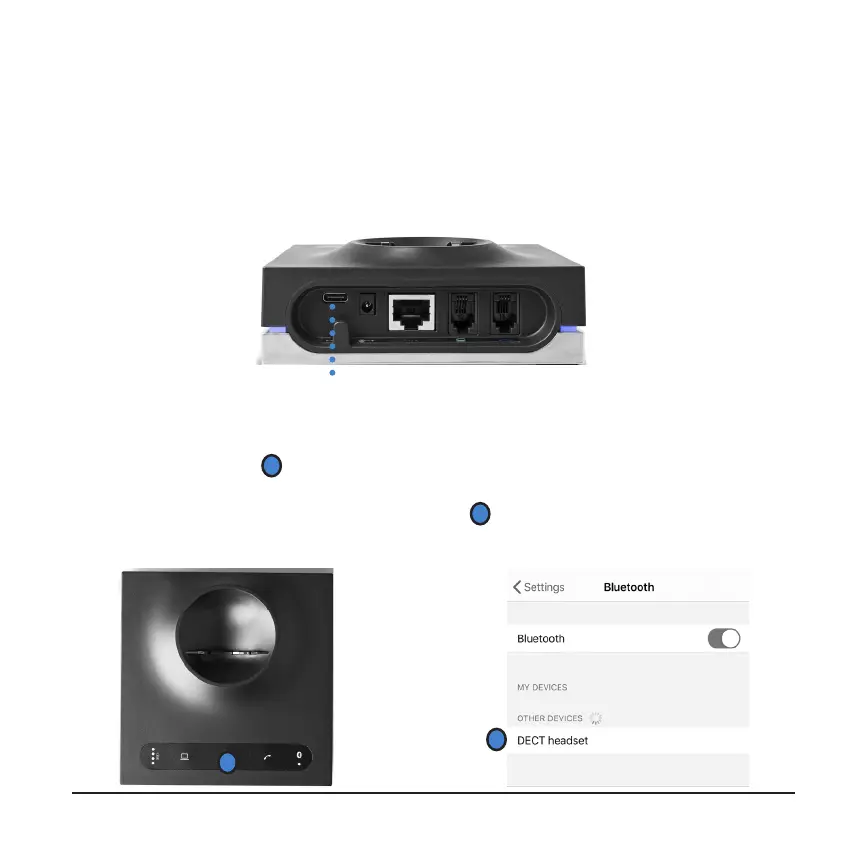
CONNECTING TO YOUR COMPUTER Use the included USB cable to connect
the charging base to an available USB port on your computer. If your computer
doesn’t recognize the device after a minute, go to your sound settings and select
“Leitner Headset” as both your default microphone and default speakers.
USB port
6
CONNECTING TO BLUETOOTH With your headset turned off, hold down the
Bluetooth button (
1
) for three seconds until the light starts flashing. Make sure
Bluetooth is enabled on the device you're trying to connect to. Select 'Leitner
Headset' from the list of available devices (
2
). The light on your charging base
will stop flashing once it's successfullly connected.
1
2



 To Next Page