8
HOW TO
SET UP YOUR HEADSET
1
Plug the power adaptor into the charging base. The power light on the base will
light up. We recommend charging your headset for at least 4 hours before use.
2a
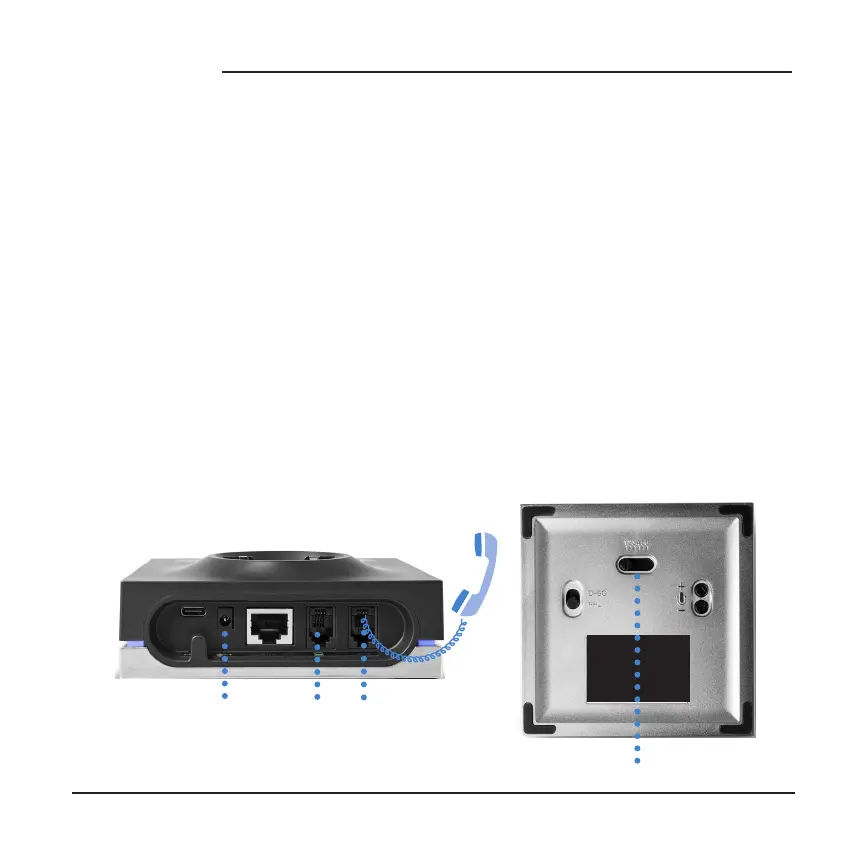
CONNECTING TO A TELEPHONE WITH A HEADSET JACK Use the included
connector cord to connect the telephone port on the base to the headset port
on your desk phone. You may need to adjust the compatibility switch on the
bottom of the base to find the correct setting for your phone model. Most
phones use 1. Cisco phones should be set to 4 when using the headset jack.
Power socket Telephone port
Compatibility switch
2b
CONNECTING TO A TELEPHONE WITHOUT A HEADSET JACK Connect
the curly cord of your handset to the handset port on the charging base. Use the
included connector cord to connect the telephone port on the the charging base
to the handset jack on your desk phone. See 2a on using the compatibility switch.
Handset port



 To Next Page