9
3
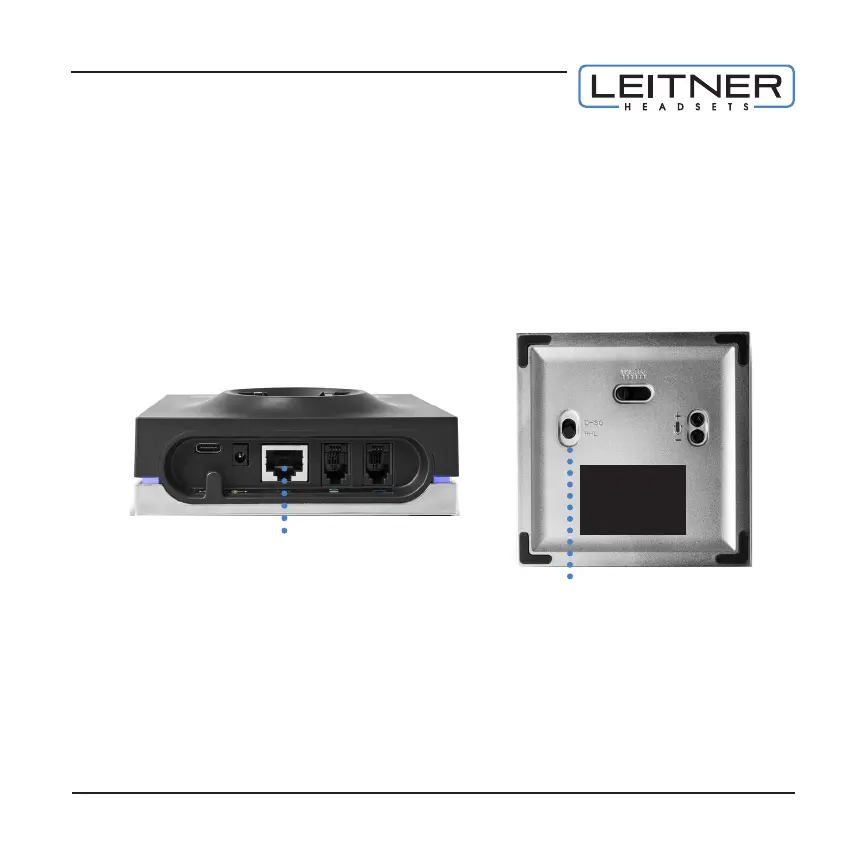
CONNECTING TO A LEITNER HANDSET LIFTER (OPTIONAL) Connect your
headset to your desk phone as shown in Step 2b. Attach the handset lifter to
your desk phone and connect it to the AUX port on the charging base. Set the
accessory selection switch on the bottom of the base to RHL. See the included
user guide or go to headsets.com/LifterSetup for more help.
Accessory selection switch
AUX port
CONNECTING TO A LEITNER ELECTRONIC HOOKSWITCH (EHS) CABLE
(OPTIONAL)* Each office phone is a bit different so please refer to the EHS cable
instructions for quick and easy setup.
*
With a handset lifter or EHS cable connected, you’ll be able to answer and end calls
using the ON/OFF button on the headset—up to 350 feet away from your desk!
4



 To Next Page