10CH TXT Essential Instructions v1.docx 2024-09-05 5
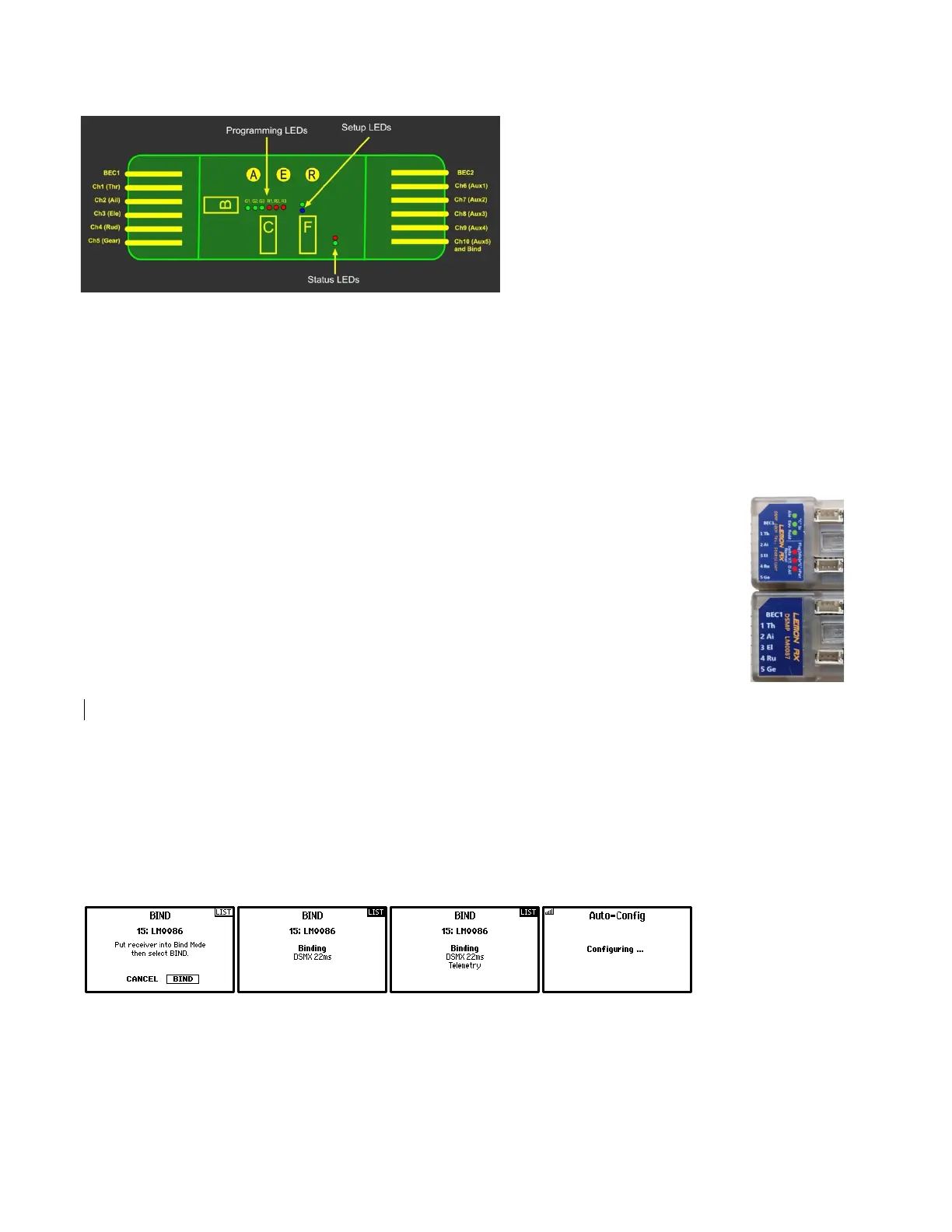
With the receiver powered ON, locate the three
green and three red programming lights (G1, G2,
G3 and R1, R2, R3). Press button C for no more
than 2 seconds to identify these lights.
Also locate for future reference the position of the
blue and green Setup lights and the red and green
Status lights.
Individual stability gain adjustments for Roll (Aileron), Pitch (Elevator), and Yaw (Rudder) are done with the
three rotary “pots” labelled A, E and R in the diagram.
The meaning of the various LEDs is explained in Appendix 2 on page 15.
Programming Stabilization with Text Display using a Spektrum Generation 2 or higher radio
Text Display is an enhancement to the firmware of Lemon telemetry receivers (7- and 10-channel). It allows you
to see and change the settings of the stabilizer on the screen of your transmitter, rather than relying on lights
and button-pushing, and is particularly useful when setting up gains, checking the stabilizer response direction,
and identifying what mixes are currently set.
Please note that Text Display cannot be added to older telemetry receivers and does not
apply to any non-telemetry receivers.
Text Display was officially announced in August 2024 and a new label was introduced,
recognizable by the absence of fine print relating to receiver LEDs. See old and new labels at
right, with the new label at the bottom.
A number of the receivers produced between April and August 2024 have the old labels but
have some or full Text Display capability; these are identifiable by testing access as described
below.
Lemon Text Display uses the “TextGen” DSMX™ functionality available in Spektrum NX and iX transmitters, as
well as in most programmable DX transmitters. To ensure optimum performance, be sure you have the most
recent version of AirWare installed.
For a transmitter running EdgeTX, such as the RadioMaster TX16S, setup of Text Display is somewhat different,
as explained in Appendix 1 on page 14, but the result is essentially the same.
Accessing Text Display
With a Spektrum transmitter, just bind normally and let the transmitter establish a telemetry connection.
For example, a Spektrum DX8e transmitter will look like this as the transmitter sets up the Telemetry screens:
Finally, when binding and configuring is complete, go to the last telemetry screen and you should see something
like one of the following (Spektrum DX8e, NX8 and iX14 shown).



 To Next Page