10CH TXT Essential Instructions v1.docx 2024-09-05 6
Congratulations – you have successfully activated the Text Display function.
If you have problems accessing Text Display, see Appendix 4: Troubleshooting.
Initial Screen: Basic Text Display Information
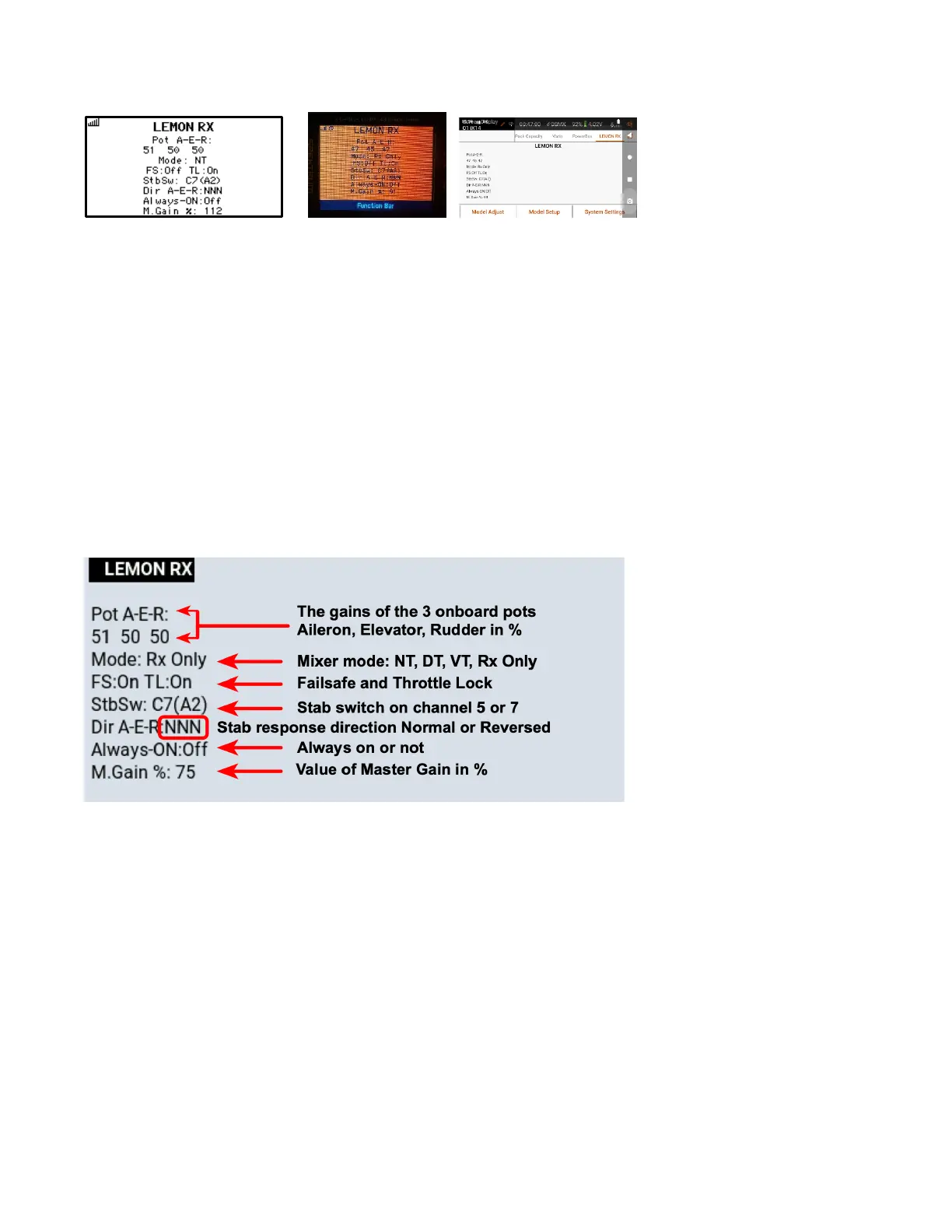
The picture below shows what the initial Text Display information means.
Particularly useful items are the individual gains for Aileron, Elevator and Rudder, which are set on the receiver,
as well as the Master Gain value, which is set on channel 8 of the transmitter. These are updated in real time as
you change them. The values can be recorded for a model once you have tuned the flight behaviour.
The Mixer mode options are: NT for normal tail, DT for Delta/Elevons, VT for V-Tail, or Rx Only if stabilization is
disabled. +DuA will be added to NT or VT if the Dual Aileron option is active. Mixer Mode is also displayed by the
red LEDs on the receiver.
Stabilizer Response Direction (not to be confused with control response direction) is shown as Normal or
Reverse for each axis (A, E, R); stabilizer reverse is also signalled by corresponding green LEDs on the receiver.
Throttle Lock (TL) is explained in Appendix 3. In most installations it will be left at the default ON setting.
Setup Mode Screen
The initial screen, shown above, displays basic information but does not allow it to be changed. To make
changes, you must put Text Display into Setup Mode.
To enter Setup Mode, first ensure that channels 1-4 (T, A, E, R) provide ± 100% output and are controlled by
the two sticks. Check the transmitter Monitor screen to verify that this is the case. Note that transmitter stick
Mode and Channel Order are irrelevant for this purpose.
Power up the receiver (with or without servos connected). Within 60 seconds after the receiver is powered up,
hold the two transmitter sticks in the lower outside corners of the gimbals for a few seconds.
The Lemon RX display should become something like this one.



 To Next Page