Connections
Connections
5
SWITCH
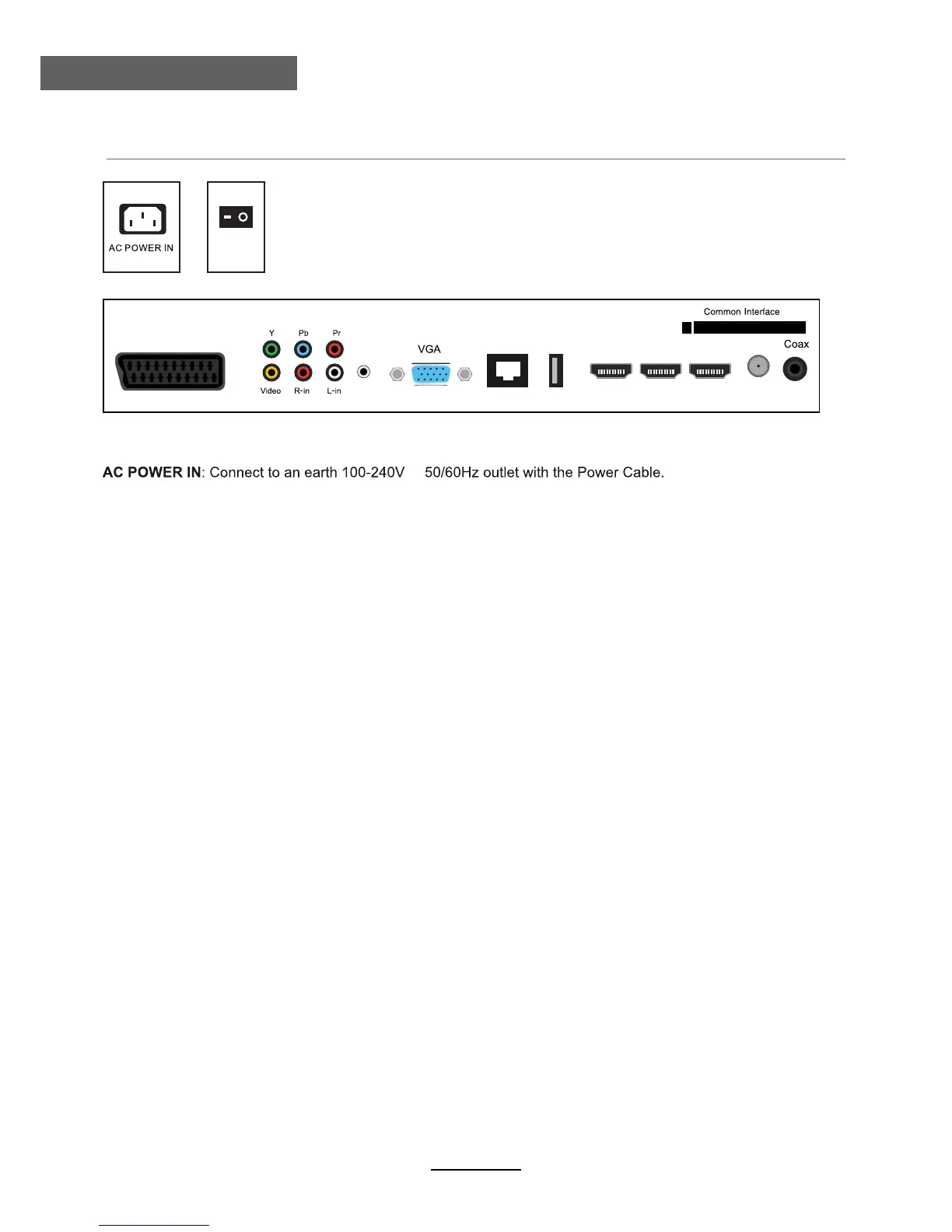
SCART: Connect them to the SCART video output terminal of DVD.
YPbPr: Connect them to the YPbPr video output terminal of DVD.
VIDEO: Connect it to video output terminal of DVD.(used in AV source)
R/L in: Connect them to the audio output terminal of DVD.(shared with YPbPr)
PC AUDIO IN: Connect it to the audio output terminal of PC.
VGA: For PC display.Connect it to the D-Sub 15 pins analog output connector of the PC.
USB
RJ45
SCART HDMI1 HDMI2 HDMI3 RF
PC
Audio
In
RJ45:Ethernet jack.
USB -For upgrade: For software upgrade only.
HDMI1/2/3: Connect it to the HDMI of DVD or other equipment.
RF: Connect antenna or cable 75 Ohm coaxial to receive TV signal.
Coax: Digital coaxial output.
Common Interface: CI slot.
SWITCH: Switch on or off the power suply.
~,



 To Next Page