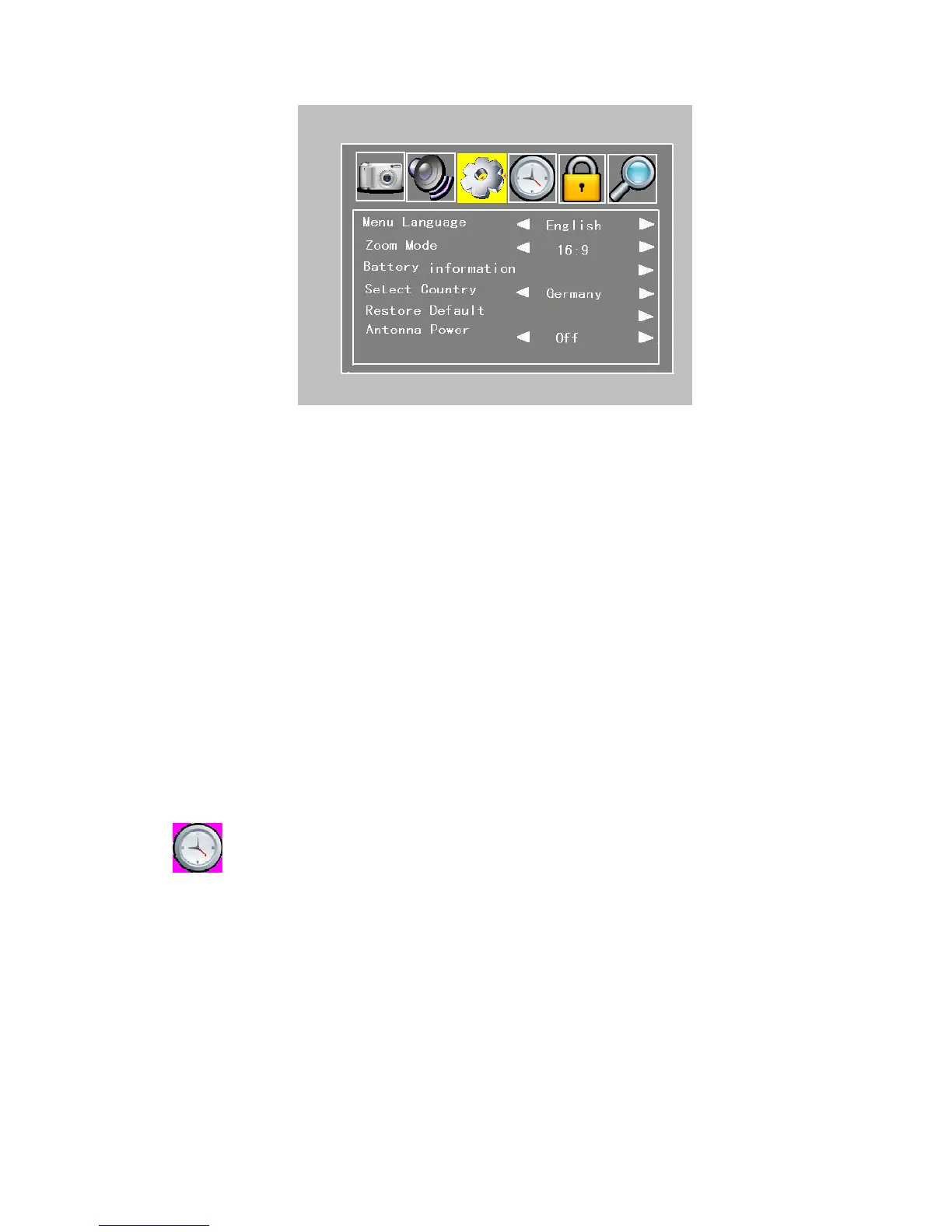
Figure 4.2.3
Menu Language: Left/right cursor buttons adjust the screen: English, Dutch, French,
German, Italian, Portuguese, Spanish .
Zoom Mode: Left/right cursor buttons adjust the screen: 16:9, 4:3
Battery Information: right cursor buttons enter the battery information.
! IF the Machine charge battery, the Battery Information menu can′t select.
Select Country: Left/right cursor buttons adjust the screen: Germany, French, Poland,
Portugal, Russia and so on
Restore Default: Press the Left/right cursor buttons to enter next step, and press OK key
to come back the factory default.
Antenna Power: Left/right cursor buttons adjust the screen: on, off
! Zoom Mode only operated in DTV, ATV and AV mode.
If the machine turn on and used the outside power supplied or charge battery, the battery icon
hide whenever on or off.
If use the power antenna, please press the Left/right cursor buttons to ON.
: (Only DTV mode)
Under the Time Setting menu, you can set the time zone here in order to correct current time
zone where you are.


 To Next Page