LenovoTAB37Plus
25
Thissectionpresentsnoticesrelatedtoremovingandreplacingparts.Readthis
sectioncarefullybeforereplacinganyFRU.
Screw notices
Loosescrewscancauseareliabilityproblem.IntheLenovocomputer,this
problemisaddressedwithspecialnylon‐coatedscrewsthathavethefollowing
characteristics:
• Theymaintaintightconnections.
• Theydonoteasilycomeloose,evenwithshockorvibration.
• Theyarehardertotighten.
• Eachoneshouldbeusedonlyonce.
Dothefollowingwhenyouservicethismachine:
• Keepthescrewkitinyourtoolbag.
• CarefullyremovescrewsforreusewhenreplacingFRUs.
• Useatorquescrewdriverifyouhaveone.
Tightenscrewsasfollows:
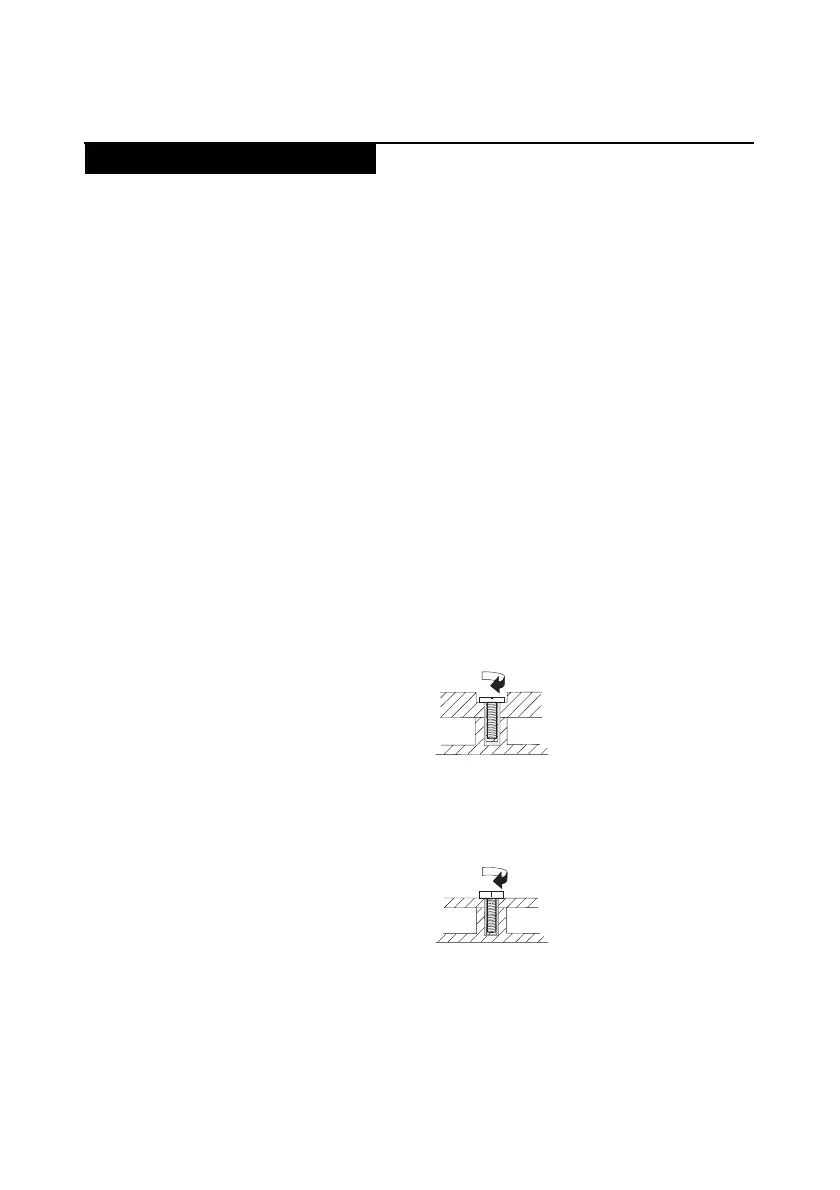
• Plastic to plastic
Turnanadditional90°afterthescrewheadtouchesthesurfaceoftheplastic
part:
• Logic card to plastic
Turnanadditional180°afterthescrewheadtouchesthesurfaceofthelogic
card:
• Torque driver
Ifyouhaveatorquescrewdriver,refertothe“Torque”columnforeachstep.
• Makesurethatyouusethecorrectscrews.Ifyouhaveatorquescrewdriver,
tightenallscrewsfirmlytothetorqueshowninthetable.Never use a screw
that you removed. Use a new one. Make sure that all screws are
tightened firmly.
• Ensuretorquescrewdriversarecalibratedcorrectlyfollowingcountry
specifications.
FRU replacement notices
more than 90°
(Cross-section)
more than 180°
(Cross-section)








 To Next Page