LenovoTAB37Plus
33
1040 SIM Card Holder FPC
Foraccess,removetheseFRUsinorder:
• “1010BackCover”onpage 27
• “1020Battery”onpage 29
• “1030SubBoardandRFWire”onpage 32
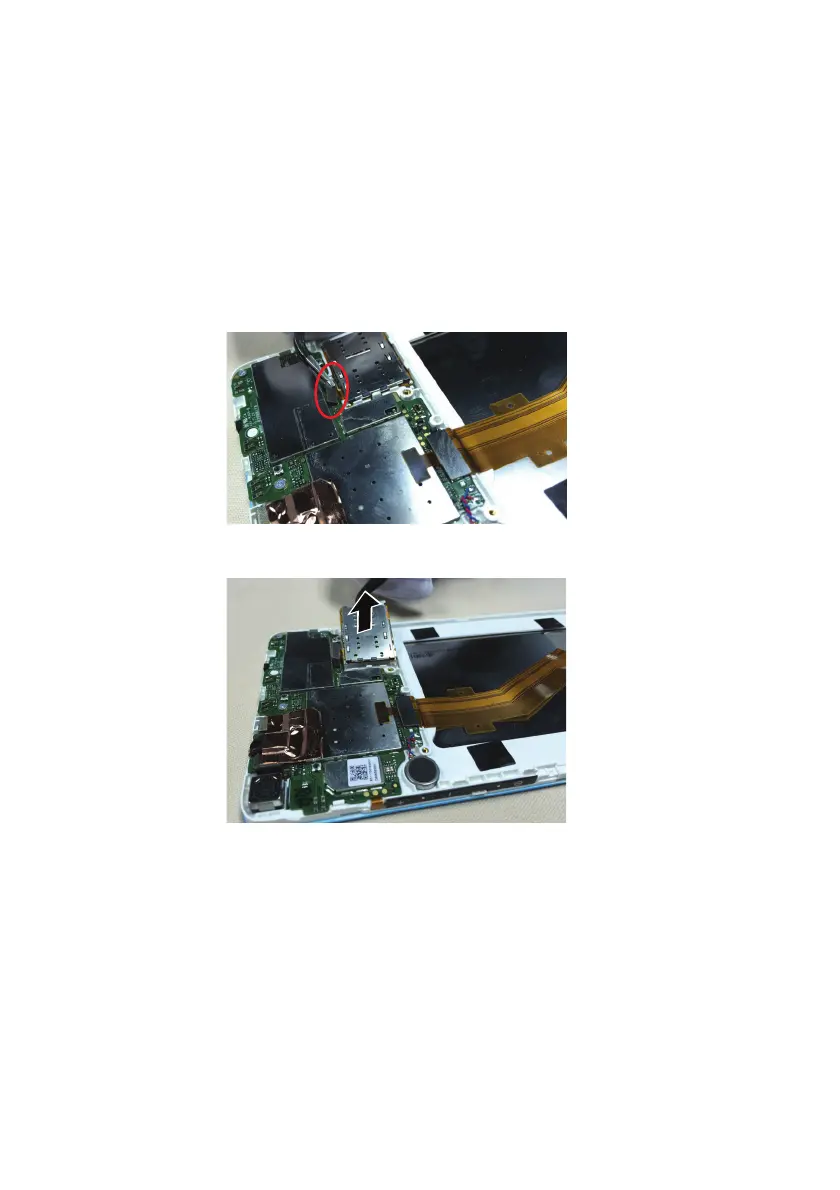
Figure4.RemovalstepsofSIMcardholderFPC
UsetweezerstogentlypryaparttheB2Bconnectoronthemainboard.
DismounttheLTESIMcardholderandFPCcomponentsortheWi‐FiTFcard
holderandFPCcomponents.
Note:theSIM/TFcardholderandFPCcomponentsareconnectedtothefrontcasewith
double‐sidedadhesive.Whenremoving,beextracautioustoavoiddamagingtheSIM/TF
cardholderandFPCcomponents.





 To Next Page